rectangle-guillotine solver
The rectangle-guillotine solver solves problems where items are two-dimensional rectangles that must be cut from rectangular bins using guillotine cuts — cuts that go all the way from one side of the current plate to the other.
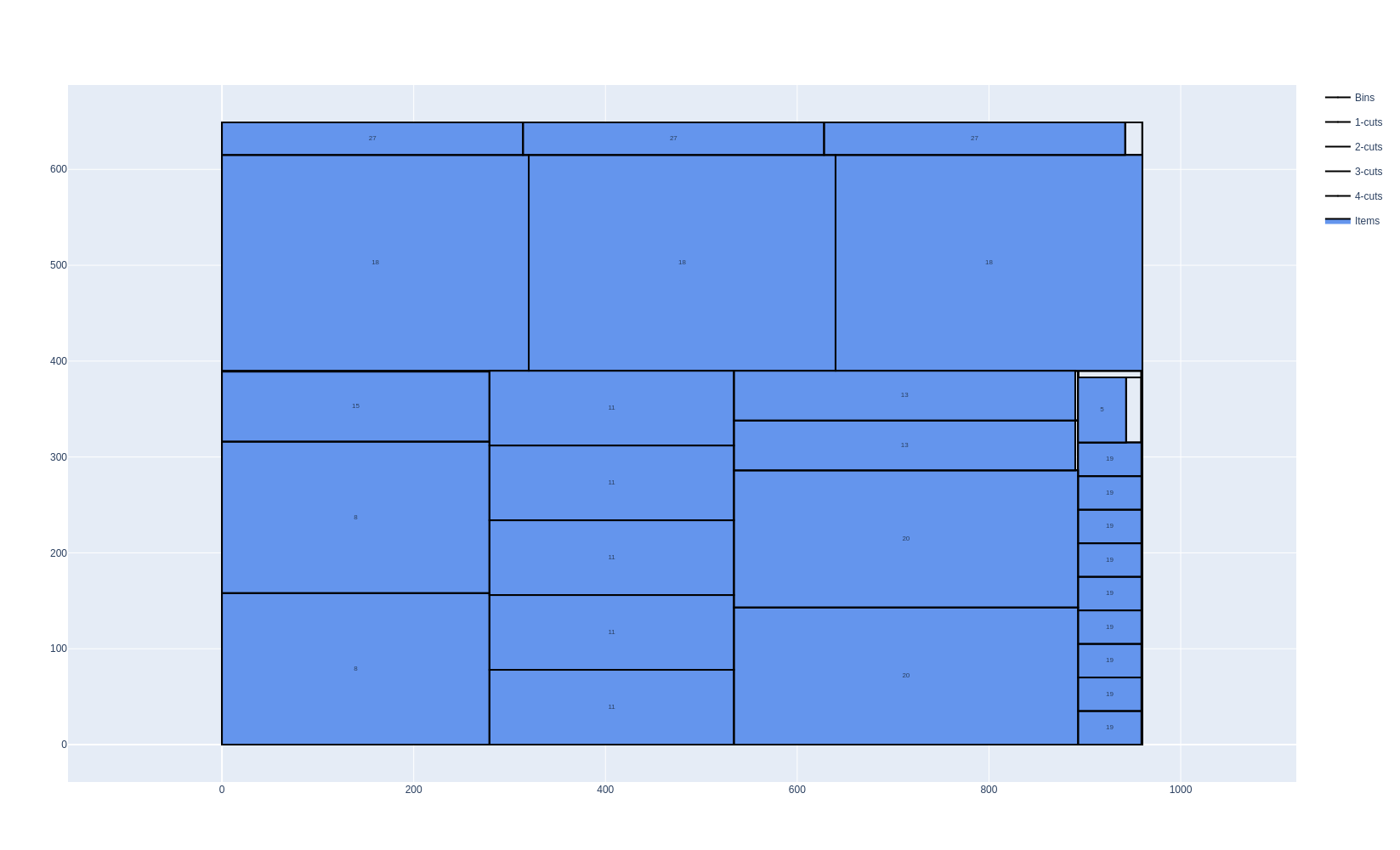
These problems occur for example in glass cutting, wooden panel cutting, and paper cutting industries.
Features:
Objectives:
Knapsack
Bin packing
Bin packing with leftovers
Open dimension X
Open dimension Y
Variable-sized bin packing
Item types
Item rotation (90°)
Stacks (items that must stay grouped)
Bin types
Trims (border offsets on each side)
Rectangular defects
Cutting constraints
Number of cutting stages
Cut type (Roadef2018, NonExact, Exact, Homogenous)
First stage orientation (horizontal or vertical)
Minimum and maximum distances between cuts
Maximum number of consecutive 1-cuts
Maximum number of consecutive 2-cuts
Cut thickness
Guillotine vs non-guillotine patterns
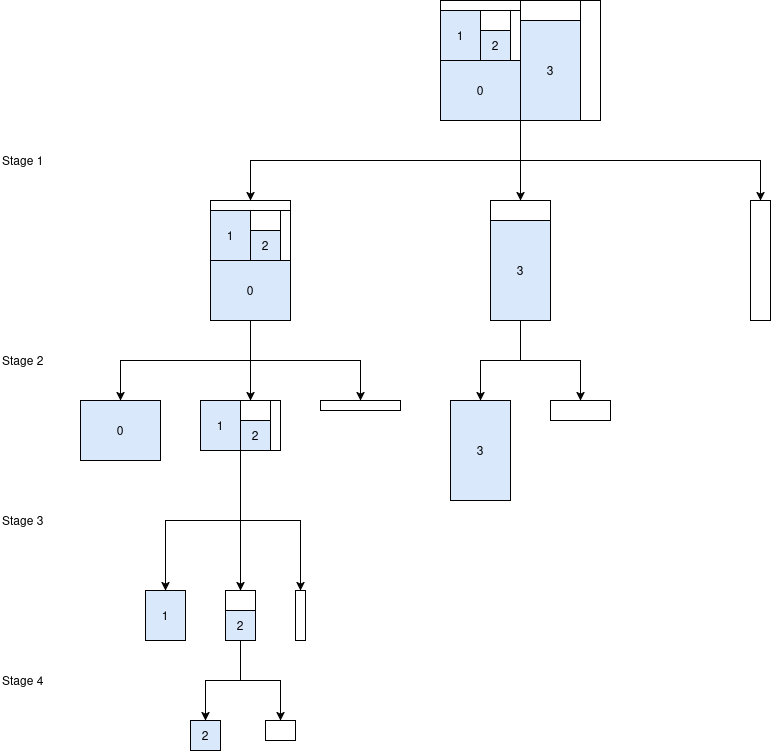
A cutting pattern is a guillotine pattern if it can be produced by a sequence of straight cuts, each going all the way from one edge of the current plate to the opposite edge. The number of cutting stages of a pattern is the number of sets of parallel cuts necessary to extract all the items from the pattern. Here is an example of a 4-staged pattern:
A pattern that cannot be produced this way, however the items are arranged, is a non-guillotine pattern.
The rectangle-guillotine solver only produces guillotine patterns. Problems where non-guillotine patterns are required (or simply allowed) should instead be modeled with the rectangle solver, which places items freely.
The following example solves the same instance — four items of clearly different shapes (8 × 3, 4 × 5, 5 × 4 and 7 × 6) arranged in a “pinwheel” around a tiny unused central rectangle — with both solvers (bin-packing objective). The rectangle solver, which is free to produce non-guillotine patterns, packs all 4 items into a single 12 × 9 bin using the pinwheel arrangement, leaving almost no waste. The rectangle-guillotine solver cannot reproduce this pattern with straight cuts, however the items are arranged, so it needs a second bin.
|
|
|---|---|
|
|
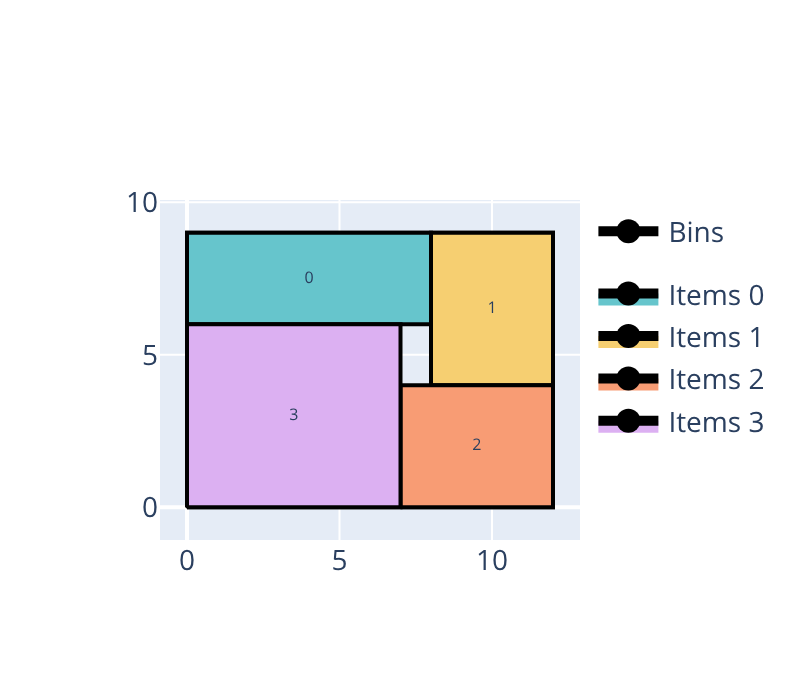
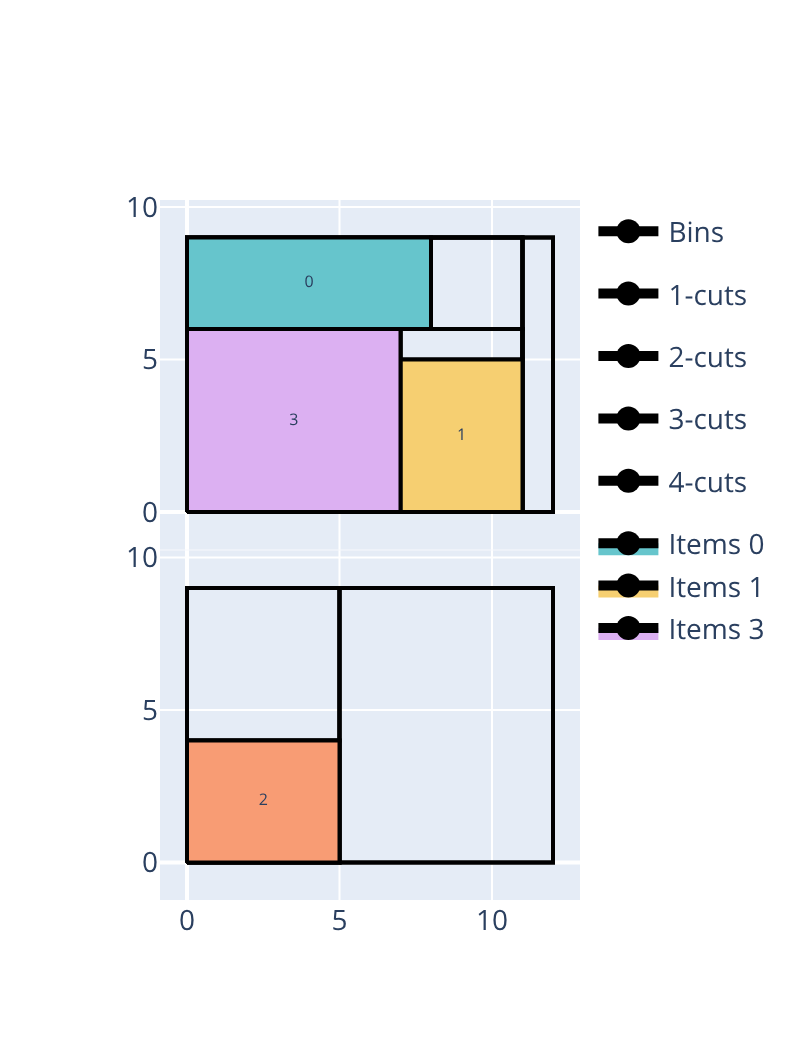
Open the examples in the online solver: Guillotine vs non-guillotine: non-guillotine patterns, Guillotine vs non-guillotine: guillotine cuts.
{
    "objective": "bin-packing",
    "bin_types": [
        {"x": 12, "y": 9, "copies": 2}
    ],
    "item_types": [
        {"x": 8, "y": 3, "oriented": true},
        {"x": 4, "y": 5, "oriented": true},
        {"x": 5, "y": 4, "oriented": true},
        {"x": 7, "y": 6, "oriented": true}
    ]
}
{
    "objective": "bin-packing",
    "bin_types": [
        {"width": 12, "height": 9, "copies": 2}
    ],
    "item_types": [
        {"width": 8, "height": 3, "oriented": true},
        {"width": 4, "height": 5, "oriented": true},
        {"width": 5, "height": 4, "oriented": true},
        {"width": 7, "height": 6, "oriented": true}
    ]
}
import packingsolver.rectangle as psr

instance_builder = psr.InstanceBuilder()
instance_builder.set_objective(psr.Objective.BinPacking)
instance_builder.add_bin_type(12, 9, copies=2)
instance_builder.add_item_type(8, 3, oriented=True)
instance_builder.add_item_type(4, 5, oriented=True)
instance_builder.add_item_type(5, 4, oriented=True)
instance_builder.add_item_type(7, 6, oriented=True)
instance = instance_builder.build()
import packingsolver.rectangleguillotine as psg

instance_builder = psg.InstanceBuilder()
instance_builder.set_objective(psg.Objective.BinPacking)
instance_builder.add_bin_type(12, 9, copies=2)
instance_builder.add_item_type(8, 3, oriented=True)
instance_builder.add_item_type(4, 5, oriented=True)
instance_builder.add_item_type(5, 4, oriented=True)
instance_builder.add_item_type(7, 6, oriented=True)
instance = instance_builder.build()
#include "packingsolver/rectangle/instance_builder.hpp"

using namespace packingsolver;
using namespace packingsolver::rectangle;

InstanceBuilder instance_builder;
instance_builder.set_objective(Objective::BinPacking);
BinTypeId bin_type_id = instance_builder.add_bin_type(12, 9);
instance_builder.set_bin_type_copies(bin_type_id, 2);
instance_builder.add_item_type(8, 3, true);
instance_builder.add_item_type(4, 5, true);
instance_builder.add_item_type(5, 4, true);
instance_builder.add_item_type(7, 6, true);
Instance instance = instance_builder.build();
#include "packingsolver/rectangleguillotine/instance_builder.hpp"

using namespace packingsolver;
using namespace packingsolver::rectangleguillotine;

InstanceBuilder instance_builder;
instance_builder.set_objective(Objective::BinPacking);
BinTypeId bin_type_id = instance_builder.add_bin_type(12, 9);
instance_builder.set_bin_type_copies(bin_type_id, 2);
instance_builder.add_item_type(8, 3, true);
instance_builder.add_item_type(4, 5, true);
instance_builder.add_item_type(5, 4, true);
instance_builder.add_item_type(7, 6, true);
Instance instance = instance_builder.build();
Basic usage
An instance is described in the JSON format below. The online solver downloads its instances in this format (Download) and loads them (Load a JSON file), the command-line solver reads them (--input), and the Python package and the C++ library read them with InstanceBuilder.read. Instances can also be built directly with the InstanceBuilder of the Python package and of the C++ library.
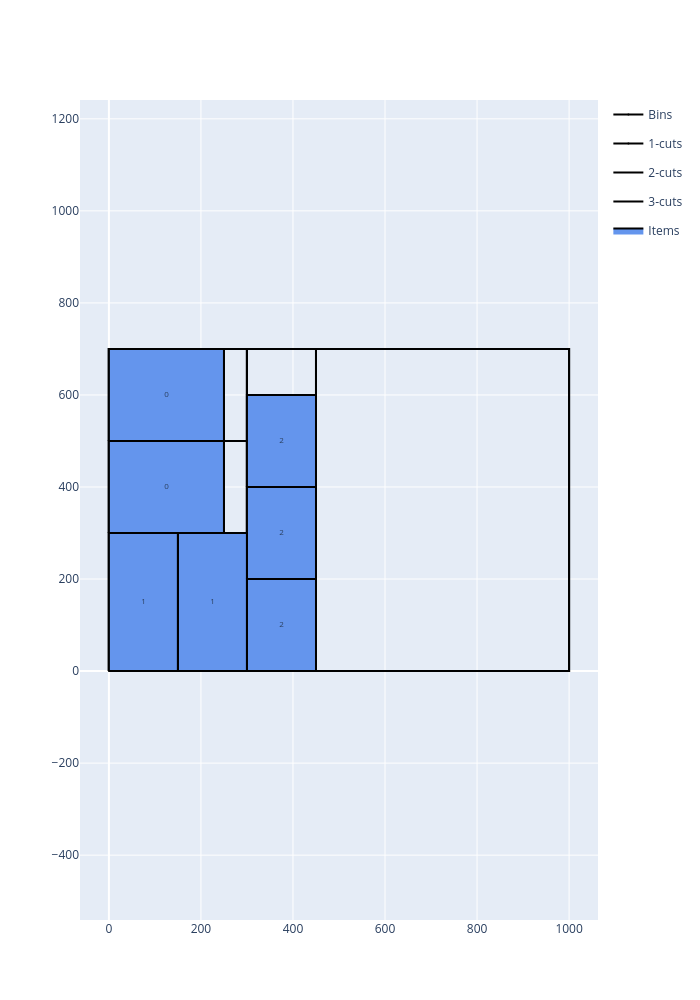
In the following example, the items of three item types are cut from plates of size 1000 × 700, using as few plates as possible, and then maximizing the leftover of the last plate:
Open the example in the online solver: Basic example, then click Solve.
{
    "objective": "bin-packing-with-leftovers",
    "bin_types": [
        {"width": 1000, "height": 700, "copies": 5}
    ],
    "item_types": [
        {"width": 250, "height": 200, "copies": 2},
        {"width": 150, "height": 300, "copies": 2},
        {"width": 200, "height": 150, "copies": 3}
    ]
}
Solve it with the command-line solver:
packingsolver_rectangleguillotine \
        --input instance.json \
        --certificate solution.csv \
        --time-limit 5
import packingsolver.rectangleguillotine as psg

instance_builder = psg.InstanceBuilder()
instance_builder.set_objective(psg.Objective.BinPackingWithLeftovers)
instance_builder.add_bin_type(1000, 700, copies=5)
instance_builder.add_item_type(250, 200, copies=2)
instance_builder.add_item_type(150, 300, copies=2)
instance_builder.add_item_type(200, 150, copies=3)
instance = instance_builder.build()
Solve it:
parameters = psg.OptimizeParameters()
parameters.time_limit = 5
output = psg.optimize(instance, parameters)
output.solution.write("solution.csv")
#include "packingsolver/rectangleguillotine/instance_builder.hpp"

using namespace packingsolver;
using namespace packingsolver::rectangleguillotine;

InstanceBuilder instance_builder;
instance_builder.set_objective(Objective::BinPackingWithLeftovers);
BinTypeId bin_type_id = instance_builder.add_bin_type(1000, 700);
instance_builder.set_bin_type_copies(bin_type_id, 5);
ItemTypeId item_type_id = instance_builder.add_item_type(250, 200);
instance_builder.set_item_type_copies(item_type_id, 2);
item_type_id = instance_builder.add_item_type(150, 300);
instance_builder.set_item_type_copies(item_type_id, 2);
item_type_id = instance_builder.add_item_type(200, 150);
instance_builder.set_item_type_copies(item_type_id, 3);
Instance instance = instance_builder.build();
Solve it:
#include "packingsolver/rectangleguillotine/optimize.hpp"

OptimizeParameters parameters;
parameters.timer.set_time_limit(5);
rectangleguillotine::Output output = optimize(instance, parameters);
output.solution_pool.best().write("solution.csv");
Link the target PackingSolver::rectangleguillotine of the CMake project.
The solution:
Instance format
An instance is a JSON object with the following fields:
Field |
Description |
|---|---|
|
Mandatory. One of |
|
See Maximum number of cutting stages. Default: |
|
See Cut types. Default: |
|
See First stage orientation. Default: |
|
See Cut thickness. Default: |
|
See Cut through defects. Default: |
|
|
|
See Maximum number of consecutive 1-cuts and Maximum number of consecutive 2-cuts. Default: no limit |
|
Mandatory. The bin types (array) |
|
Mandatory. The item types (array) |
A bin type has the following fields:
Field |
Description |
|---|---|
|
Mandatory. The width and the height of the bins (integers) |
|
The number of copies of the bin type. Default: |
|
The minimum number of copies of the bin type to use, for the variable-sized bin packing objective. Default: |
|
The cost of a bin of this type, for the variable-sized bin packing objective. Default: the area of the bin |
|
See Trims. Default: no trims |
|
See Defects. Default: none |
An item type has the following fields:
Field |
Description |
|---|---|
|
Mandatory. The width and the height of the items (integers) |
|
The number of copies of the item type. Default: |
|
The minimum number of copies of the item type to pack, for the knapsack objective. Default: |
|
The profit of an item of this type, for the knapsack objective. Default: the area of the item |
|
See Item rotations. Default: |
|
See Cutting sequences (stacks). Default: none |
In Python, the optional fields of the bin types and of the item types are keyword arguments of InstanceBuilder.add_bin_type and InstanceBuilder.add_item_type, with the same names (the trims are given in a dictionary, trims). In C++, they are set with the InstanceBuilder.set_bin_type_<field> and InstanceBuilder.set_item_type_<field> methods; the examples below show the exceptions. The other fields of the instance are set with the InstanceBuilder.set_<field> methods.
Certificate format
The solution is written (command-line option --certificate, Solution.write) as a CSV file with the columns PLATE_ID, COPIES, NODE_ID, X, Y, WIDTH, HEIGHT, TYPE, CUT, PARENT. Each line is a node of the cutting tree of a plate (a bin of the solution), or a defect:
PLATE_ID: the index of the plate in the solution, andCOPIESthe number of identical plates it stands for;NODE_ID: the id of the node, andPARENTthe id of its parent node (empty for the plates and the defects);X,Y,WIDTH,HEIGHT: the position of the bottom-left corner of the node, and its size;TYPE: the item type of the node if it is an item;-1for a waste,-2for an intermediate node (cut further),-3for the residual (the leftover of the last plate),-4for a defect;CUT: the depth of the node in the cutting tree:0for a plate,1for a node obtained by a 1-cut, etc.;-1for a trim.
PLATE_ID,COPIES,NODE_ID,X,Y,WIDTH,HEIGHT,TYPE,CUT,PARENT
0,1,0,0,0,1000,700,0,0,
0,1,1,0,0,300,700,-2,1,0
0,1,2,0,0,300,300,-2,2,1
0,1,3,0,0,150,300,1,3,2
0,1,4,150,0,150,300,1,3,2
0,1,5,0,300,300,200,-2,2,1
0,1,6,0,300,250,200,0,3,5
To visualize a solution, open it in the solution viewer, or run:
python3 scripts/visualize.py solution.csv
Maximum number of cutting stages
The maximum number of stages may be constrained: 2, 3 (default), or unlimited.
Choose the Number of stages below the objective.
In the instance: "number_of_stages": 2, or "number_of_stages": "unlimited".
instance_builder.set_number_of_stages(2), or instance_builder.set_number_of_stages_unlimited()
instance_builder.set_number_of_stages(2);, or instance_builder.set_number_of_stages_unlimited();
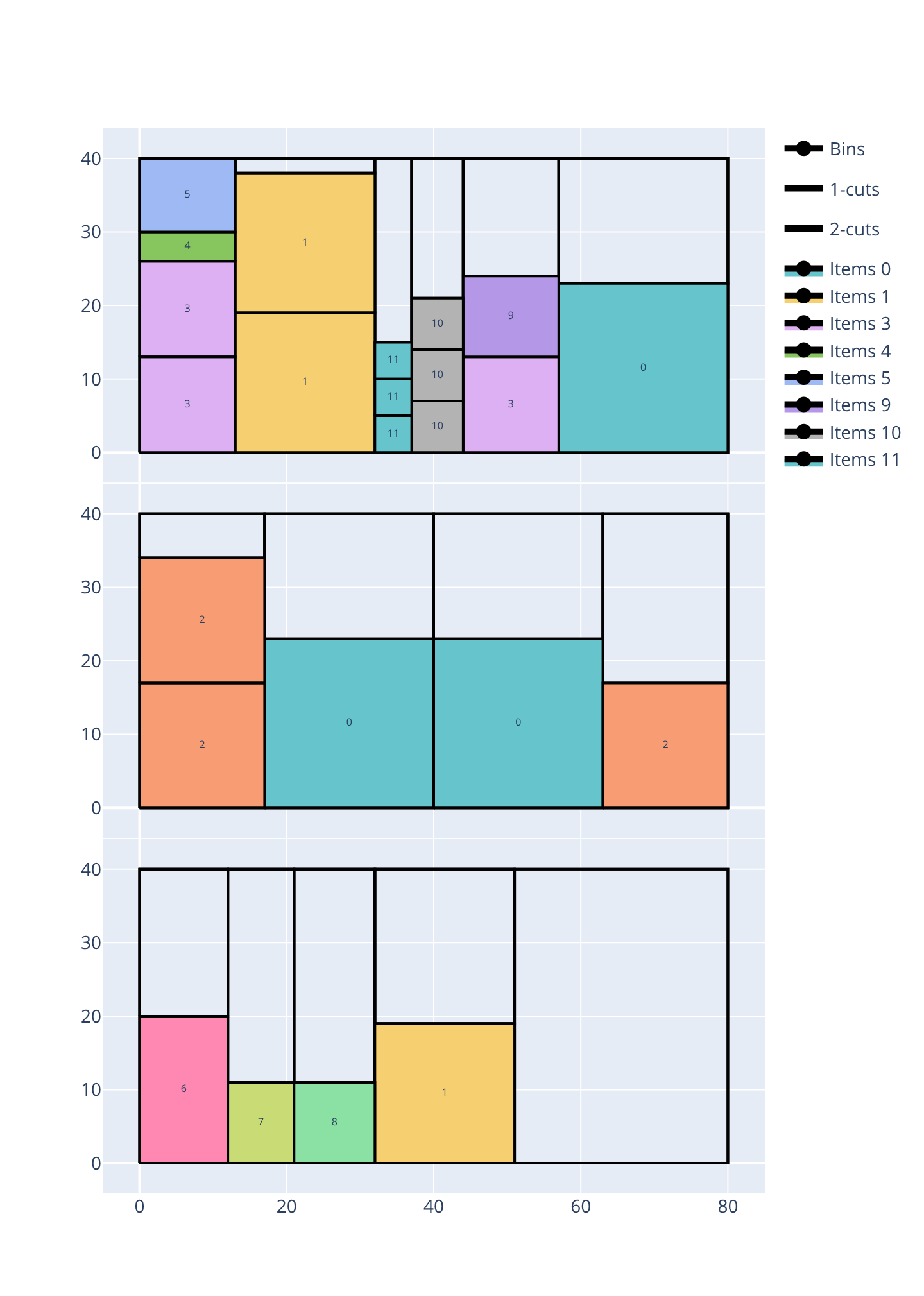
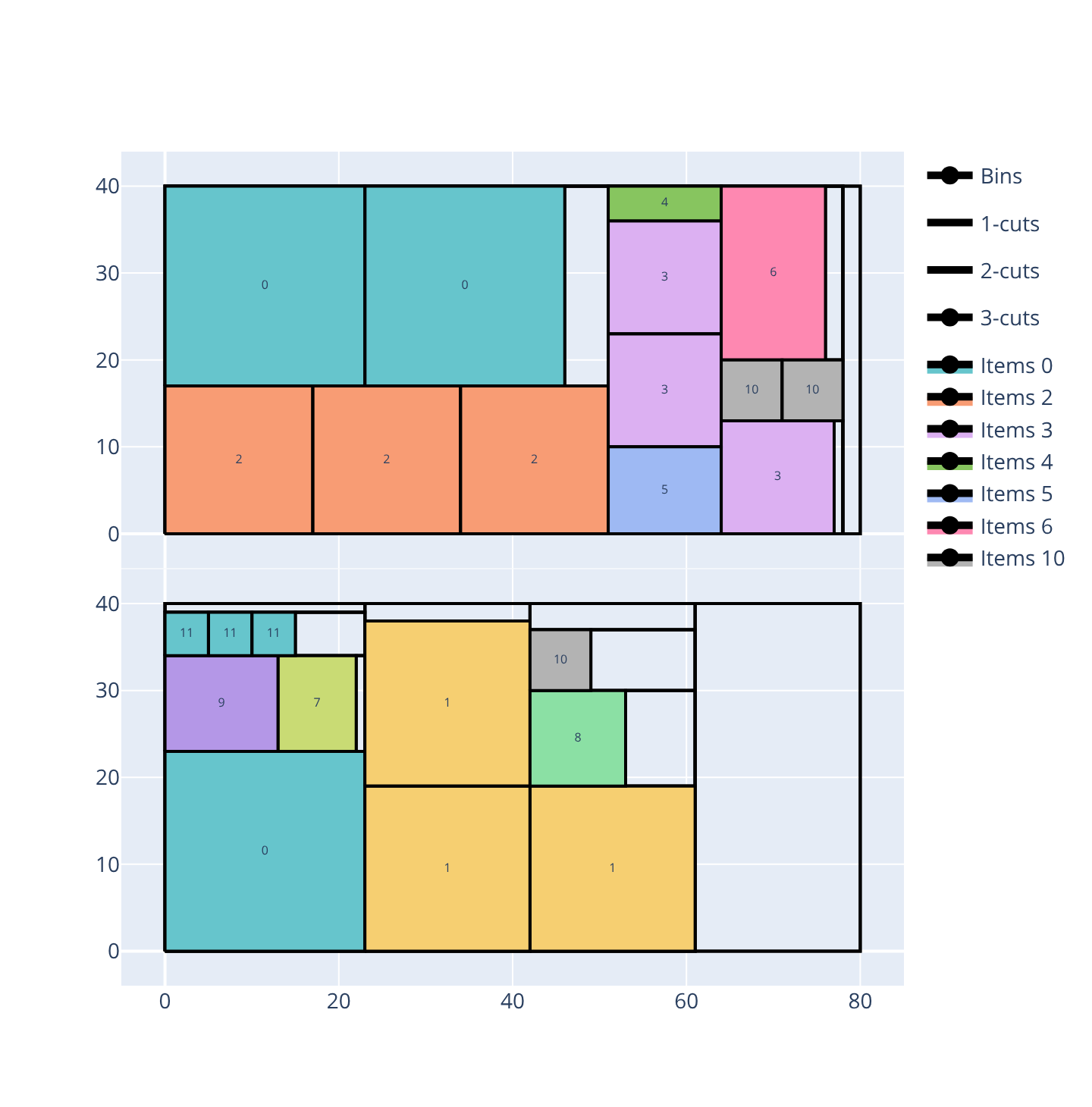
The following example packs 24 items (12 item types) into 80 × 40 bins with the exact cut type, a vertical first stage orientation and the bin-packing-with-leftovers objective. Since items must fill their sub-plate exactly at the last stage, the number of stages directly limits how tightly they can be nested. With only 2 stages, that requirement leaves so much waste that a third bin is needed (3 bins, 40.15% waste). A third stage is already enough to fit everything into 2 bins, with far less waste (10.44%):
2 stages |
3 stages |
|---|---|
|
|
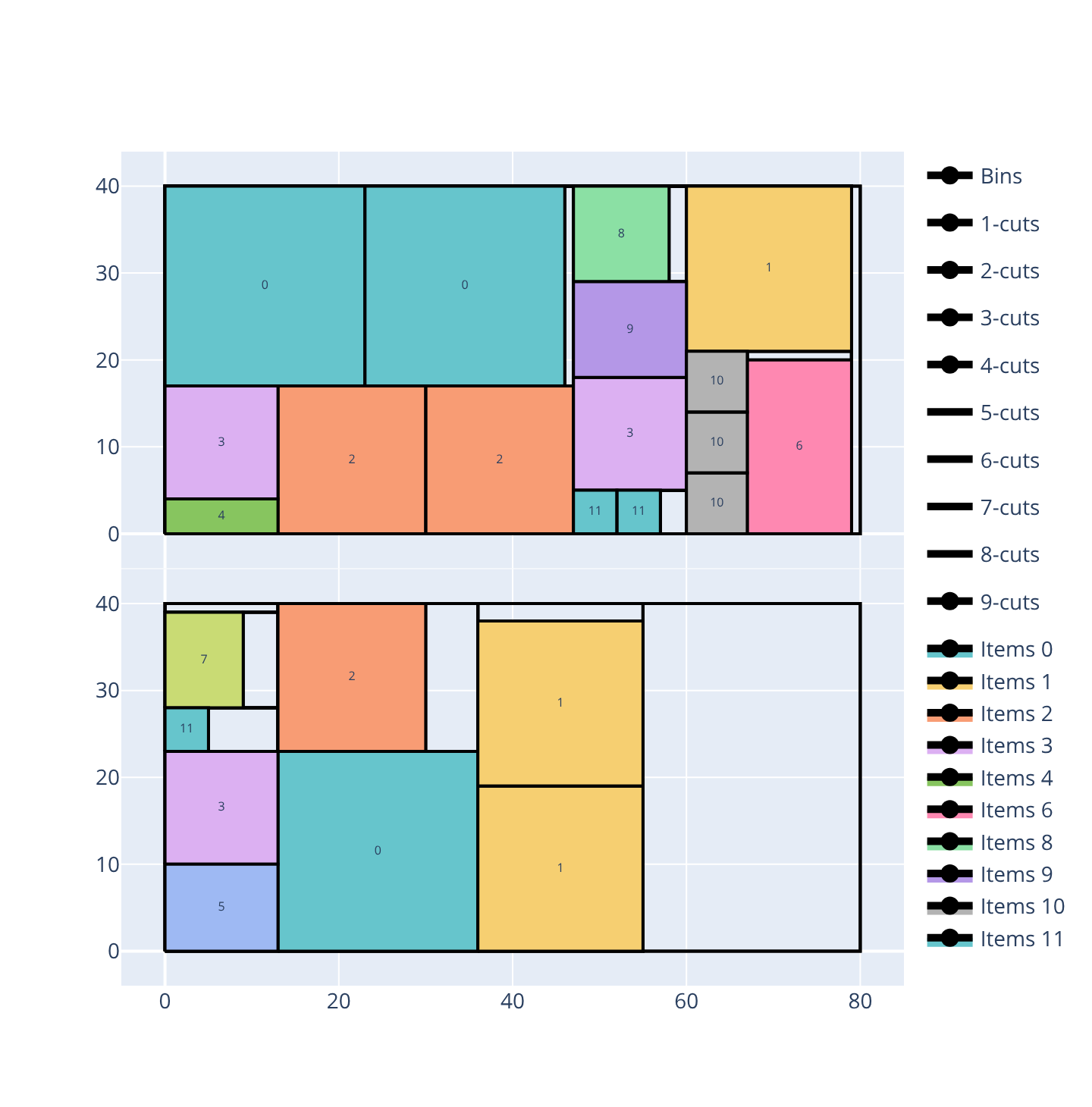
An unlimited number of stages keeps the same 2 bins but reduces the waste further (6.46%), by nesting items through a deeper hierarchy of cuts (up to a 6th-stage cut, visible in the image below):
Open the examples in the online solver: Number of stages: 2, Number of stages: 3, Number of stages: unlimited.
{
    "objective": "bin-packing-with-leftovers",
    "number_of_stages": 2,
    "cut_type": "exact",
    "first_stage_orientation": "vertical",
    "bin_types": [
        {"width": 80, "height": 40, "copies": 7}
    ],
    "item_types": [
        {"width": 23, "height": 23, "oriented": true, "copies": 3},
        {"width": 19, "height": 19, "oriented": true, "copies": 3},
        {"width": 17, "height": 17, "oriented": true, "copies": 3},
        {"width": 13, "height": 13, "oriented": true, "copies": 3},
        {"width": 13, "height": 4, "oriented": true},
        {"width": 13, "height": 10, "oriented": true},
        {"width": 12, "height": 20, "oriented": true},
        {"width": 9, "height": 11, "oriented": true},
        {"width": 11, "height": 11, "oriented": true},
        {"width": 13, "height": 11, "oriented": true},
        {"width": 7, "height": 7, "oriented": true, "copies": 3},
        {"width": 5, "height": 5, "oriented": true, "copies": 3}
    ]
}
{
    "objective": "bin-packing-with-leftovers",
    "number_of_stages": 3,
    "cut_type": "exact",
    "first_stage_orientation": "vertical",
    "bin_types": [
        {"width": 80, "height": 40, "copies": 7}
    ],
    "item_types": [
        {"width": 23, "height": 23, "oriented": true, "copies": 3},
        {"width": 19, "height": 19, "oriented": true, "copies": 3},
        {"width": 17, "height": 17, "oriented": true, "copies": 3},
        {"width": 13, "height": 13, "oriented": true, "copies": 3},
        {"width": 13, "height": 4, "oriented": true},
        {"width": 13, "height": 10, "oriented": true},
        {"width": 12, "height": 20, "oriented": true},
        {"width": 9, "height": 11, "oriented": true},
        {"width": 11, "height": 11, "oriented": true},
        {"width": 13, "height": 11, "oriented": true},
        {"width": 7, "height": 7, "oriented": true, "copies": 3},
        {"width": 5, "height": 5, "oriented": true, "copies": 3}
    ]
}
{
    "objective": "bin-packing-with-leftovers",
    "number_of_stages": "unlimited",
    "cut_type": "exact",
    "first_stage_orientation": "vertical",
    "bin_types": [
        {"width": 80, "height": 40, "copies": 7}
    ],
    "item_types": [
        {"width": 23, "height": 23, "oriented": true, "copies": 3},
        {"width": 19, "height": 19, "oriented": true, "copies": 3},
        {"width": 17, "height": 17, "oriented": true, "copies": 3},
        {"width": 13, "height": 13, "oriented": true, "copies": 3},
        {"width": 13, "height": 4, "oriented": true},
        {"width": 13, "height": 10, "oriented": true},
        {"width": 12, "height": 20, "oriented": true},
        {"width": 9, "height": 11, "oriented": true},
        {"width": 11, "height": 11, "oriented": true},
        {"width": 13, "height": 11, "oriented": true},
        {"width": 7, "height": 7, "oriented": true, "copies": 3},
        {"width": 5, "height": 5, "oriented": true, "copies": 3}
    ]
}
import packingsolver.rectangleguillotine as psg

instance_builder = psg.InstanceBuilder()
instance_builder.set_objective(psg.Objective.BinPackingWithLeftovers)
instance_builder.set_number_of_stages(2)
instance_builder.set_cut_type(psg.CutType.Exact)
instance_builder.set_first_stage_orientation(psg.CutOrientation.Vertical)
instance_builder.add_bin_type(80, 40, copies=7)
instance_builder.add_item_type(23, 23, oriented=True, copies=3)
instance_builder.add_item_type(19, 19, oriented=True, copies=3)
instance_builder.add_item_type(17, 17, oriented=True, copies=3)
instance_builder.add_item_type(13, 13, oriented=True, copies=3)
instance_builder.add_item_type(13, 4, oriented=True)
instance_builder.add_item_type(13, 10, oriented=True)
instance_builder.add_item_type(12, 20, oriented=True)
instance_builder.add_item_type(9, 11, oriented=True)
instance_builder.add_item_type(11, 11, oriented=True)
instance_builder.add_item_type(13, 11, oriented=True)
instance_builder.add_item_type(7, 7, oriented=True, copies=3)
instance_builder.add_item_type(5, 5, oriented=True, copies=3)
instance = instance_builder.build()
import packingsolver.rectangleguillotine as psg

instance_builder = psg.InstanceBuilder()
instance_builder.set_objective(psg.Objective.BinPackingWithLeftovers)
instance_builder.set_number_of_stages(3)
instance_builder.set_cut_type(psg.CutType.Exact)
instance_builder.set_first_stage_orientation(psg.CutOrientation.Vertical)
instance_builder.add_bin_type(80, 40, copies=7)
instance_builder.add_item_type(23, 23, oriented=True, copies=3)
instance_builder.add_item_type(19, 19, oriented=True, copies=3)
instance_builder.add_item_type(17, 17, oriented=True, copies=3)
instance_builder.add_item_type(13, 13, oriented=True, copies=3)
instance_builder.add_item_type(13, 4, oriented=True)
instance_builder.add_item_type(13, 10, oriented=True)
instance_builder.add_item_type(12, 20, oriented=True)
instance_builder.add_item_type(9, 11, oriented=True)
instance_builder.add_item_type(11, 11, oriented=True)
instance_builder.add_item_type(13, 11, oriented=True)
instance_builder.add_item_type(7, 7, oriented=True, copies=3)
instance_builder.add_item_type(5, 5, oriented=True, copies=3)
instance = instance_builder.build()
import packingsolver.rectangleguillotine as psg

instance_builder = psg.InstanceBuilder()
instance_builder.set_objective(psg.Objective.BinPackingWithLeftovers)
instance_builder.set_number_of_stages_unlimited()
instance_builder.set_cut_type(psg.CutType.Exact)
instance_builder.set_first_stage_orientation(psg.CutOrientation.Vertical)
instance_builder.add_bin_type(80, 40, copies=7)
instance_builder.add_item_type(23, 23, oriented=True, copies=3)
instance_builder.add_item_type(19, 19, oriented=True, copies=3)
instance_builder.add_item_type(17, 17, oriented=True, copies=3)
instance_builder.add_item_type(13, 13, oriented=True, copies=3)
instance_builder.add_item_type(13, 4, oriented=True)
instance_builder.add_item_type(13, 10, oriented=True)
instance_builder.add_item_type(12, 20, oriented=True)
instance_builder.add_item_type(9, 11, oriented=True)
instance_builder.add_item_type(11, 11, oriented=True)
instance_builder.add_item_type(13, 11, oriented=True)
instance_builder.add_item_type(7, 7, oriented=True, copies=3)
instance_builder.add_item_type(5, 5, oriented=True, copies=3)
instance = instance_builder.build()
#include "packingsolver/rectangleguillotine/instance_builder.hpp"

using namespace packingsolver;
using namespace packingsolver::rectangleguillotine;

InstanceBuilder instance_builder;
instance_builder.set_objective(Objective::BinPackingWithLeftovers);
instance_builder.set_number_of_stages(2);
instance_builder.set_cut_type(CutType::Exact);
instance_builder.set_first_stage_orientation(CutOrientation::Vertical);
BinTypeId bin_type_id = instance_builder.add_bin_type(80, 40);
instance_builder.set_bin_type_copies(bin_type_id, 7);
ItemTypeId item_type_id = instance_builder.add_item_type(23, 23, true);
instance_builder.set_item_type_copies(item_type_id, 3);
item_type_id = instance_builder.add_item_type(19, 19, true);
instance_builder.set_item_type_copies(item_type_id, 3);
item_type_id = instance_builder.add_item_type(17, 17, true);
instance_builder.set_item_type_copies(item_type_id, 3);
item_type_id = instance_builder.add_item_type(13, 13, true);
instance_builder.set_item_type_copies(item_type_id, 3);
instance_builder.add_item_type(13, 4, true);
instance_builder.add_item_type(13, 10, true);
instance_builder.add_item_type(12, 20, true);
instance_builder.add_item_type(9, 11, true);
instance_builder.add_item_type(11, 11, true);
instance_builder.add_item_type(13, 11, true);
item_type_id = instance_builder.add_item_type(7, 7, true);
instance_builder.set_item_type_copies(item_type_id, 3);
item_type_id = instance_builder.add_item_type(5, 5, true);
instance_builder.set_item_type_copies(item_type_id, 3);
Instance instance = instance_builder.build();
#include "packingsolver/rectangleguillotine/instance_builder.hpp"

using namespace packingsolver;
using namespace packingsolver::rectangleguillotine;

InstanceBuilder instance_builder;
instance_builder.set_objective(Objective::BinPackingWithLeftovers);
instance_builder.set_number_of_stages(3);
instance_builder.set_cut_type(CutType::Exact);
instance_builder.set_first_stage_orientation(CutOrientation::Vertical);
BinTypeId bin_type_id = instance_builder.add_bin_type(80, 40);
instance_builder.set_bin_type_copies(bin_type_id, 7);
ItemTypeId item_type_id = instance_builder.add_item_type(23, 23, true);
instance_builder.set_item_type_copies(item_type_id, 3);
item_type_id = instance_builder.add_item_type(19, 19, true);
instance_builder.set_item_type_copies(item_type_id, 3);
item_type_id = instance_builder.add_item_type(17, 17, true);
instance_builder.set_item_type_copies(item_type_id, 3);
item_type_id = instance_builder.add_item_type(13, 13, true);
instance_builder.set_item_type_copies(item_type_id, 3);
instance_builder.add_item_type(13, 4, true);
instance_builder.add_item_type(13, 10, true);
instance_builder.add_item_type(12, 20, true);
instance_builder.add_item_type(9, 11, true);
instance_builder.add_item_type(11, 11, true);
instance_builder.add_item_type(13, 11, true);
item_type_id = instance_builder.add_item_type(7, 7, true);
instance_builder.set_item_type_copies(item_type_id, 3);
item_type_id = instance_builder.add_item_type(5, 5, true);
instance_builder.set_item_type_copies(item_type_id, 3);
Instance instance = instance_builder.build();
#include "packingsolver/rectangleguillotine/instance_builder.hpp"

using namespace packingsolver;
using namespace packingsolver::rectangleguillotine;

InstanceBuilder instance_builder;
instance_builder.set_objective(Objective::BinPackingWithLeftovers);
instance_builder.set_number_of_stages_unlimited();
instance_builder.set_cut_type(CutType::Exact);
instance_builder.set_first_stage_orientation(CutOrientation::Vertical);
BinTypeId bin_type_id = instance_builder.add_bin_type(80, 40);
instance_builder.set_bin_type_copies(bin_type_id, 7);
ItemTypeId item_type_id = instance_builder.add_item_type(23, 23, true);
instance_builder.set_item_type_copies(item_type_id, 3);
item_type_id = instance_builder.add_item_type(19, 19, true);
instance_builder.set_item_type_copies(item_type_id, 3);
item_type_id = instance_builder.add_item_type(17, 17, true);
instance_builder.set_item_type_copies(item_type_id, 3);
item_type_id = instance_builder.add_item_type(13, 13, true);
instance_builder.set_item_type_copies(item_type_id, 3);
instance_builder.add_item_type(13, 4, true);
instance_builder.add_item_type(13, 10, true);
instance_builder.add_item_type(12, 20, true);
instance_builder.add_item_type(9, 11, true);
instance_builder.add_item_type(11, 11, true);
instance_builder.add_item_type(13, 11, true);
item_type_id = instance_builder.add_item_type(7, 7, true);
instance_builder.set_item_type_copies(item_type_id, 3);
item_type_id = instance_builder.add_item_type(5, 5, true);
instance_builder.set_item_type_copies(item_type_id, 3);
Instance instance = instance_builder.build();
Cut types
roadef2018: pattern from the 2018 ROADEF challenge; stage-2 cuts produce only items of identical height; trimming cuts are allowednon-exact(default): more flexible; stage-3 cuts are not required; some waste is allowed in sub-platesexact: items must fill their sub-plate exactly with no waste at stage 3homogenous: all items in a strip have the same height
Choose the Cut type below the objective.
In the instance: "cut_type": "exact".
instance_builder.set_cut_type(psg.CutType.Exact)
instance_builder.set_cut_type(CutType::Exact);
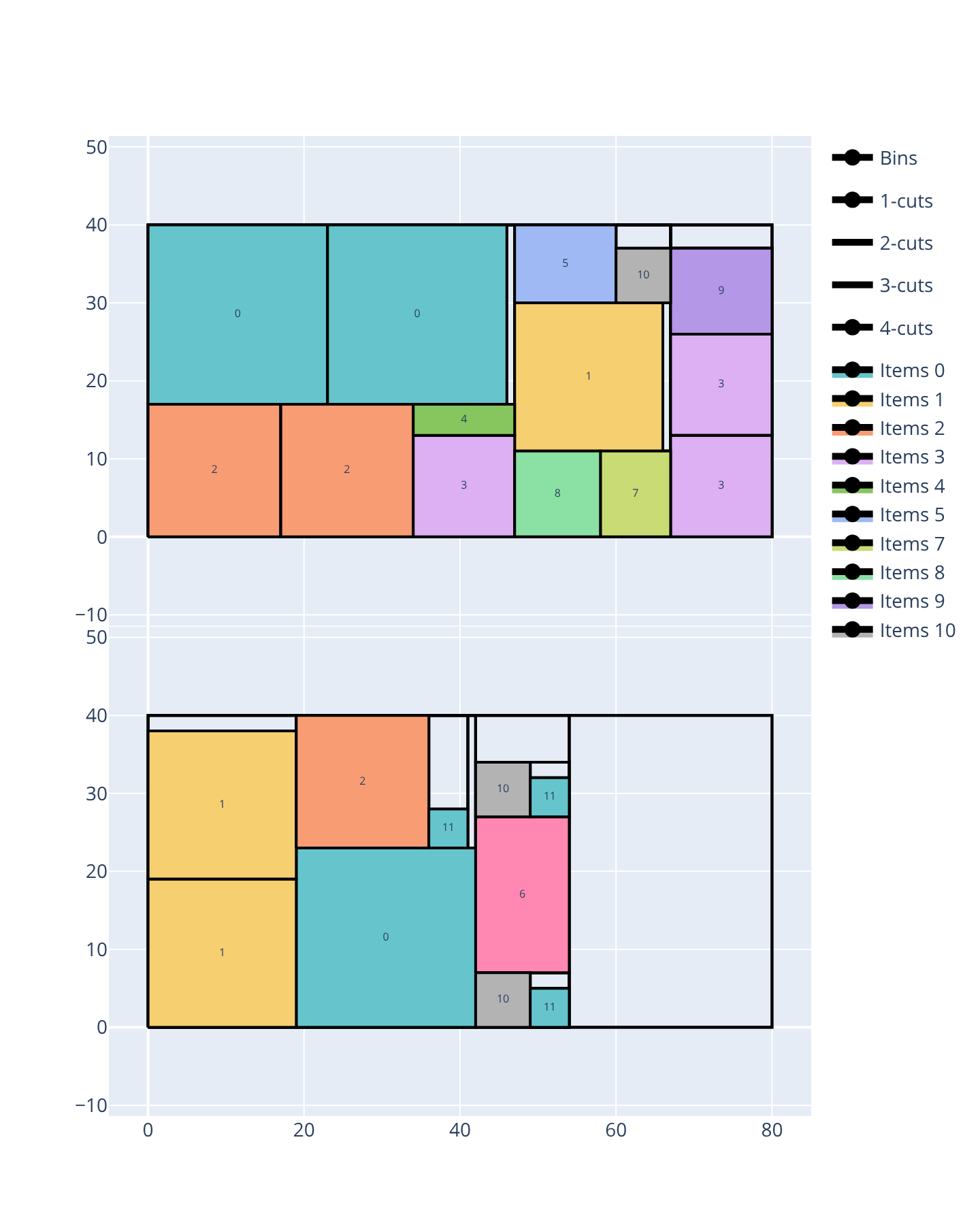
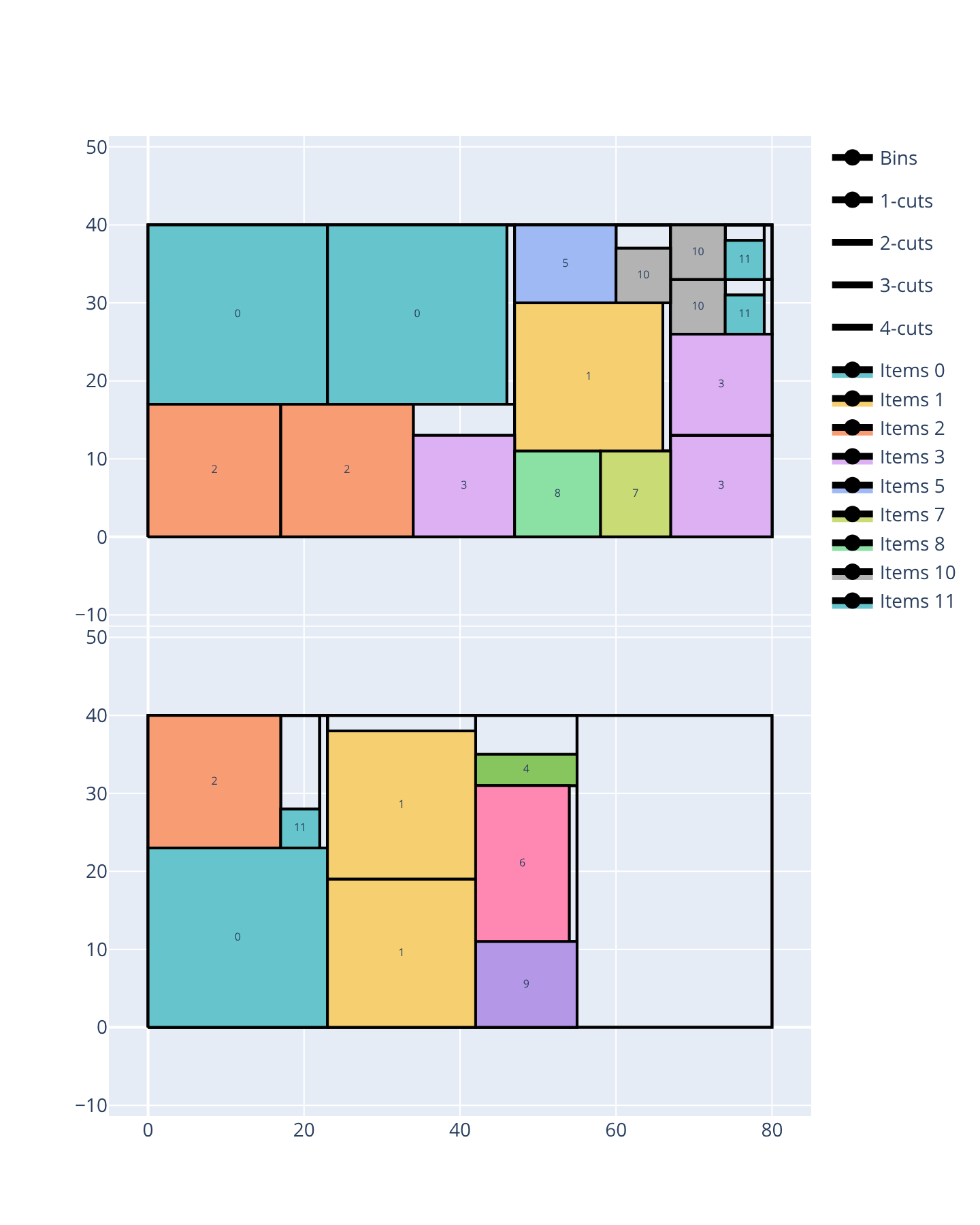
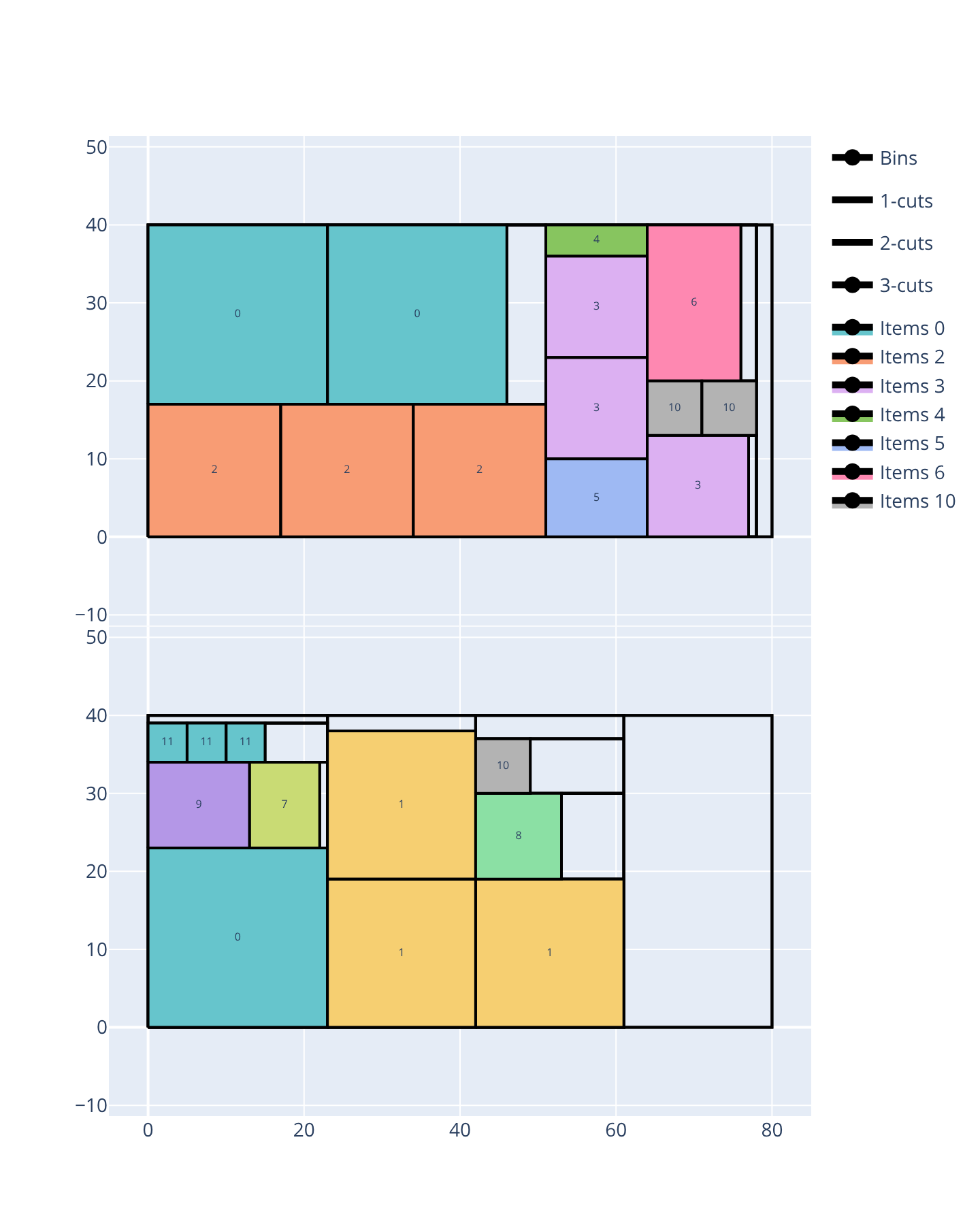
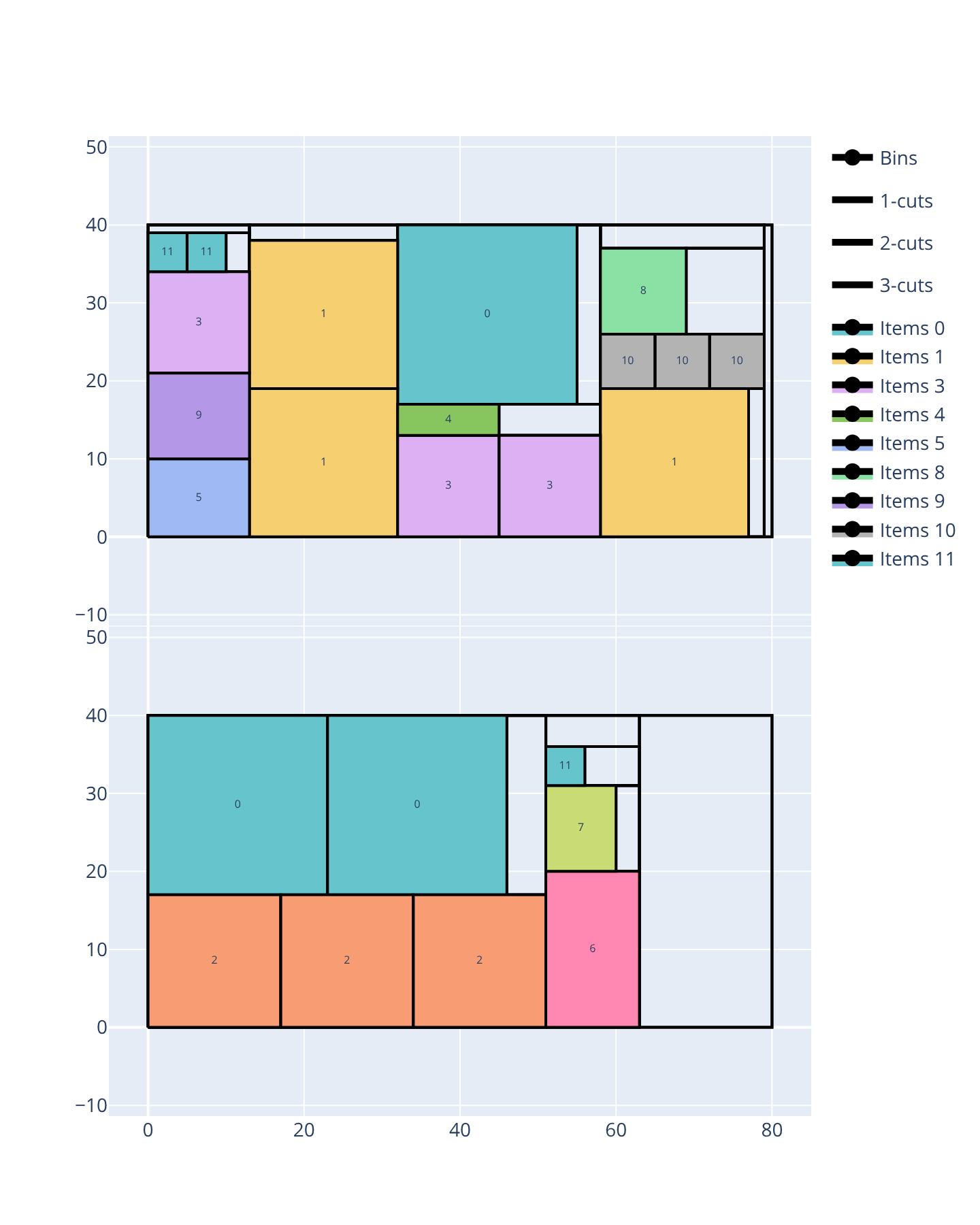
The following example packs 24 items (12 item types) into 80 × 40 bins with 3 cutting stages, a vertical first stage orientation and the bin-packing-with-leftovers objective, which minimizes the number of bins first and, among solutions using that many bins, maximizes the leftover value of the last bin. Every bin in every solution below uses several genuine stage-1 cuts, splitting it into multiple vertical strips. All 4 cut types pack every item into the same 2 bins, but the leftover value they reach decreases as the cut type gets more restrictive:
roadef2018: leftover value 72 — the most permissive cut type, it takes full advantage of its free trimming cuts past the 3-stage budgetnon-exact: leftover value 65 — still allows sub-plates to be filled with some waste, but withoutroadef2018’s free trimming cuts, so it packs slightly less tightlyexact: leftover value 57 — items must fill their sub-plate exactly, which rules out some of the arrangements the 2 cut types above usehomogenous: leftover value 48 — the most restrictive cut type here, since items sharing a sub-plate must also be of the same type
|
|
|---|---|
|
|
|
|
|---|---|
|
|
Open the examples in the online solver: Cut types: roadef2018, Cut types: non-exact, Cut types: exact, Cut types: homogenous.
{
    "objective": "bin-packing-with-leftovers",
    "cut_type": "roadef2018",
    "number_of_stages": 3,
    "first_stage_orientation": "vertical",
    "bin_types": [
        {"width": 80, "height": 40, "copies": 7}
    ],
    "item_types": [
        {"width": 23, "height": 23, "oriented": true, "copies": 3},
        {"width": 19, "height": 19, "oriented": true, "copies": 3},
        {"width": 17, "height": 17, "oriented": true, "copies": 3},
        {"width": 13, "height": 13, "oriented": true, "copies": 3},
        {"width": 13, "height": 4, "oriented": true},
        {"width": 13, "height": 10, "oriented": true},
        {"width": 12, "height": 20, "oriented": true},
        {"width": 9, "height": 11, "oriented": true},
        {"width": 11, "height": 11, "oriented": true},
        {"width": 13, "height": 11, "oriented": true},
        {"width": 7, "height": 7, "oriented": true, "copies": 3},
        {"width": 5, "height": 5, "oriented": true, "copies": 3}
    ]
}
{
    "objective": "bin-packing-with-leftovers",
    "cut_type": "non-exact",
    "number_of_stages": 3,
    "first_stage_orientation": "vertical",
    "bin_types": [
        {"width": 80, "height": 40, "copies": 7}
    ],
    "item_types": [
        {"width": 23, "height": 23, "oriented": true, "copies": 3},
        {"width": 19, "height": 19, "oriented": true, "copies": 3},
        {"width": 17, "height": 17, "oriented": true, "copies": 3},
        {"width": 13, "height": 13, "oriented": true, "copies": 3},
        {"width": 13, "height": 4, "oriented": true},
        {"width": 13, "height": 10, "oriented": true},
        {"width": 12, "height": 20, "oriented": true},
        {"width": 9, "height": 11, "oriented": true},
        {"width": 11, "height": 11, "oriented": true},
        {"width": 13, "height": 11, "oriented": true},
        {"width": 7, "height": 7, "oriented": true, "copies": 3},
        {"width": 5, "height": 5, "oriented": true, "copies": 3}
    ]
}
{
    "objective": "bin-packing-with-leftovers",
    "cut_type": "exact",
    "number_of_stages": 3,
    "first_stage_orientation": "vertical",
    "bin_types": [
        {"width": 80, "height": 40, "copies": 7}
    ],
    "item_types": [
        {"width": 23, "height": 23, "oriented": true, "copies": 3},
        {"width": 19, "height": 19, "oriented": true, "copies": 3},
        {"width": 17, "height": 17, "oriented": true, "copies": 3},
        {"width": 13, "height": 13, "oriented": true, "copies": 3},
        {"width": 13, "height": 4, "oriented": true},
        {"width": 13, "height": 10, "oriented": true},
        {"width": 12, "height": 20, "oriented": true},
        {"width": 9, "height": 11, "oriented": true},
        {"width": 11, "height": 11, "oriented": true},
        {"width": 13, "height": 11, "oriented": true},
        {"width": 7, "height": 7, "oriented": true, "copies": 3},
        {"width": 5, "height": 5, "oriented": true, "copies": 3}
    ]
}
{
    "objective": "bin-packing-with-leftovers",
    "cut_type": "homogenous",
    "number_of_stages": 3,
    "first_stage_orientation": "vertical",
    "bin_types": [
        {"width": 80, "height": 40, "copies": 7}
    ],
    "item_types": [
        {"width": 23, "height": 23, "oriented": true, "copies": 3},
        {"width": 19, "height": 19, "oriented": true, "copies": 3},
        {"width": 17, "height": 17, "oriented": true, "copies": 3},
        {"width": 13, "height": 13, "oriented": true, "copies": 3},
        {"width": 13, "height": 4, "oriented": true},
        {"width": 13, "height": 10, "oriented": true},
        {"width": 12, "height": 20, "oriented": true},
        {"width": 9, "height": 11, "oriented": true},
        {"width": 11, "height": 11, "oriented": true},
        {"width": 13, "height": 11, "oriented": true},
        {"width": 7, "height": 7, "oriented": true, "copies": 3},
        {"width": 5, "height": 5, "oriented": true, "copies": 3}
    ]
}
import packingsolver.rectangleguillotine as psg

instance_builder = psg.InstanceBuilder()
instance_builder.set_objective(psg.Objective.BinPackingWithLeftovers)
instance_builder.set_number_of_stages(3)
instance_builder.set_cut_type(psg.CutType.Roadef2018)
instance_builder.set_first_stage_orientation(psg.CutOrientation.Vertical)
instance_builder.add_bin_type(80, 40, copies=7)
instance_builder.add_item_type(23, 23, oriented=True, copies=3)
instance_builder.add_item_type(19, 19, oriented=True, copies=3)
instance_builder.add_item_type(17, 17, oriented=True, copies=3)
instance_builder.add_item_type(13, 13, oriented=True, copies=3)
instance_builder.add_item_type(13, 4, oriented=True)
instance_builder.add_item_type(13, 10, oriented=True)
instance_builder.add_item_type(12, 20, oriented=True)
instance_builder.add_item_type(9, 11, oriented=True)
instance_builder.add_item_type(11, 11, oriented=True)
instance_builder.add_item_type(13, 11, oriented=True)
instance_builder.add_item_type(7, 7, oriented=True, copies=3)
instance_builder.add_item_type(5, 5, oriented=True, copies=3)
instance = instance_builder.build()
import packingsolver.rectangleguillotine as psg

instance_builder = psg.InstanceBuilder()
instance_builder.set_objective(psg.Objective.BinPackingWithLeftovers)
instance_builder.set_number_of_stages(3)
instance_builder.set_cut_type(psg.CutType.NonExact)
instance_builder.set_first_stage_orientation(psg.CutOrientation.Vertical)
instance_builder.add_bin_type(80, 40, copies=7)
instance_builder.add_item_type(23, 23, oriented=True, copies=3)
instance_builder.add_item_type(19, 19, oriented=True, copies=3)
instance_builder.add_item_type(17, 17, oriented=True, copies=3)
instance_builder.add_item_type(13, 13, oriented=True, copies=3)
instance_builder.add_item_type(13, 4, oriented=True)
instance_builder.add_item_type(13, 10, oriented=True)
instance_builder.add_item_type(12, 20, oriented=True)
instance_builder.add_item_type(9, 11, oriented=True)
instance_builder.add_item_type(11, 11, oriented=True)
instance_builder.add_item_type(13, 11, oriented=True)
instance_builder.add_item_type(7, 7, oriented=True, copies=3)
instance_builder.add_item_type(5, 5, oriented=True, copies=3)
instance = instance_builder.build()
import packingsolver.rectangleguillotine as psg

instance_builder = psg.InstanceBuilder()
instance_builder.set_objective(psg.Objective.BinPackingWithLeftovers)
instance_builder.set_number_of_stages(3)
instance_builder.set_cut_type(psg.CutType.Exact)
instance_builder.set_first_stage_orientation(psg.CutOrientation.Vertical)
instance_builder.add_bin_type(80, 40, copies=7)
instance_builder.add_item_type(23, 23, oriented=True, copies=3)
instance_builder.add_item_type(19, 19, oriented=True, copies=3)
instance_builder.add_item_type(17, 17, oriented=True, copies=3)
instance_builder.add_item_type(13, 13, oriented=True, copies=3)
instance_builder.add_item_type(13, 4, oriented=True)
instance_builder.add_item_type(13, 10, oriented=True)
instance_builder.add_item_type(12, 20, oriented=True)
instance_builder.add_item_type(9, 11, oriented=True)
instance_builder.add_item_type(11, 11, oriented=True)
instance_builder.add_item_type(13, 11, oriented=True)
instance_builder.add_item_type(7, 7, oriented=True, copies=3)
instance_builder.add_item_type(5, 5, oriented=True, copies=3)
instance = instance_builder.build()
import packingsolver.rectangleguillotine as psg

instance_builder = psg.InstanceBuilder()
instance_builder.set_objective(psg.Objective.BinPackingWithLeftovers)
instance_builder.set_number_of_stages(3)
instance_builder.set_cut_type(psg.CutType.Homogenous)
instance_builder.set_first_stage_orientation(psg.CutOrientation.Vertical)
instance_builder.add_bin_type(80, 40, copies=7)
instance_builder.add_item_type(23, 23, oriented=True, copies=3)
instance_builder.add_item_type(19, 19, oriented=True, copies=3)
instance_builder.add_item_type(17, 17, oriented=True, copies=3)
instance_builder.add_item_type(13, 13, oriented=True, copies=3)
instance_builder.add_item_type(13, 4, oriented=True)
instance_builder.add_item_type(13, 10, oriented=True)
instance_builder.add_item_type(12, 20, oriented=True)
instance_builder.add_item_type(9, 11, oriented=True)
instance_builder.add_item_type(11, 11, oriented=True)
instance_builder.add_item_type(13, 11, oriented=True)
instance_builder.add_item_type(7, 7, oriented=True, copies=3)
instance_builder.add_item_type(5, 5, oriented=True, copies=3)
instance = instance_builder.build()
#include "packingsolver/rectangleguillotine/instance_builder.hpp"

using namespace packingsolver;
using namespace packingsolver::rectangleguillotine;

InstanceBuilder instance_builder;
instance_builder.set_objective(Objective::BinPackingWithLeftovers);
instance_builder.set_number_of_stages(3);
instance_builder.set_cut_type(CutType::Roadef2018);
instance_builder.set_first_stage_orientation(CutOrientation::Vertical);
BinTypeId bin_type_id = instance_builder.add_bin_type(80, 40);
instance_builder.set_bin_type_copies(bin_type_id, 7);
ItemTypeId item_type_id = instance_builder.add_item_type(23, 23, true);
instance_builder.set_item_type_copies(item_type_id, 3);
item_type_id = instance_builder.add_item_type(19, 19, true);
instance_builder.set_item_type_copies(item_type_id, 3);
item_type_id = instance_builder.add_item_type(17, 17, true);
instance_builder.set_item_type_copies(item_type_id, 3);
item_type_id = instance_builder.add_item_type(13, 13, true);
instance_builder.set_item_type_copies(item_type_id, 3);
instance_builder.add_item_type(13, 4, true);
instance_builder.add_item_type(13, 10, true);
instance_builder.add_item_type(12, 20, true);
instance_builder.add_item_type(9, 11, true);
instance_builder.add_item_type(11, 11, true);
instance_builder.add_item_type(13, 11, true);
item_type_id = instance_builder.add_item_type(7, 7, true);
instance_builder.set_item_type_copies(item_type_id, 3);
item_type_id = instance_builder.add_item_type(5, 5, true);
instance_builder.set_item_type_copies(item_type_id, 3);
Instance instance = instance_builder.build();
#include "packingsolver/rectangleguillotine/instance_builder.hpp"

using namespace packingsolver;
using namespace packingsolver::rectangleguillotine;

InstanceBuilder instance_builder;
instance_builder.set_objective(Objective::BinPackingWithLeftovers);
instance_builder.set_number_of_stages(3);
instance_builder.set_cut_type(CutType::NonExact);
instance_builder.set_first_stage_orientation(CutOrientation::Vertical);
BinTypeId bin_type_id = instance_builder.add_bin_type(80, 40);
instance_builder.set_bin_type_copies(bin_type_id, 7);
ItemTypeId item_type_id = instance_builder.add_item_type(23, 23, true);
instance_builder.set_item_type_copies(item_type_id, 3);
item_type_id = instance_builder.add_item_type(19, 19, true);
instance_builder.set_item_type_copies(item_type_id, 3);
item_type_id = instance_builder.add_item_type(17, 17, true);
instance_builder.set_item_type_copies(item_type_id, 3);
item_type_id = instance_builder.add_item_type(13, 13, true);
instance_builder.set_item_type_copies(item_type_id, 3);
instance_builder.add_item_type(13, 4, true);
instance_builder.add_item_type(13, 10, true);
instance_builder.add_item_type(12, 20, true);
instance_builder.add_item_type(9, 11, true);
instance_builder.add_item_type(11, 11, true);
instance_builder.add_item_type(13, 11, true);
item_type_id = instance_builder.add_item_type(7, 7, true);
instance_builder.set_item_type_copies(item_type_id, 3);
item_type_id = instance_builder.add_item_type(5, 5, true);
instance_builder.set_item_type_copies(item_type_id, 3);
Instance instance = instance_builder.build();
#include "packingsolver/rectangleguillotine/instance_builder.hpp"

using namespace packingsolver;
using namespace packingsolver::rectangleguillotine;

InstanceBuilder instance_builder;
instance_builder.set_objective(Objective::BinPackingWithLeftovers);
instance_builder.set_number_of_stages(3);
instance_builder.set_cut_type(CutType::Exact);
instance_builder.set_first_stage_orientation(CutOrientation::Vertical);
BinTypeId bin_type_id = instance_builder.add_bin_type(80, 40);
instance_builder.set_bin_type_copies(bin_type_id, 7);
ItemTypeId item_type_id = instance_builder.add_item_type(23, 23, true);
instance_builder.set_item_type_copies(item_type_id, 3);
item_type_id = instance_builder.add_item_type(19, 19, true);
instance_builder.set_item_type_copies(item_type_id, 3);
item_type_id = instance_builder.add_item_type(17, 17, true);
instance_builder.set_item_type_copies(item_type_id, 3);
item_type_id = instance_builder.add_item_type(13, 13, true);
instance_builder.set_item_type_copies(item_type_id, 3);
instance_builder.add_item_type(13, 4, true);
instance_builder.add_item_type(13, 10, true);
instance_builder.add_item_type(12, 20, true);
instance_builder.add_item_type(9, 11, true);
instance_builder.add_item_type(11, 11, true);
instance_builder.add_item_type(13, 11, true);
item_type_id = instance_builder.add_item_type(7, 7, true);
instance_builder.set_item_type_copies(item_type_id, 3);
item_type_id = instance_builder.add_item_type(5, 5, true);
instance_builder.set_item_type_copies(item_type_id, 3);
Instance instance = instance_builder.build();
#include "packingsolver/rectangleguillotine/instance_builder.hpp"

using namespace packingsolver;
using namespace packingsolver::rectangleguillotine;

InstanceBuilder instance_builder;
instance_builder.set_objective(Objective::BinPackingWithLeftovers);
instance_builder.set_number_of_stages(3);
instance_builder.set_cut_type(CutType::Homogenous);
instance_builder.set_first_stage_orientation(CutOrientation::Vertical);
BinTypeId bin_type_id = instance_builder.add_bin_type(80, 40);
instance_builder.set_bin_type_copies(bin_type_id, 7);
ItemTypeId item_type_id = instance_builder.add_item_type(23, 23, true);
instance_builder.set_item_type_copies(item_type_id, 3);
item_type_id = instance_builder.add_item_type(19, 19, true);
instance_builder.set_item_type_copies(item_type_id, 3);
item_type_id = instance_builder.add_item_type(17, 17, true);
instance_builder.set_item_type_copies(item_type_id, 3);
item_type_id = instance_builder.add_item_type(13, 13, true);
instance_builder.set_item_type_copies(item_type_id, 3);
instance_builder.add_item_type(13, 4, true);
instance_builder.add_item_type(13, 10, true);
instance_builder.add_item_type(12, 20, true);
instance_builder.add_item_type(9, 11, true);
instance_builder.add_item_type(11, 11, true);
instance_builder.add_item_type(13, 11, true);
item_type_id = instance_builder.add_item_type(7, 7, true);
instance_builder.set_item_type_copies(item_type_id, 3);
item_type_id = instance_builder.add_item_type(5, 5, true);
instance_builder.set_item_type_copies(item_type_id, 3);
Instance instance = instance_builder.build();
First stage orientation
The first stage orientation controls whether stage-1 cuts (see Guillotine vs non-guillotine patterns above) are vertical (default) or horizontal; with any, the orientation of the stage-1 cuts may differ from one plate to the other.
Choose the First stage orientation below the objective.
In the instance: "first_stage_orientation": "horizontal".
instance_builder.set_first_stage_orientation(psg.CutOrientation.Horizontal)
instance_builder.set_first_stage_orientation(CutOrientation::Horizontal);
The following example packs 4 items (4 × 3, 4 × 7, 6 × 5 and 6 × 4) into 10 × 10 bins with only 2 cutting stages (bin-packing objective). The two 4-wide items share a column, stacking to exactly fill a 4 × 10 vertical strip; the two 6-wide items share a second 6 × 10 vertical strip, stacking to a height of 9 with some waste. With vertical stage-1 cuts, the cuts run along these two columns and all 4 items fit into a single bin. With horizontal stage-1 cuts, since no two items share the same height, each stage-1 row can only hold one item at that depth, and a second bin is needed.
|
|
|---|---|
|
|
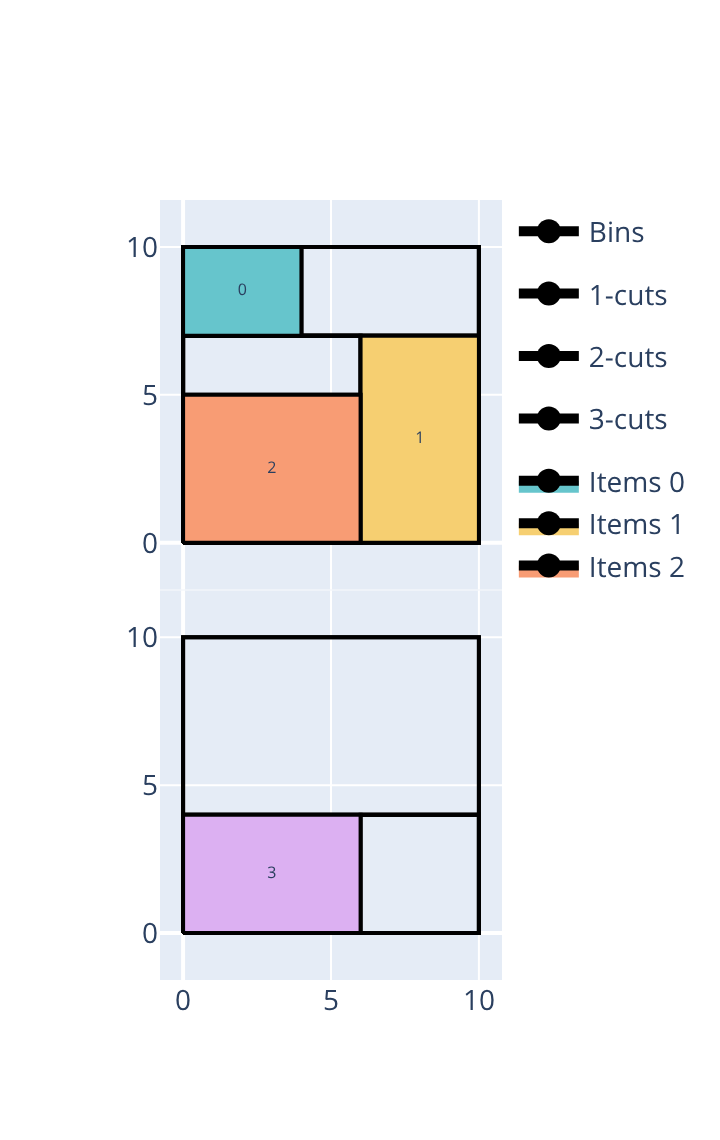
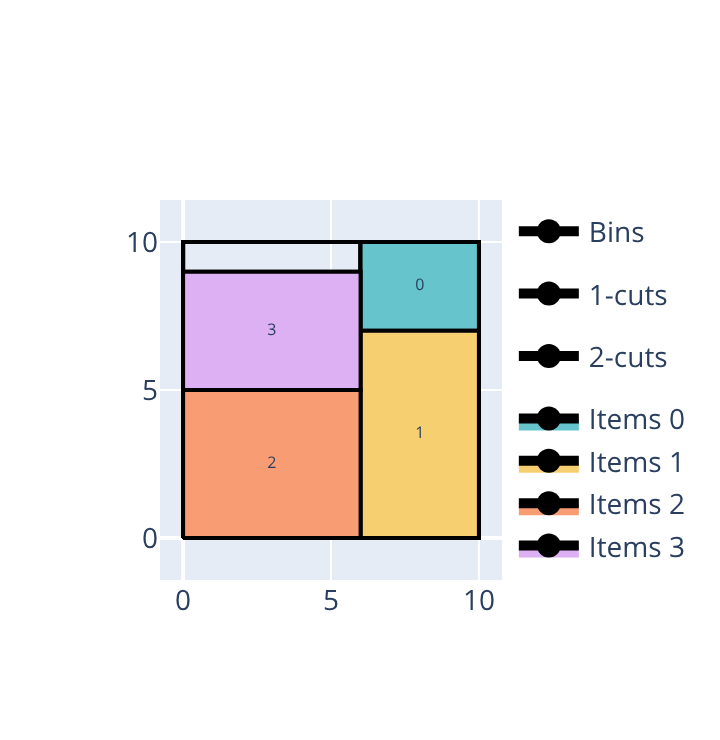
Open the examples in the online solver: First stage orientation: horizontal, First stage orientation: vertical.
{
    "objective": "bin-packing",
    "number_of_stages": 2,
    "first_stage_orientation": "horizontal",
    "bin_types": [
        {"width": 10, "height": 10, "copies": 3}
    ],
    "item_types": [
        {"width": 4, "height": 3, "oriented": true},
        {"width": 4, "height": 7, "oriented": true},
        {"width": 6, "height": 5, "oriented": true},
        {"width": 6, "height": 4, "oriented": true}
    ]
}
{
    "objective": "bin-packing",
    "number_of_stages": 2,
    "first_stage_orientation": "vertical",
    "bin_types": [
        {"width": 10, "height": 10, "copies": 3}
    ],
    "item_types": [
        {"width": 4, "height": 3, "oriented": true},
        {"width": 4, "height": 7, "oriented": true},
        {"width": 6, "height": 5, "oriented": true},
        {"width": 6, "height": 4, "oriented": true}
    ]
}
import packingsolver.rectangleguillotine as psg

instance_builder = psg.InstanceBuilder()
instance_builder.set_objective(psg.Objective.BinPacking)
instance_builder.set_number_of_stages(2)
instance_builder.set_first_stage_orientation(psg.CutOrientation.Horizontal)
instance_builder.add_bin_type(10, 10, copies=3)
instance_builder.add_item_type(4, 3, oriented=True)
instance_builder.add_item_type(4, 7, oriented=True)
instance_builder.add_item_type(6, 5, oriented=True)
instance_builder.add_item_type(6, 4, oriented=True)
instance = instance_builder.build()
import packingsolver.rectangleguillotine as psg

instance_builder = psg.InstanceBuilder()
instance_builder.set_objective(psg.Objective.BinPacking)
instance_builder.set_number_of_stages(2)
instance_builder.set_first_stage_orientation(psg.CutOrientation.Vertical)
instance_builder.add_bin_type(10, 10, copies=3)
instance_builder.add_item_type(4, 3, oriented=True)
instance_builder.add_item_type(4, 7, oriented=True)
instance_builder.add_item_type(6, 5, oriented=True)
instance_builder.add_item_type(6, 4, oriented=True)
instance = instance_builder.build()
#include "packingsolver/rectangleguillotine/instance_builder.hpp"

using namespace packingsolver;
using namespace packingsolver::rectangleguillotine;

InstanceBuilder instance_builder;
instance_builder.set_objective(Objective::BinPacking);
instance_builder.set_number_of_stages(2);
instance_builder.set_first_stage_orientation(CutOrientation::Horizontal);
BinTypeId bin_type_id = instance_builder.add_bin_type(10, 10);
instance_builder.set_bin_type_copies(bin_type_id, 3);
instance_builder.add_item_type(4, 3, true);
instance_builder.add_item_type(4, 7, true);
instance_builder.add_item_type(6, 5, true);
instance_builder.add_item_type(6, 4, true);
Instance instance = instance_builder.build();
#include "packingsolver/rectangleguillotine/instance_builder.hpp"

using namespace packingsolver;
using namespace packingsolver::rectangleguillotine;

InstanceBuilder instance_builder;
instance_builder.set_objective(Objective::BinPacking);
instance_builder.set_number_of_stages(2);
instance_builder.set_first_stage_orientation(CutOrientation::Vertical);
BinTypeId bin_type_id = instance_builder.add_bin_type(10, 10);
instance_builder.set_bin_type_copies(bin_type_id, 3);
instance_builder.add_item_type(4, 3, true);
instance_builder.add_item_type(4, 7, true);
instance_builder.add_item_type(6, 5, true);
instance_builder.add_item_type(6, 4, true);
Instance instance = instance_builder.build();
Item rotations
By default, the items may be rotated by 90°. An item type can be fixed in its original orientation:
In the Item types table, check Oriented.
In an item type: "oriented": true.
instance_builder.add_item_type(width, height, oriented=True)
instance_builder.add_item_type(width, height, true);
The following example packs 2 copies of a 6 × 10 item into 10 × 12 bins (bin-packing objective). When the items are oriented, two items side by side need a width of 12 (more than the 10 of the bin), and stacked they need a height of 20 (more than the 12 of the bin), so they can’t share a bin: 2 bins are needed. When they can be rotated, both items are turned on their side (10 × 6) and stacked exactly into a single 10 × 12 bin.
Oriented items |
Items which can be rotated |
|---|---|
|
|
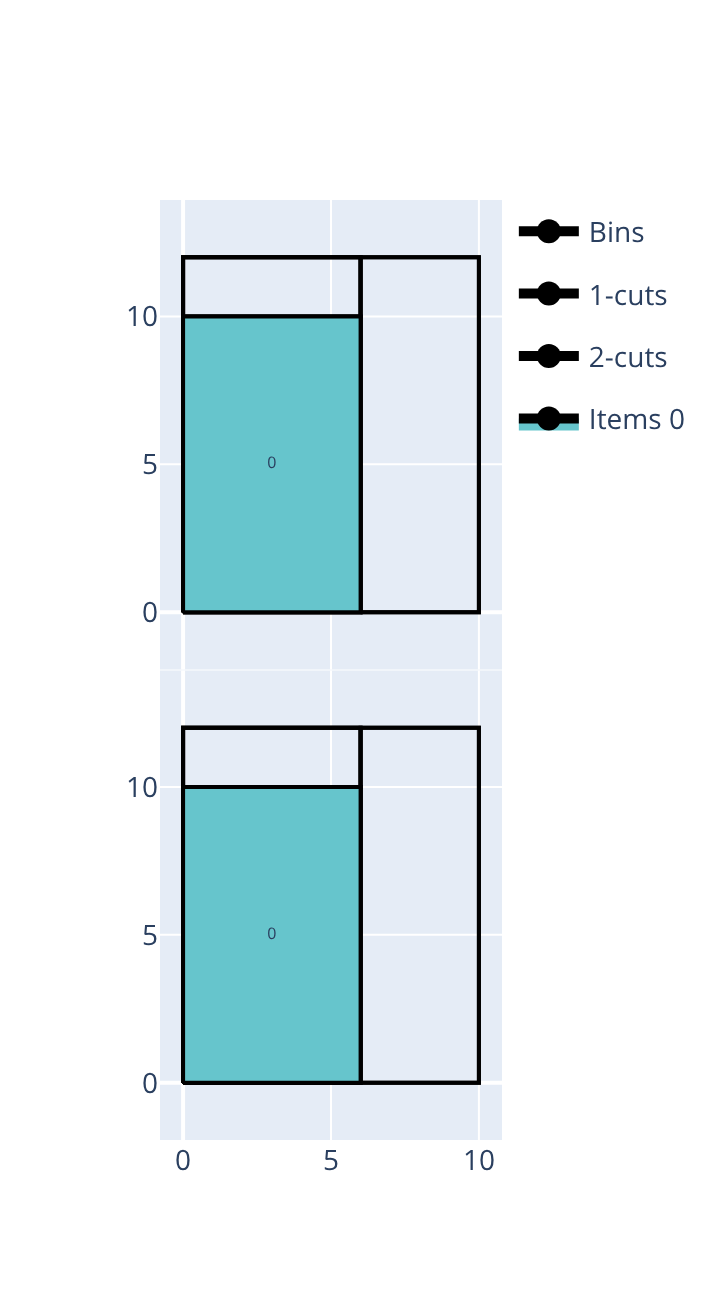
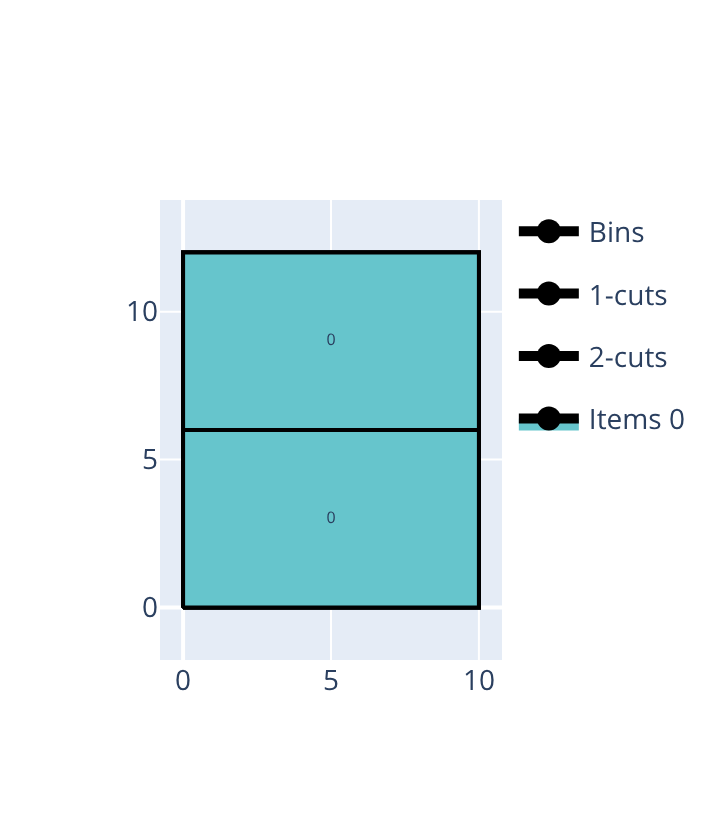
Open the examples in the online solver: Item rotations: oriented items, Item rotations: items which can be rotated.
{
    "objective": "bin-packing",
    "bin_types": [
        {"width": 10, "height": 12, "copies": 2}
    ],
    "item_types": [
        {"width": 6, "height": 10, "oriented": true, "copies": 2}
    ]
}
{
    "objective": "bin-packing",
    "bin_types": [
        {"width": 10, "height": 12, "copies": 2}
    ],
    "item_types": [
        {"width": 6, "height": 10, "copies": 2}
    ]
}
import packingsolver.rectangleguillotine as psg

instance_builder = psg.InstanceBuilder()
instance_builder.set_objective(psg.Objective.BinPacking)
instance_builder.add_bin_type(10, 12, copies=2)
instance_builder.add_item_type(6, 10, oriented=True, copies=2)
instance = instance_builder.build()
import packingsolver.rectangleguillotine as psg

instance_builder = psg.InstanceBuilder()
instance_builder.set_objective(psg.Objective.BinPacking)
instance_builder.add_bin_type(10, 12, copies=2)
instance_builder.add_item_type(6, 10, copies=2)
instance = instance_builder.build()
#include "packingsolver/rectangleguillotine/instance_builder.hpp"

using namespace packingsolver;
using namespace packingsolver::rectangleguillotine;

InstanceBuilder instance_builder;
instance_builder.set_objective(Objective::BinPacking);
BinTypeId bin_type_id = instance_builder.add_bin_type(10, 12);
instance_builder.set_bin_type_copies(bin_type_id, 2);
ItemTypeId item_type_id = instance_builder.add_item_type(6, 10, true);
instance_builder.set_item_type_copies(item_type_id, 2);
Instance instance = instance_builder.build();
#include "packingsolver/rectangleguillotine/instance_builder.hpp"

using namespace packingsolver;
using namespace packingsolver::rectangleguillotine;

InstanceBuilder instance_builder;
instance_builder.set_objective(Objective::BinPacking);
BinTypeId bin_type_id = instance_builder.add_bin_type(10, 12);
instance_builder.set_bin_type_copies(bin_type_id, 2);
ItemTypeId item_type_id = instance_builder.add_item_type(6, 10);
instance_builder.set_item_type_copies(item_type_id, 2);
Instance instance = instance_builder.build();
Cut thickness
The cut thickness is the width of the saw blade: each cut consumes this width of material. Default: 0.
Fill the Cut thickness below the objective.
In the instance: "cut_thickness": 1.
instance_builder.set_cut_thickness(1)
instance_builder.set_cut_thickness(1);
The following example packs 3 items (10 × 4, 10 × 3 and 10 × 3) into 10 × 10 bins (bin-packing objective), stacked to exactly fill the height of the bin. Without cut thickness, the 3 items fit in a single bin. With a cut thickness of 1, the two cuts separating the 3 items eat into the available height, so the third item no longer fits and a second bin is needed.
Cut thickness 0 |
Cut thickness 1 |
|---|---|
|
|
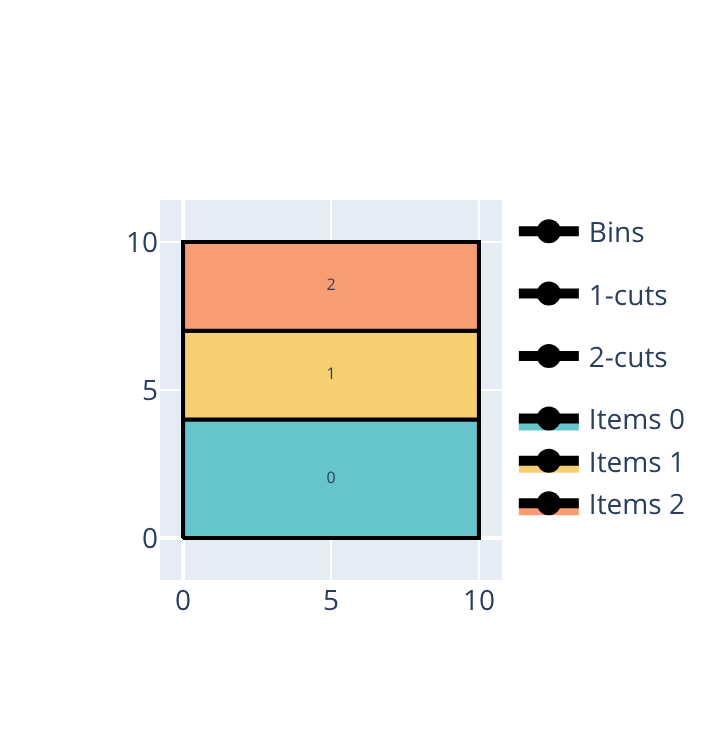
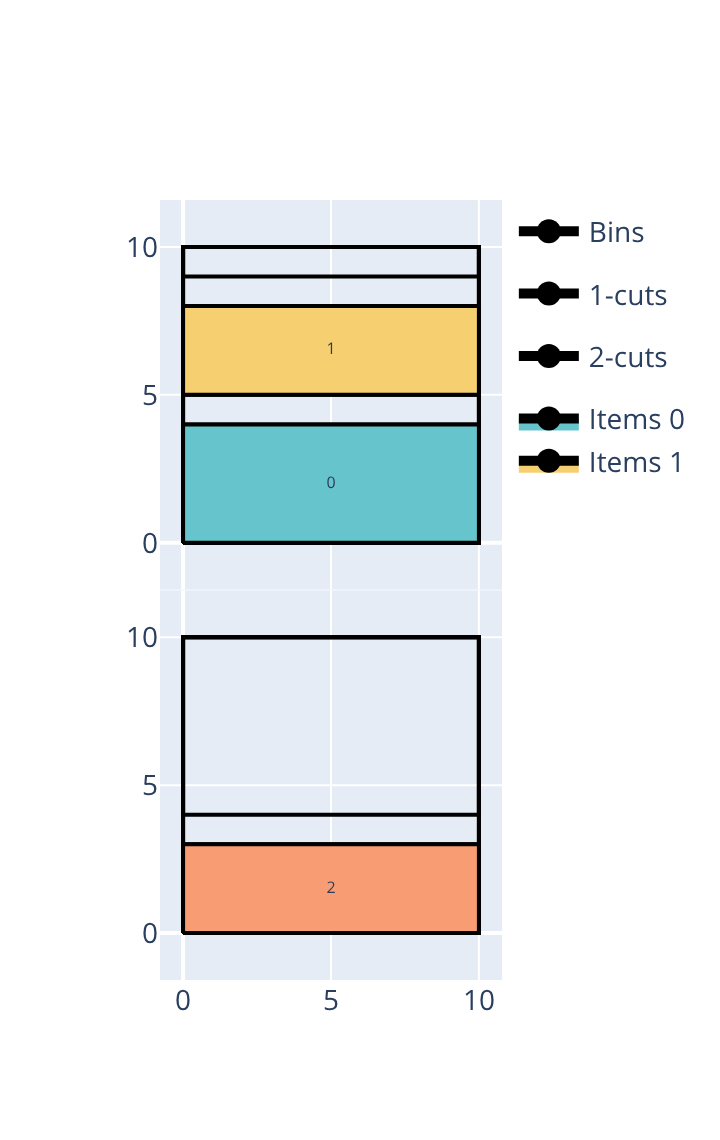
Open the examples in the online solver: Cut thickness: 0, Cut thickness: 1.
{
    "objective": "bin-packing",
    "cut_thickness": 0,
    "bin_types": [
        {"width": 10, "height": 10, "copies": 3}
    ],
    "item_types": [
        {"width": 10, "height": 4, "oriented": true},
        {"width": 10, "height": 3, "oriented": true},
        {"width": 10, "height": 3, "oriented": true}
    ]
}
{
    "objective": "bin-packing",
    "cut_thickness": 1,
    "bin_types": [
        {"width": 10, "height": 10, "copies": 3}
    ],
    "item_types": [
        {"width": 10, "height": 4, "oriented": true},
        {"width": 10, "height": 3, "oriented": true},
        {"width": 10, "height": 3, "oriented": true}
    ]
}
import packingsolver.rectangleguillotine as psg

instance_builder = psg.InstanceBuilder()
instance_builder.set_objective(psg.Objective.BinPacking)
instance_builder.set_cut_thickness(0)
instance_builder.add_bin_type(10, 10, copies=3)
instance_builder.add_item_type(10, 4, oriented=True)
instance_builder.add_item_type(10, 3, oriented=True)
instance_builder.add_item_type(10, 3, oriented=True)
instance = instance_builder.build()
import packingsolver.rectangleguillotine as psg

instance_builder = psg.InstanceBuilder()
instance_builder.set_objective(psg.Objective.BinPacking)
instance_builder.set_cut_thickness(1)
instance_builder.add_bin_type(10, 10, copies=3)
instance_builder.add_item_type(10, 4, oriented=True)
instance_builder.add_item_type(10, 3, oriented=True)
instance_builder.add_item_type(10, 3, oriented=True)
instance = instance_builder.build()
#include "packingsolver/rectangleguillotine/instance_builder.hpp"

using namespace packingsolver;
using namespace packingsolver::rectangleguillotine;

InstanceBuilder instance_builder;
instance_builder.set_objective(Objective::BinPacking);
instance_builder.set_cut_thickness(0);
BinTypeId bin_type_id = instance_builder.add_bin_type(10, 10);
instance_builder.set_bin_type_copies(bin_type_id, 3);
instance_builder.add_item_type(10, 4, true);
instance_builder.add_item_type(10, 3, true);
instance_builder.add_item_type(10, 3, true);
Instance instance = instance_builder.build();
#include "packingsolver/rectangleguillotine/instance_builder.hpp"

using namespace packingsolver;
using namespace packingsolver::rectangleguillotine;

InstanceBuilder instance_builder;
instance_builder.set_objective(Objective::BinPacking);
instance_builder.set_cut_thickness(1);
BinTypeId bin_type_id = instance_builder.add_bin_type(10, 10);
instance_builder.set_bin_type_copies(bin_type_id, 3);
instance_builder.add_item_type(10, 4, true);
instance_builder.add_item_type(10, 3, true);
instance_builder.add_item_type(10, 3, true);
Instance instance = instance_builder.build();
Trims
Trims model a reserved border around the bin (e.g., for clamping or edge defects). They prevent items from being placed within the specified distance of each edge.
A hard trim is physically cut away: the trim strip is counted as waste. The left and bottom trims are hard by default.
A soft trim is reserved but not cut: waste is only counted from the first actual cut inward. The right and top trims are soft by default.
In the Bin types table, fill the Trims of a bin type; click More on its row to change their types.
In a bin type: "left_trim": 1, "left_trim_type": "soft", and the same for right, bottom and top.
instance_builder.add_bin_type(width, height, trims={"left_trim": 1, "left_trim_type": psg.TrimType.Soft}), and the same for right, bottom and top.
instance_builder.add_trims(bin_type_id, left_trim, left_trim_type, right_trim, right_trim_type, bottom_trim, bottom_trim_type, top_trim, top_trim_type);
The following example packs 3 items (4 × 8, 3 × 8 and 3 × 8) into 10 × 10 bins (bin-packing objective), side by side to exactly fill the width of the bin. Without trims, the 3 items fit in a single bin. With a trim of 1 on the four edges, only a width of 8 is left, which is no longer enough for the three items to sit side by side, so a second bin is needed.
Without trims |
With trims |
|---|---|
|
|
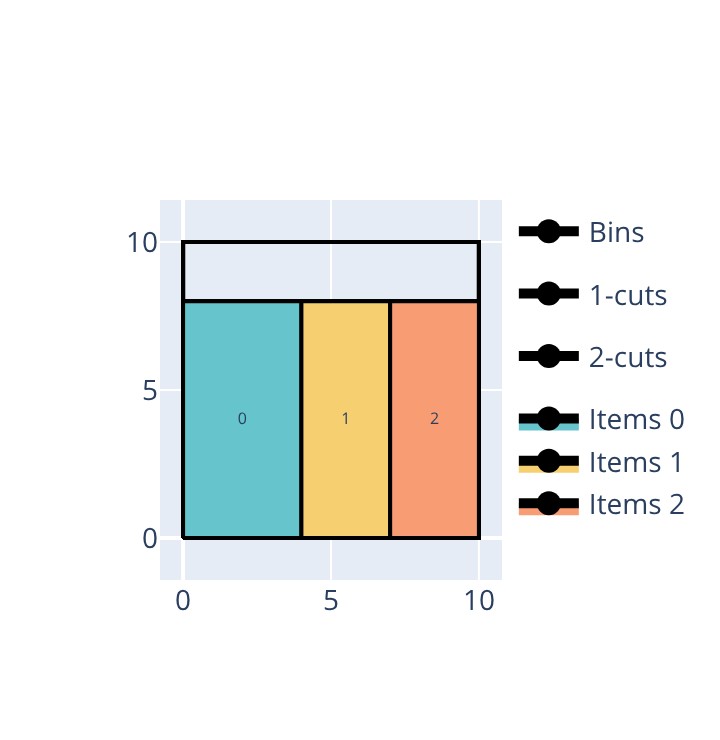
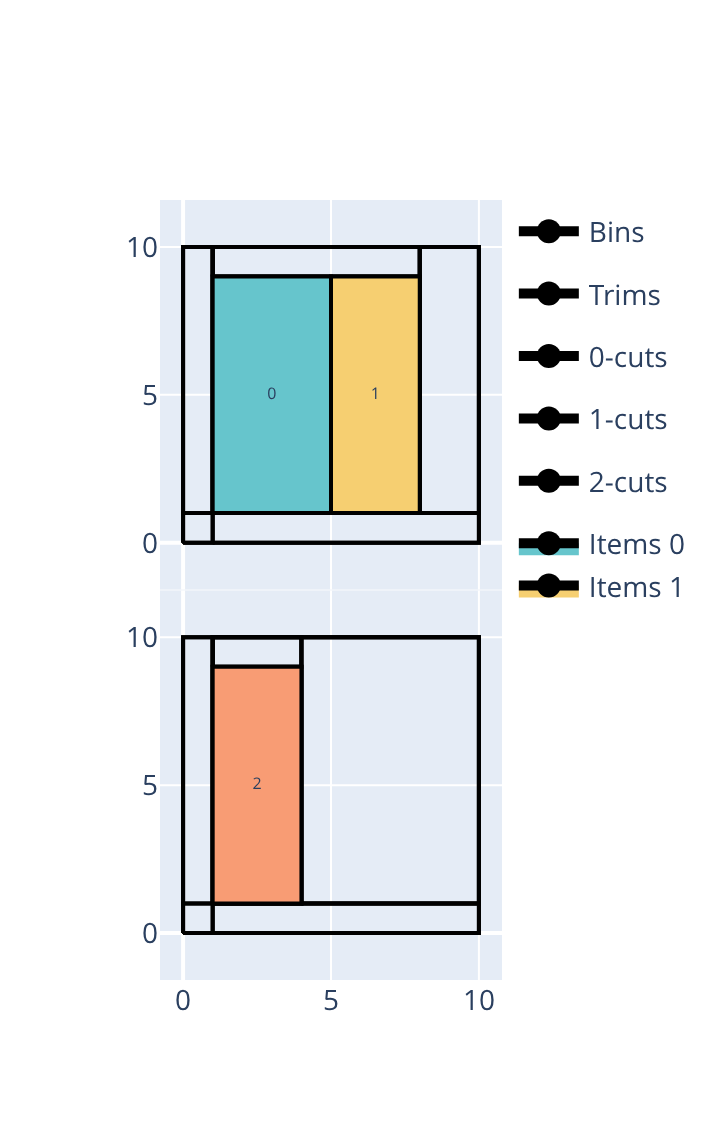
Open the examples in the online solver: Trims: without trims, Trims: with trims.
{
    "objective": "bin-packing",
    "bin_types": [
        {"width": 10, "height": 10, "copies": 3}
    ],
    "item_types": [
        {"width": 4, "height": 8, "oriented": true},
        {"width": 3, "height": 8, "oriented": true},
        {"width": 3, "height": 8, "oriented": true}
    ]
}
{
    "objective": "bin-packing",
    "bin_types": [
        {
            "width": 10,
            "height": 10,
            "left_trim": 1,
            "right_trim": 1,
            "bottom_trim": 1,
            "top_trim": 1,
            "copies": 3
        }
    ],
    "item_types": [
        {"width": 4, "height": 8, "oriented": true},
        {"width": 3, "height": 8, "oriented": true},
        {"width": 3, "height": 8, "oriented": true}
    ]
}
import packingsolver.rectangleguillotine as psg

instance_builder = psg.InstanceBuilder()
instance_builder.set_objective(psg.Objective.BinPacking)
instance_builder.add_bin_type(10, 10, copies=3)
instance_builder.add_item_type(4, 8, oriented=True)
instance_builder.add_item_type(3, 8, oriented=True)
instance_builder.add_item_type(3, 8, oriented=True)
instance = instance_builder.build()
import packingsolver.rectangleguillotine as psg

instance_builder = psg.InstanceBuilder()
instance_builder.set_objective(psg.Objective.BinPacking)
instance_builder.add_bin_type(
        10,
        10,
        trims={"left_trim": 1, "right_trim": 1, "bottom_trim": 1, "top_trim": 1},
        copies=3,
)
instance_builder.add_item_type(4, 8, oriented=True)
instance_builder.add_item_type(3, 8, oriented=True)
instance_builder.add_item_type(3, 8, oriented=True)
instance = instance_builder.build()
#include "packingsolver/rectangleguillotine/instance_builder.hpp"

using namespace packingsolver;
using namespace packingsolver::rectangleguillotine;

InstanceBuilder instance_builder;
instance_builder.set_objective(Objective::BinPacking);
BinTypeId bin_type_id = instance_builder.add_bin_type(10, 10);
instance_builder.set_bin_type_copies(bin_type_id, 3);
instance_builder.add_item_type(4, 8, true);
instance_builder.add_item_type(3, 8, true);
instance_builder.add_item_type(3, 8, true);
Instance instance = instance_builder.build();
#include "packingsolver/rectangleguillotine/instance_builder.hpp"

using namespace packingsolver;
using namespace packingsolver::rectangleguillotine;

InstanceBuilder instance_builder;
instance_builder.set_objective(Objective::BinPacking);
BinTypeId bin_type_id = instance_builder.add_bin_type(10, 10);
instance_builder.set_bin_type_copies(bin_type_id, 3);
instance_builder.add_trims(
        bin_type_id,
        1, TrimType::Hard,
        1, TrimType::Soft,
        1, TrimType::Hard,
        1, TrimType::Soft);
instance_builder.add_item_type(4, 8, true);
instance_builder.add_item_type(3, 8, true);
instance_builder.add_item_type(3, 8, true);
Instance instance = instance_builder.build();
Defects
Defects are rectangular regions of a bin where items cannot be placed. A defect is given by the position of its bottom-left corner (x, y) and by its size (width, height):
In the Bin types table, click Add a defect below a bin type, and fill its position (X, Y) and its size (W, H).
In a bin type: "defects": [{"x": 4, "y": 4, "width": 2, "height": 2}].
instance_builder.add_defect(bin_type_id, x, y, width, height), where bin_type_id is returned by add_bin_type.
instance_builder.add_defect(bin_type_id, x, y, width, height);, where bin_type_id is returned by add_bin_type.
The following example packs 2 copies of a 10 × 6 item into 10 × 12 bins (bin-packing objective), stacked to fill each bin exactly. Without defects, one bin is enough. A small 2 × 2 defect in the middle of the bin, just below the join between the two items, leaves no room to shift either item out of the way: one of the two items no longer fits, so a second bin is needed.
Without defects |
With a defect |
|---|---|
|
|
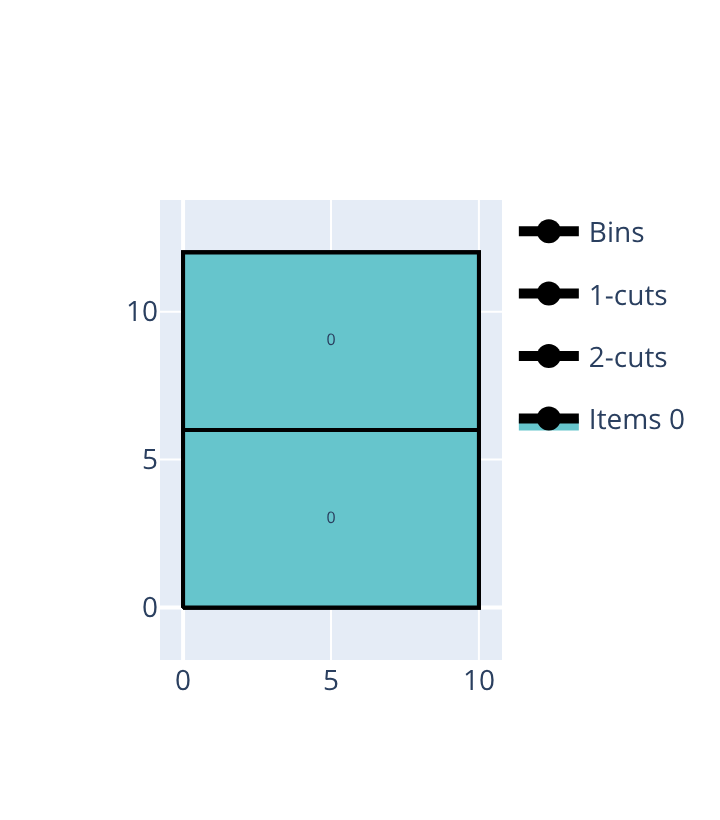
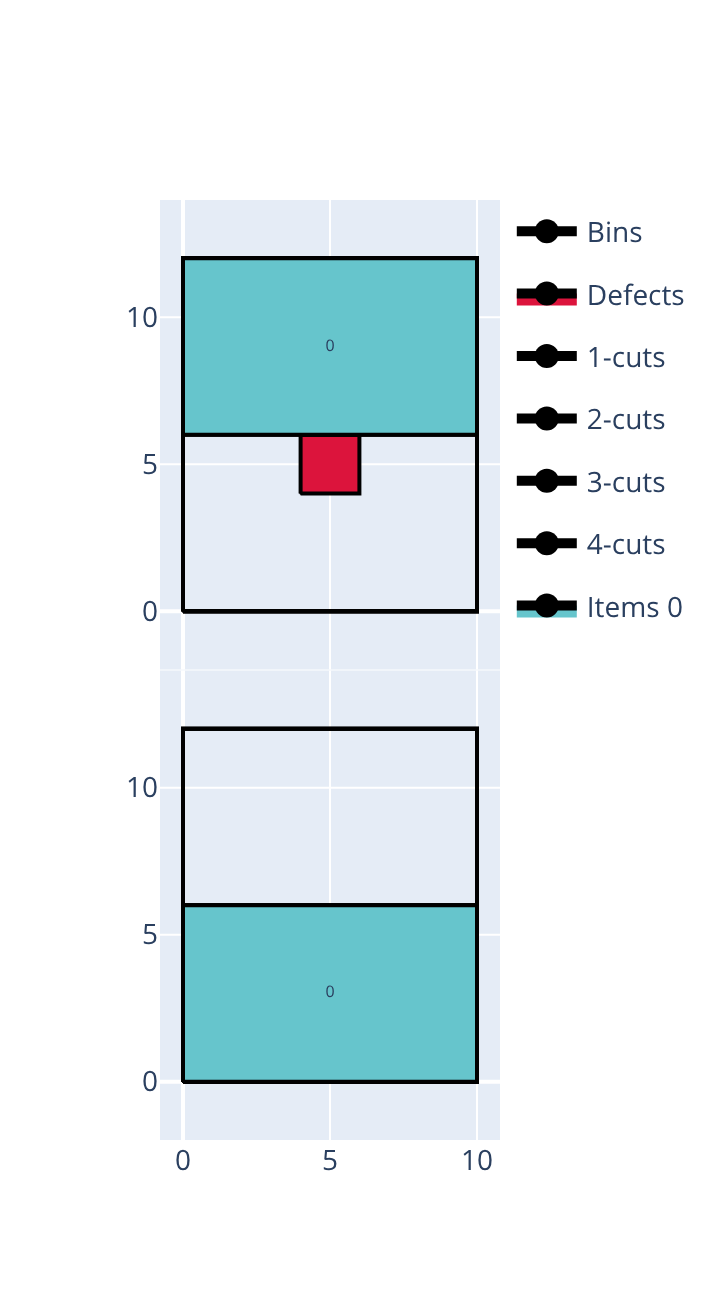
Open the examples in the online solver: Defects: without defects, Defects: with a defect.
{
    "objective": "bin-packing",
    "bin_types": [
        {"width": 10, "height": 12, "copies": 3}
    ],
    "item_types": [
        {"width": 10, "height": 6, "oriented": true, "copies": 2}
    ]
}
{
    "objective": "bin-packing",
    "bin_types": [
        {"width": 10, "height": 12, "defects": [{"x": 4, "y": 4, "width": 2, "height": 2}]},
        {"width": 10, "height": 12, "copies": 2}
    ],
    "item_types": [
        {"width": 10, "height": 6, "oriented": true, "copies": 2}
    ]
}
import packingsolver.rectangleguillotine as psg

instance_builder = psg.InstanceBuilder()
instance_builder.set_objective(psg.Objective.BinPacking)
instance_builder.add_bin_type(10, 12, copies=3)
instance_builder.add_item_type(10, 6, oriented=True, copies=2)
instance = instance_builder.build()
import packingsolver.rectangleguillotine as psg

instance_builder = psg.InstanceBuilder()
instance_builder.set_objective(psg.Objective.BinPacking)
bin_type_id = instance_builder.add_bin_type(10, 12)
instance_builder.add_defect(bin_type_id, 4, 4, 2, 2)
instance_builder.add_bin_type(10, 12, copies=2)
instance_builder.add_item_type(10, 6, oriented=True, copies=2)
instance = instance_builder.build()
#include "packingsolver/rectangleguillotine/instance_builder.hpp"

using namespace packingsolver;
using namespace packingsolver::rectangleguillotine;

InstanceBuilder instance_builder;
instance_builder.set_objective(Objective::BinPacking);
BinTypeId bin_type_id = instance_builder.add_bin_type(10, 12);
instance_builder.set_bin_type_copies(bin_type_id, 3);
ItemTypeId item_type_id = instance_builder.add_item_type(10, 6, true);
instance_builder.set_item_type_copies(item_type_id, 2);
Instance instance = instance_builder.build();
#include "packingsolver/rectangleguillotine/instance_builder.hpp"

using namespace packingsolver;
using namespace packingsolver::rectangleguillotine;

InstanceBuilder instance_builder;
instance_builder.set_objective(Objective::BinPacking);
BinTypeId bin_type_id = instance_builder.add_bin_type(10, 12);
instance_builder.add_defect(bin_type_id, 4, 4, 2, 2);
bin_type_id = instance_builder.add_bin_type(10, 12);
instance_builder.set_bin_type_copies(bin_type_id, 2);
ItemTypeId item_type_id = instance_builder.add_item_type(10, 6, true);
instance_builder.set_item_type_copies(item_type_id, 2);
Instance instance = instance_builder.build();
Cut through defects
By default, a guillotine cut may not pass through a defect; it must be routed around it instead. This can be allowed:
Check Cut through defects below the objective.
In the instance: "cut_through_defects": true.
instance_builder.set_cut_through_defects(True)
instance_builder.set_cut_through_defects(true);
The following example packs a 5 × 5 and a 5 × 6 item into 10 × 10 bins with only 2 cutting stages (bin-packing objective), so the two items — whose widths sum exactly to the width of the bin — must be separated by a single first-stage cut. A small 2 × 2 defect floats in the unused strip above the shorter item, without touching either item or the edges of the bin, but still straddling that cut. Allowing cuts through defects lets the solver cut straight through it, and both items fit into a single bin. Without it, that cut can no longer be made, so the two items can no longer share a bin, and a second bin is needed.
With cuts through defects |
Without cuts through defects |
|---|---|
|
|
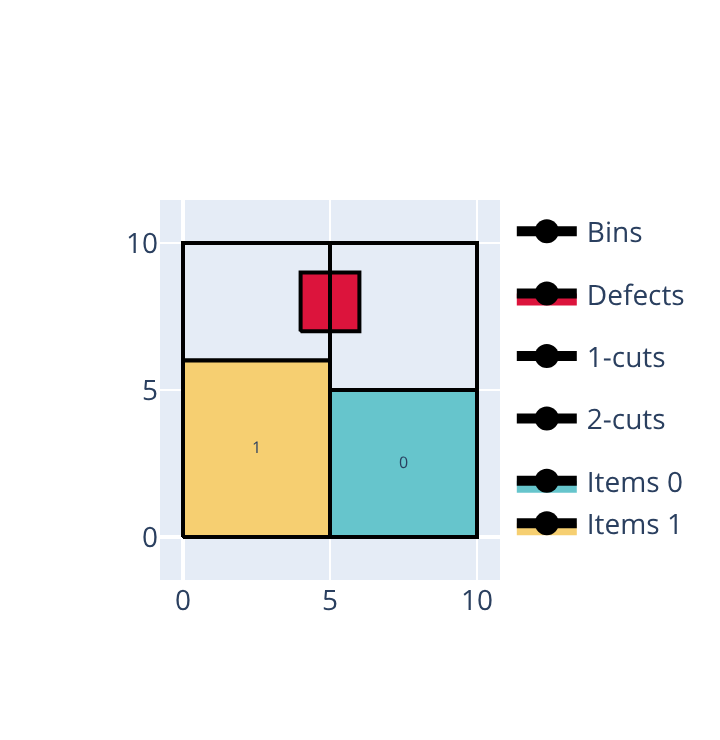
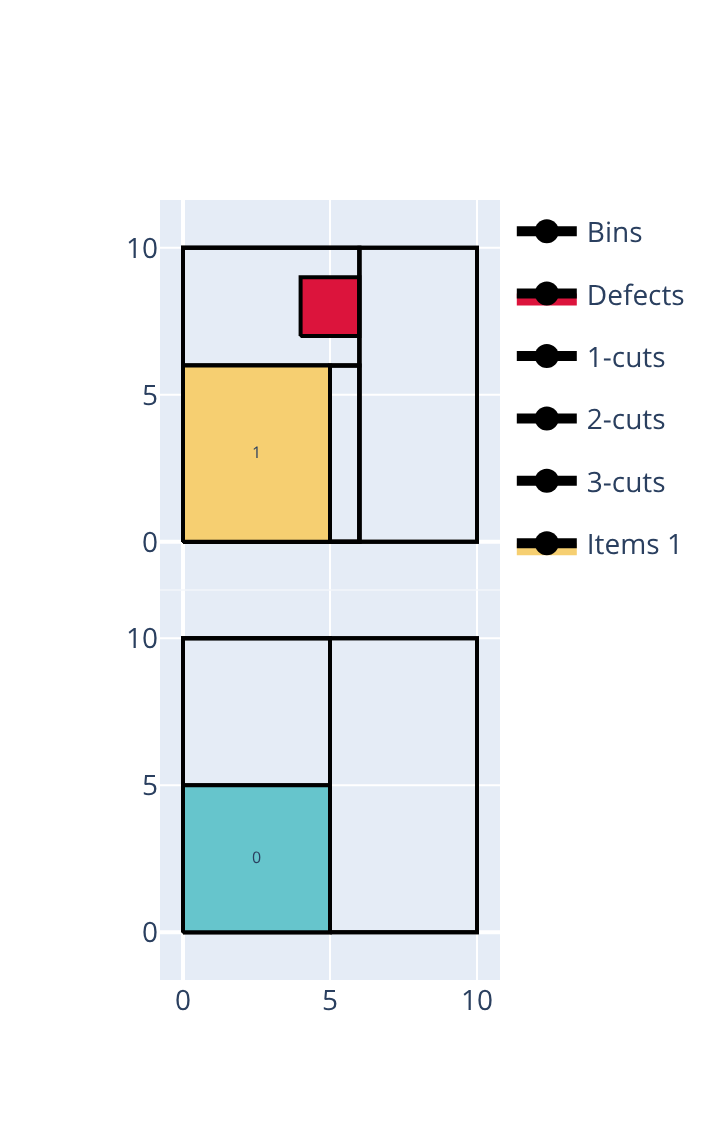
Open the examples in the online solver: Cut through defects: allowed, Cut through defects: not allowed.
{
    "objective": "bin-packing",
    "number_of_stages": 2,
    "cut_through_defects": true,
    "bin_types": [
        {"width": 10, "height": 10, "defects": [{"x": 4, "y": 7, "width": 2, "height": 2}]},
        {"width": 10, "height": 10, "copies": 2}
    ],
    "item_types": [
        {"width": 5, "height": 5, "oriented": true},
        {"width": 5, "height": 6, "oriented": true}
    ]
}
{
    "objective": "bin-packing",
    "number_of_stages": 2,
    "bin_types": [
        {"width": 10, "height": 10, "defects": [{"x": 4, "y": 7, "width": 2, "height": 2}]},
        {"width": 10, "height": 10, "copies": 2}
    ],
    "item_types": [
        {"width": 5, "height": 5, "oriented": true},
        {"width": 5, "height": 6, "oriented": true}
    ]
}
import packingsolver.rectangleguillotine as psg

instance_builder = psg.InstanceBuilder()
instance_builder.set_objective(psg.Objective.BinPacking)
instance_builder.set_number_of_stages(2)
instance_builder.set_cut_through_defects(True)
bin_type_id = instance_builder.add_bin_type(10, 10)
instance_builder.add_defect(bin_type_id, 4, 7, 2, 2)
instance_builder.add_bin_type(10, 10, copies=2)
instance_builder.add_item_type(5, 5, oriented=True)
instance_builder.add_item_type(5, 6, oriented=True)
instance = instance_builder.build()
import packingsolver.rectangleguillotine as psg

instance_builder = psg.InstanceBuilder()
instance_builder.set_objective(psg.Objective.BinPacking)
instance_builder.set_number_of_stages(2)
bin_type_id = instance_builder.add_bin_type(10, 10)
instance_builder.add_defect(bin_type_id, 4, 7, 2, 2)
instance_builder.add_bin_type(10, 10, copies=2)
instance_builder.add_item_type(5, 5, oriented=True)
instance_builder.add_item_type(5, 6, oriented=True)
instance = instance_builder.build()
#include "packingsolver/rectangleguillotine/instance_builder.hpp"

using namespace packingsolver;
using namespace packingsolver::rectangleguillotine;

InstanceBuilder instance_builder;
instance_builder.set_objective(Objective::BinPacking);
instance_builder.set_number_of_stages(2);
instance_builder.set_cut_through_defects(true);
BinTypeId bin_type_id = instance_builder.add_bin_type(10, 10);
instance_builder.add_defect(bin_type_id, 4, 7, 2, 2);
bin_type_id = instance_builder.add_bin_type(10, 10);
instance_builder.set_bin_type_copies(bin_type_id, 2);
instance_builder.add_item_type(5, 5, true);
instance_builder.add_item_type(5, 6, true);
Instance instance = instance_builder.build();
#include "packingsolver/rectangleguillotine/instance_builder.hpp"

using namespace packingsolver;
using namespace packingsolver::rectangleguillotine;

InstanceBuilder instance_builder;
instance_builder.set_objective(Objective::BinPacking);
instance_builder.set_number_of_stages(2);
BinTypeId bin_type_id = instance_builder.add_bin_type(10, 10);
instance_builder.add_defect(bin_type_id, 4, 7, 2, 2);
bin_type_id = instance_builder.add_bin_type(10, 10);
instance_builder.set_bin_type_copies(bin_type_id, 2);
instance_builder.add_item_type(5, 5, true);
instance_builder.add_item_type(5, 6, true);
Instance instance = instance_builder.build();
Cutting sequences (stacks)
Items with the same stack id must be produced contiguously, in the order of their item types: all copies of an item type must be cut before moving on to the next item type of the same stack. This models a physical stack of items (e.g. glued or stapled together) that must be separated in a fixed sequence. By default, each item type forms its own stack, so no ordering constraint applies.
In the Item types table, click More on a row and fill its Stack id.
In an item type: "stack_id": 0.
instance_builder.add_item_type(width, height, stack_id=0)
instance_builder.add_item_type(width, height, oriented, 0);
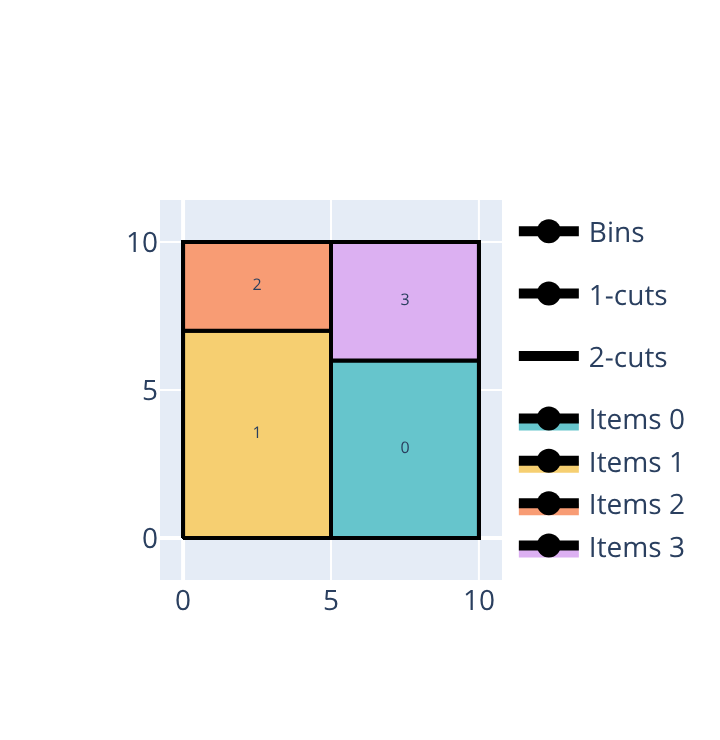
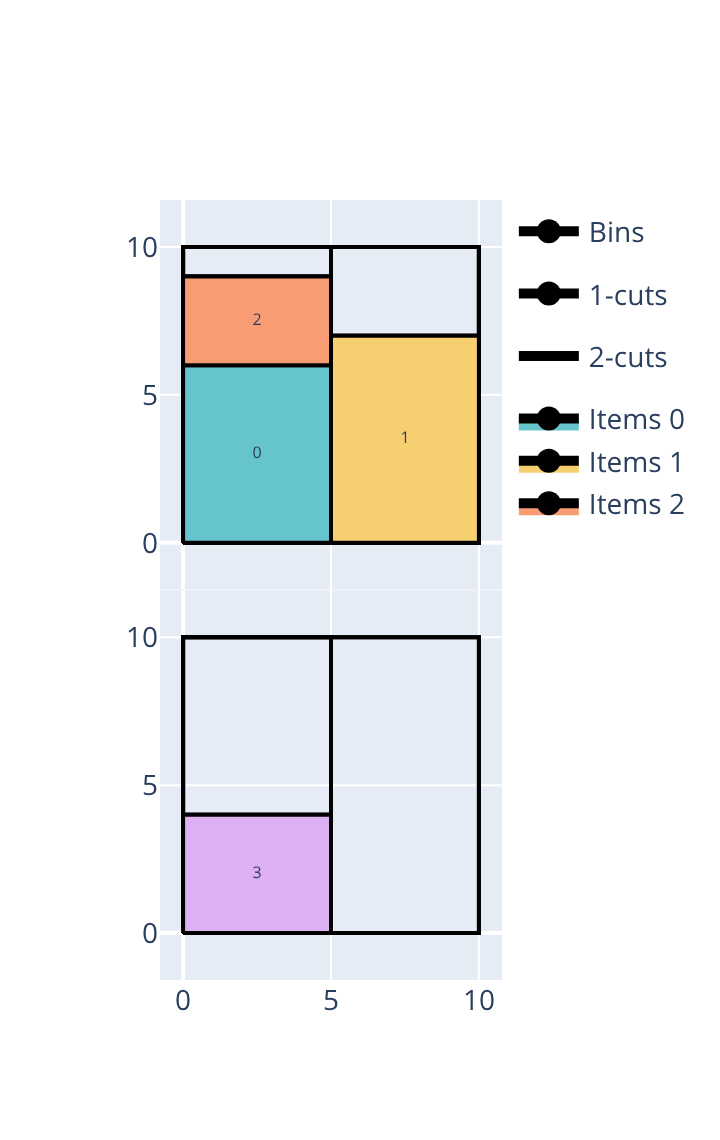
The following example packs 4 items of width 5 into 10 × 10 bins (bin-packing objective): two items of height 6 and 4 that together fill one 5 × 10 column, and two items of height 3 and 7 that together fill another 5 × 10 column. Without stacks, the solver is free to group the items by column and packs everything into a single bin. Splitting the items into two stacks of two — stack 0 with the items of height 6 and 7, stack 1 with the items of height 3 and 4 — pairs one item from each column in every stack, forcing each stack’s two items to be produced back-to-back; since neither column can be completed without interrupting the other stack, a second bin is needed.
Without stacks |
With stacks |
|---|---|
|
|
Open the examples in the online solver: Cutting sequences: without stacks, Cutting sequences: with stacks.
{
    "objective": "bin-packing",
    "bin_types": [
        {"width": 10, "height": 10, "copies": 4}
    ],
    "item_types": [
        {"width": 5, "height": 6, "oriented": true},
        {"width": 5, "height": 7, "oriented": true},
        {"width": 5, "height": 3, "oriented": true},
        {"width": 5, "height": 4, "oriented": true}
    ]
}
{
    "objective": "bin-packing",
    "bin_types": [
        {"width": 10, "height": 10, "copies": 4}
    ],
    "item_types": [
        {"width": 5, "height": 6, "oriented": true, "stack_id": 0},
        {"width": 5, "height": 7, "oriented": true, "stack_id": 0},
        {"width": 5, "height": 3, "oriented": true, "stack_id": 1},
        {"width": 5, "height": 4, "oriented": true, "stack_id": 1}
    ]
}
import packingsolver.rectangleguillotine as psg

instance_builder = psg.InstanceBuilder()
instance_builder.set_objective(psg.Objective.BinPacking)
instance_builder.add_bin_type(10, 10, copies=4)
instance_builder.add_item_type(5, 6, oriented=True)
instance_builder.add_item_type(5, 7, oriented=True)
instance_builder.add_item_type(5, 3, oriented=True)
instance_builder.add_item_type(5, 4, oriented=True)
instance = instance_builder.build()
import packingsolver.rectangleguillotine as psg

instance_builder = psg.InstanceBuilder()
instance_builder.set_objective(psg.Objective.BinPacking)
instance_builder.add_bin_type(10, 10, copies=4)
instance_builder.add_item_type(5, 6, oriented=True, stack_id=0)
instance_builder.add_item_type(5, 7, oriented=True, stack_id=0)
instance_builder.add_item_type(5, 3, oriented=True, stack_id=1)
instance_builder.add_item_type(5, 4, oriented=True, stack_id=1)
instance = instance_builder.build()
#include "packingsolver/rectangleguillotine/instance_builder.hpp"

using namespace packingsolver;
using namespace packingsolver::rectangleguillotine;

InstanceBuilder instance_builder;
instance_builder.set_objective(Objective::BinPacking);
BinTypeId bin_type_id = instance_builder.add_bin_type(10, 10);
instance_builder.set_bin_type_copies(bin_type_id, 4);
instance_builder.add_item_type(5, 6, true);
instance_builder.add_item_type(5, 7, true);
instance_builder.add_item_type(5, 3, true);
instance_builder.add_item_type(5, 4, true);
Instance instance = instance_builder.build();
#include "packingsolver/rectangleguillotine/instance_builder.hpp"

using namespace packingsolver;
using namespace packingsolver::rectangleguillotine;

InstanceBuilder instance_builder;
instance_builder.set_objective(Objective::BinPacking);
BinTypeId bin_type_id = instance_builder.add_bin_type(10, 10);
instance_builder.set_bin_type_copies(bin_type_id, 4);
instance_builder.add_item_type(5, 6, true, 0);
instance_builder.add_item_type(5, 7, true, 0);
instance_builder.add_item_type(5, 3, true, 1);
instance_builder.add_item_type(5, 4, true, 1);
Instance instance = instance_builder.build();
Minimum and maximum distances between cuts
minimum_distance_1_cuts: the minimum distance between two first-level (stage-1) cuts. Default:0maximum_distance_1_cuts: the maximum distance between two first-level cuts. Default: no limit (-1)minimum_distance_2_cuts: the minimum distance between two second-level cuts. Default:0maximum_distance_2_cuts: the maximum distance between two second-level cuts. Default: no limit (-1); not allowed with 2 stagesminimum_waste_length: the minimum length of any waste piece. Default:0
Fill the corresponding fields below the objective (Minimum distance between 1-cuts…).
In the instance: "minimum_distance_1_cuts": 10.
instance_builder.set_minimum_distance_1_cuts(10)
instance_builder.set_minimum_distance_1_cuts(10);
Maximum number of consecutive 1-cuts
The maximum number of 1-cuts in a bin. Default: no limit (-1); it can’t be 0.
Fill the Maximum number of 1-cuts below the objective.
In the instance: "maximum_number_1_cuts": 1.
instance_builder.set_maximum_number_1_cuts(1)
instance_builder.set_maximum_number_1_cuts(1);
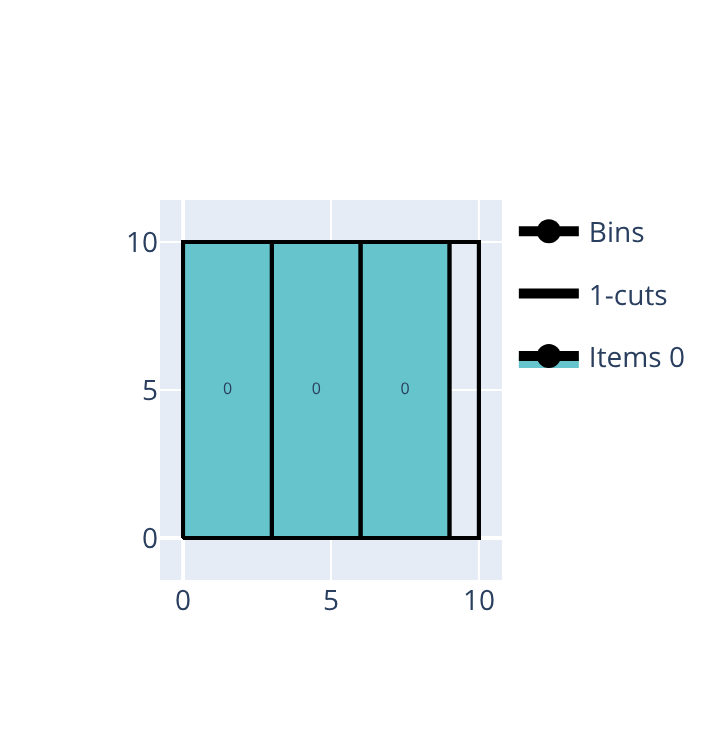
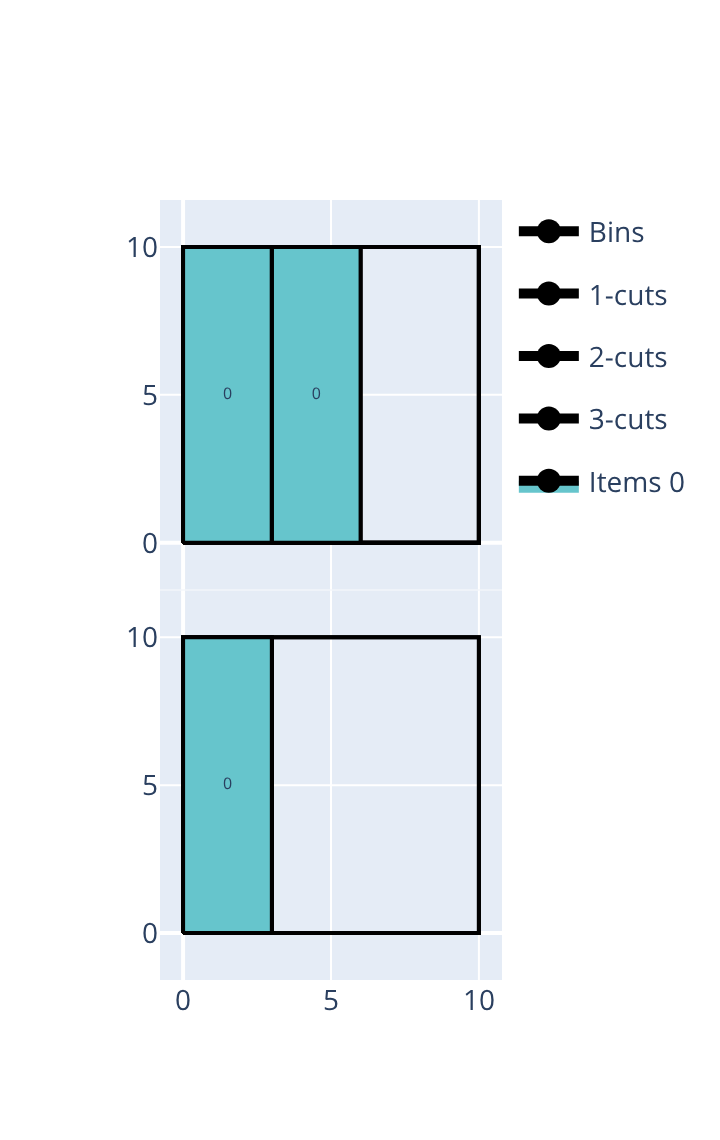
The following example packs 3 copies of a 3 × 10 item into 10 × 10 bins with only 2 cutting stages (bin-packing objective). Without a limit, the 3 items are placed side by side using 2 stage-1 cuts, all in a single bin. With a maximum of 1 first-level cut, there are only 2 strips, so only 2 of the 3 items fit, and a second bin is needed for the third.
Without limit |
At most 1 first-level cut |
|---|---|
|
|
Open the examples in the online solver: Maximum number of 1-cuts: no limit, Maximum number of 1-cuts: 1.
{
    "objective": "bin-packing",
    "number_of_stages": 2,
    "bin_types": [
        {"width": 10, "height": 10, "copies": 3}
    ],
    "item_types": [
        {"width": 3, "height": 10, "oriented": true, "copies": 3}
    ]
}
{
    "objective": "bin-packing",
    "number_of_stages": 2,
    "maximum_number_1_cuts": 1,
    "bin_types": [
        {"width": 10, "height": 10, "copies": 3}
    ],
    "item_types": [
        {"width": 3, "height": 10, "oriented": true, "copies": 3}
    ]
}
import packingsolver.rectangleguillotine as psg

instance_builder = psg.InstanceBuilder()
instance_builder.set_objective(psg.Objective.BinPacking)
instance_builder.set_number_of_stages(2)
instance_builder.add_bin_type(10, 10, copies=3)
instance_builder.add_item_type(3, 10, oriented=True, copies=3)
instance = instance_builder.build()
import packingsolver.rectangleguillotine as psg

instance_builder = psg.InstanceBuilder()
instance_builder.set_objective(psg.Objective.BinPacking)
instance_builder.set_number_of_stages(2)
instance_builder.set_maximum_number_1_cuts(1)
instance_builder.add_bin_type(10, 10, copies=3)
instance_builder.add_item_type(3, 10, oriented=True, copies=3)
instance = instance_builder.build()
#include "packingsolver/rectangleguillotine/instance_builder.hpp"

using namespace packingsolver;
using namespace packingsolver::rectangleguillotine;

InstanceBuilder instance_builder;
instance_builder.set_objective(Objective::BinPacking);
instance_builder.set_number_of_stages(2);
BinTypeId bin_type_id = instance_builder.add_bin_type(10, 10);
instance_builder.set_bin_type_copies(bin_type_id, 3);
ItemTypeId item_type_id = instance_builder.add_item_type(3, 10, true);
instance_builder.set_item_type_copies(item_type_id, 3);
Instance instance = instance_builder.build();
#include "packingsolver/rectangleguillotine/instance_builder.hpp"

using namespace packingsolver;
using namespace packingsolver::rectangleguillotine;

InstanceBuilder instance_builder;
instance_builder.set_objective(Objective::BinPacking);
instance_builder.set_number_of_stages(2);
instance_builder.set_maximum_number_1_cuts(1);
BinTypeId bin_type_id = instance_builder.add_bin_type(10, 10);
instance_builder.set_bin_type_copies(bin_type_id, 3);
ItemTypeId item_type_id = instance_builder.add_item_type(3, 10, true);
instance_builder.set_item_type_copies(item_type_id, 3);
Instance instance = instance_builder.build();
Maximum number of consecutive 2-cuts
The maximum number of 2-cuts in a first-level sub-plate. Default: no limit (-1).
Fill the Maximum number of 2-cuts below the objective.
In the instance: "maximum_number_2_cuts": 1.
instance_builder.set_maximum_number_2_cuts(1)
instance_builder.set_maximum_number_2_cuts(1);
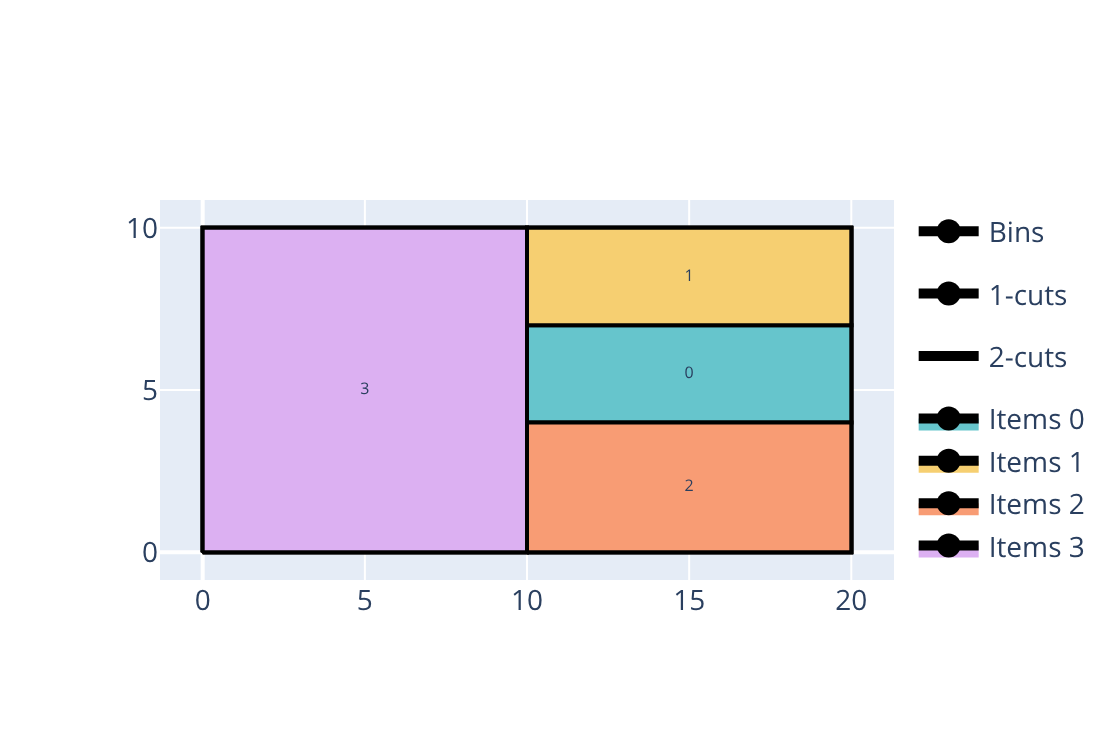
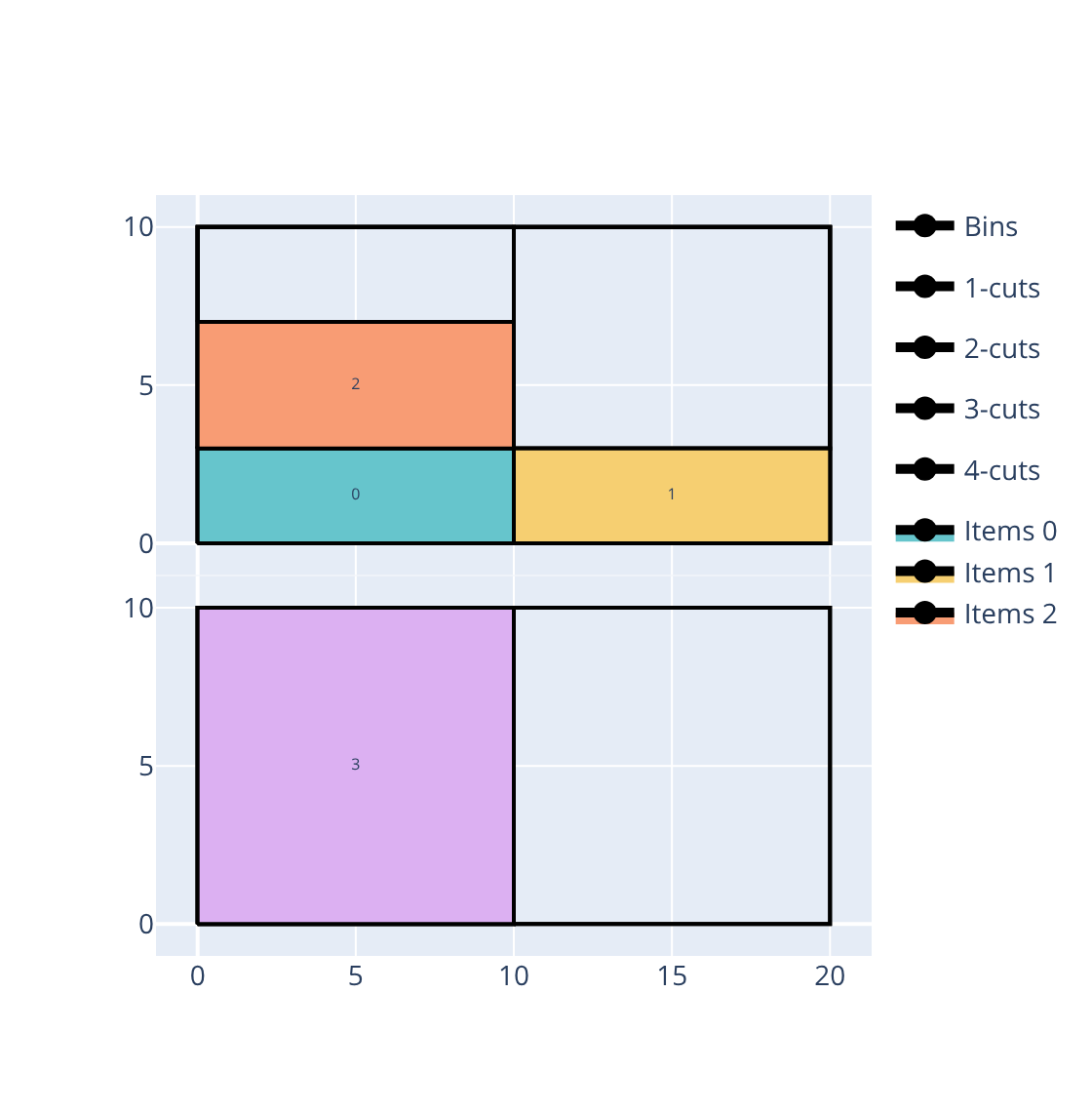
The following example packs 4 items (10 × 3, 10 × 3, 10 × 4 and 10 × 10) into 20 × 10 bins with vertical first-stage cuts (bin-packing objective). A stage-1 cut splits the bin into two 10-wide strips: one holds the 10 × 10 item alone, the other stacks the three shorter items using 2 stage-2 cuts. Without a limit, all 4 items fit into a single bin. With a maximum of 1 second-level cut, there are only 2 shelves per strip, so only 2 of the 3 stacked items fit, and a second bin is needed for the third.
Without limit |
At most 1 second-level cut |
|---|---|
|
|
Open the examples in the online solver: Maximum number of 2-cuts: no limit, Maximum number of 2-cuts: 1.
{
    "objective": "bin-packing",
    "first_stage_orientation": "vertical",
    "bin_types": [
        {"width": 20, "height": 10, "copies": 3}
    ],
    "item_types": [
        {"width": 10, "height": 3, "oriented": true},
        {"width": 10, "height": 3, "oriented": true},
        {"width": 10, "height": 4, "oriented": true},
        {"width": 10, "height": 10, "oriented": true}
    ]
}
{
    "objective": "bin-packing",
    "first_stage_orientation": "vertical",
    "maximum_number_2_cuts": 1,
    "bin_types": [
        {"width": 20, "height": 10, "copies": 3}
    ],
    "item_types": [
        {"width": 10, "height": 3, "oriented": true},
        {"width": 10, "height": 3, "oriented": true},
        {"width": 10, "height": 4, "oriented": true},
        {"width": 10, "height": 10, "oriented": true}
    ]
}
import packingsolver.rectangleguillotine as psg

instance_builder = psg.InstanceBuilder()
instance_builder.set_objective(psg.Objective.BinPacking)
instance_builder.set_first_stage_orientation(psg.CutOrientation.Vertical)
instance_builder.add_bin_type(20, 10, copies=3)
instance_builder.add_item_type(10, 3, oriented=True)
instance_builder.add_item_type(10, 3, oriented=True)
instance_builder.add_item_type(10, 4, oriented=True)
instance_builder.add_item_type(10, 10, oriented=True)
instance = instance_builder.build()
import packingsolver.rectangleguillotine as psg

instance_builder = psg.InstanceBuilder()
instance_builder.set_objective(psg.Objective.BinPacking)
instance_builder.set_first_stage_orientation(psg.CutOrientation.Vertical)
instance_builder.set_maximum_number_2_cuts(1)
instance_builder.add_bin_type(20, 10, copies=3)
instance_builder.add_item_type(10, 3, oriented=True)
instance_builder.add_item_type(10, 3, oriented=True)
instance_builder.add_item_type(10, 4, oriented=True)
instance_builder.add_item_type(10, 10, oriented=True)
instance = instance_builder.build()
#include "packingsolver/rectangleguillotine/instance_builder.hpp"

using namespace packingsolver;
using namespace packingsolver::rectangleguillotine;

InstanceBuilder instance_builder;
instance_builder.set_objective(Objective::BinPacking);
instance_builder.set_first_stage_orientation(CutOrientation::Vertical);
BinTypeId bin_type_id = instance_builder.add_bin_type(20, 10);
instance_builder.set_bin_type_copies(bin_type_id, 3);
instance_builder.add_item_type(10, 3, true);
instance_builder.add_item_type(10, 3, true);
instance_builder.add_item_type(10, 4, true);
instance_builder.add_item_type(10, 10, true);
Instance instance = instance_builder.build();
#include "packingsolver/rectangleguillotine/instance_builder.hpp"

using namespace packingsolver;
using namespace packingsolver::rectangleguillotine;

InstanceBuilder instance_builder;
instance_builder.set_objective(Objective::BinPacking);
instance_builder.set_first_stage_orientation(CutOrientation::Vertical);
instance_builder.set_maximum_number_2_cuts(1);
BinTypeId bin_type_id = instance_builder.add_bin_type(20, 10);
instance_builder.set_bin_type_copies(bin_type_id, 3);
instance_builder.add_item_type(10, 3, true);
instance_builder.add_item_type(10, 3, true);
instance_builder.add_item_type(10, 4, true);
instance_builder.add_item_type(10, 10, true);
Instance instance = instance_builder.build();