one-dimensional solver
The one-dimensional solver solves problems with one-dimensional items and bins.
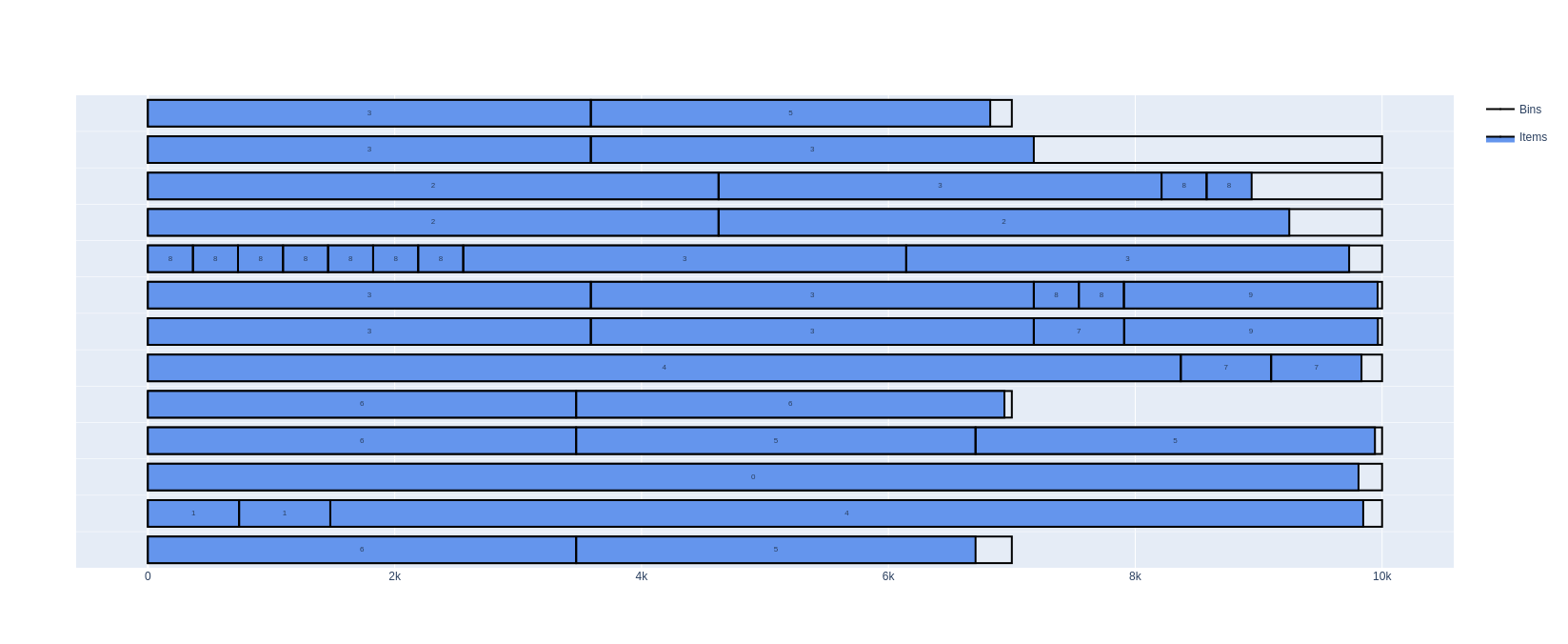
These problems occur for example when cutting paper rolls, pipes, cables, steel bars; or when stacking parcels.
This dimension is called length here.
Features:
Objectives:
Knapsack
Bin packing
Bin packing with leftovers
Variable-sized bin packing
Nesting length between consecutive items
Maximum number of items in a bin containing an item of a given type
Maximum weight allowed after an item of a given type
Maximum weight in bins
Basic usage
An instance is described in the JSON format below. The online solver downloads its instances in this format (Download) and loads them (Load a JSON file), the command-line solver reads them (--input), and the Python package and the C++ library read them with InstanceBuilder.read. Instances can also be built directly with the InstanceBuilder of the Python package and of the C++ library.
In the following example, 52 items of different lengths are packed in bins of length 1000, using as few bins as possible:
Open the example in the online solver: Basic example, then click Solve.
{
    "objective": "bin-packing",
    "bin_types": [
        {"length": 1000, "copies": 100}
    ],
    "item_types": [
        {"length": 193},
        {"length": 197},
        {"length": 199},
        {"length": 211},
        {"length": 223},
        {"length": 227},
        {"length": 229},
        {"length": 233},
        {"length": 239},
        {"length": 241},
        {"length": 251},
        {"length": 257},
        {"length": 263},
        {"length": 269},
        {"length": 271},
        {"length": 277},
        {"length": 281},
        {"length": 283},
        {"length": 293},
        {"length": 307},
        {"length": 311},
        {"length": 313},
        {"length": 317},
        {"length": 331},
        {"length": 337},
        {"length": 347},
        {"length": 349},
        {"length": 353},
        {"length": 359},
        {"length": 367},
        {"length": 373},
        {"length": 379},
        {"length": 383},
        {"length": 389},
        {"length": 397},
        {"length": 401},
        {"length": 409},
        {"length": 419},
        {"length": 421},
        {"length": 431},
        {"length": 433},
        {"length": 439},
        {"length": 443},
        {"length": 449},
        {"length": 457},
        {"length": 461},
        {"length": 463},
        {"length": 467},
        {"length": 479},
        {"length": 487},
        {"length": 491},
        {"length": 499}
    ]
}
Solve it with the command-line solver:
packingsolver_onedimensional \
        --input instance.json \
        --certificate solution.csv \
        --time-limit 5
import packingsolver.onedimensional as pso

instance_builder = pso.InstanceBuilder()
instance_builder.set_objective(pso.Objective.BinPacking)
instance_builder.add_bin_type(1000, copies=100)
instance_builder.add_item_type(193)
instance_builder.add_item_type(197)
instance_builder.add_item_type(199)
instance_builder.add_item_type(211)
instance_builder.add_item_type(223)
instance_builder.add_item_type(227)
instance_builder.add_item_type(229)
instance_builder.add_item_type(233)
instance_builder.add_item_type(239)
instance_builder.add_item_type(241)
instance_builder.add_item_type(251)
instance_builder.add_item_type(257)
instance_builder.add_item_type(263)
instance_builder.add_item_type(269)
instance_builder.add_item_type(271)
instance_builder.add_item_type(277)
instance_builder.add_item_type(281)
instance_builder.add_item_type(283)
instance_builder.add_item_type(293)
instance_builder.add_item_type(307)
instance_builder.add_item_type(311)
instance_builder.add_item_type(313)
instance_builder.add_item_type(317)
instance_builder.add_item_type(331)
instance_builder.add_item_type(337)
instance_builder.add_item_type(347)
instance_builder.add_item_type(349)
instance_builder.add_item_type(353)
instance_builder.add_item_type(359)
instance_builder.add_item_type(367)
instance_builder.add_item_type(373)
instance_builder.add_item_type(379)
instance_builder.add_item_type(383)
instance_builder.add_item_type(389)
instance_builder.add_item_type(397)
instance_builder.add_item_type(401)
instance_builder.add_item_type(409)
instance_builder.add_item_type(419)
instance_builder.add_item_type(421)
instance_builder.add_item_type(431)
instance_builder.add_item_type(433)
instance_builder.add_item_type(439)
instance_builder.add_item_type(443)
instance_builder.add_item_type(449)
instance_builder.add_item_type(457)
instance_builder.add_item_type(461)
instance_builder.add_item_type(463)
instance_builder.add_item_type(467)
instance_builder.add_item_type(479)
instance_builder.add_item_type(487)
instance_builder.add_item_type(491)
instance_builder.add_item_type(499)
instance = instance_builder.build()
Solve it:
parameters = pso.OptimizeParameters()
parameters.time_limit = 5
output = pso.optimize(instance, parameters)
output.solution.write("solution.csv")
#include "packingsolver/onedimensional/instance_builder.hpp"

using namespace packingsolver;
using namespace packingsolver::onedimensional;

InstanceBuilder instance_builder;
instance_builder.set_objective(Objective::BinPacking);
BinTypeId bin_type_id = instance_builder.add_bin_type(1000);
instance_builder.set_bin_type_copies(bin_type_id, 100);
instance_builder.add_item_type(193);
instance_builder.add_item_type(197);
instance_builder.add_item_type(199);
instance_builder.add_item_type(211);
instance_builder.add_item_type(223);
instance_builder.add_item_type(227);
instance_builder.add_item_type(229);
instance_builder.add_item_type(233);
instance_builder.add_item_type(239);
instance_builder.add_item_type(241);
instance_builder.add_item_type(251);
instance_builder.add_item_type(257);
instance_builder.add_item_type(263);
instance_builder.add_item_type(269);
instance_builder.add_item_type(271);
instance_builder.add_item_type(277);
instance_builder.add_item_type(281);
instance_builder.add_item_type(283);
instance_builder.add_item_type(293);
instance_builder.add_item_type(307);
instance_builder.add_item_type(311);
instance_builder.add_item_type(313);
instance_builder.add_item_type(317);
instance_builder.add_item_type(331);
instance_builder.add_item_type(337);
instance_builder.add_item_type(347);
instance_builder.add_item_type(349);
instance_builder.add_item_type(353);
instance_builder.add_item_type(359);
instance_builder.add_item_type(367);
instance_builder.add_item_type(373);
instance_builder.add_item_type(379);
instance_builder.add_item_type(383);
instance_builder.add_item_type(389);
instance_builder.add_item_type(397);
instance_builder.add_item_type(401);
instance_builder.add_item_type(409);
instance_builder.add_item_type(419);
instance_builder.add_item_type(421);
instance_builder.add_item_type(431);
instance_builder.add_item_type(433);
instance_builder.add_item_type(439);
instance_builder.add_item_type(443);
instance_builder.add_item_type(449);
instance_builder.add_item_type(457);
instance_builder.add_item_type(461);
instance_builder.add_item_type(463);
instance_builder.add_item_type(467);
instance_builder.add_item_type(479);
instance_builder.add_item_type(487);
instance_builder.add_item_type(491);
instance_builder.add_item_type(499);
Instance instance = instance_builder.build();
Solve it:
#include "packingsolver/onedimensional/optimize.hpp"

OptimizeParameters parameters;
parameters.timer.set_time_limit(5);
onedimensional::Output output = optimize(instance, parameters);
output.solution_pool.best().write("solution.csv");
Link the target PackingSolver::onedimensional of the CMake project.
The solution:
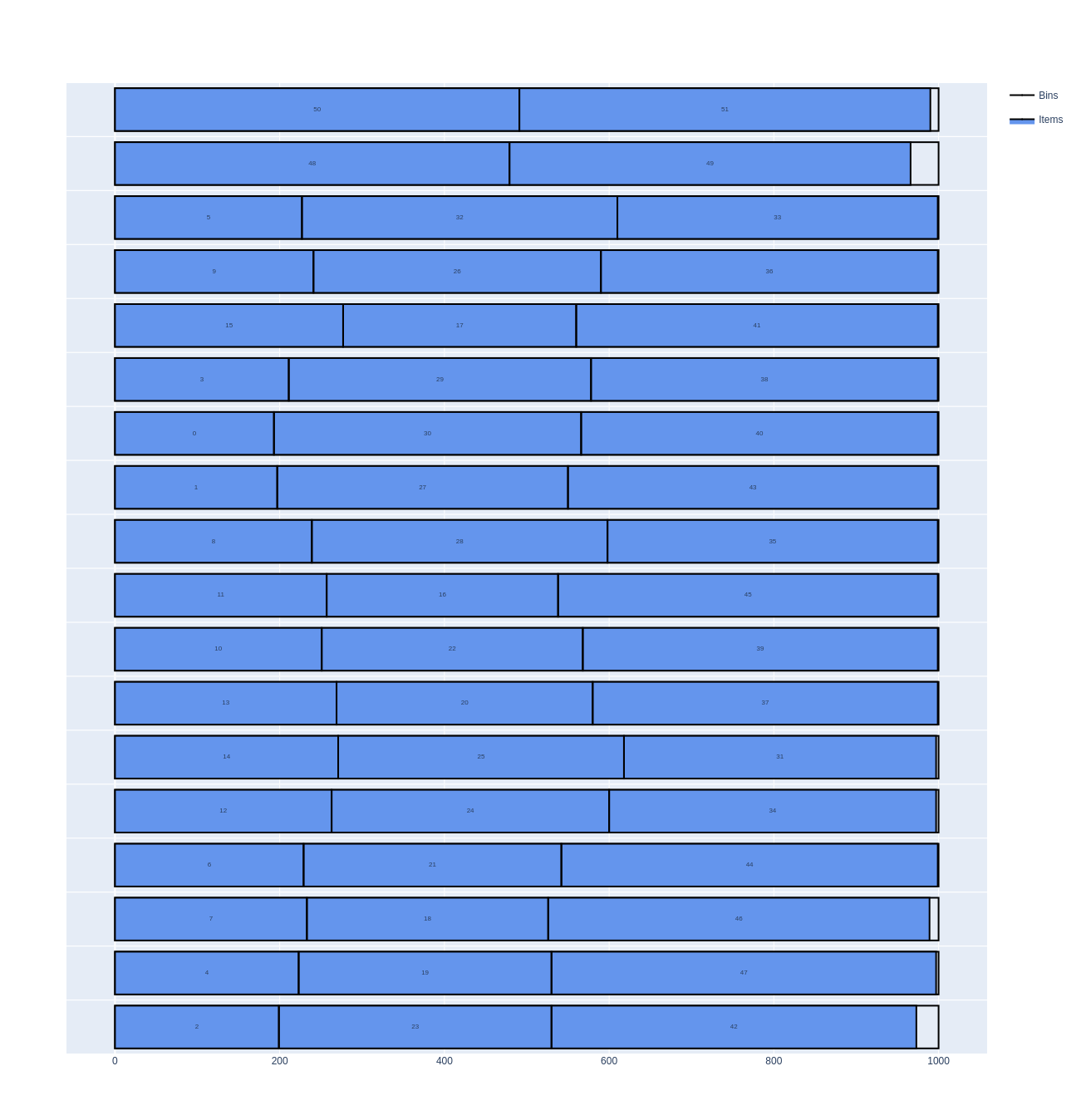
Instance format
An instance is a JSON object with the following fields:
Field |
Description |
|---|---|
|
Mandatory. One of |
|
Mandatory. The bin types (array) |
|
Mandatory. The item types (array) |
A bin type has the following fields:
Field |
Description |
|---|---|
|
Mandatory. The length of the bins (integer) |
|
The number of copies of the bin type. Default: |
|
The minimum number of copies of the bin type to use, for the variable-sized bin packing objective. Default: |
|
The cost of a bin of this type, for the variable-sized bin packing objective. Default: the length of the bin |
|
See Maximum total weight in a bin. Default: no limit |
|
The eligibility ids of the bin type (array): an item type with an eligibility id can only be packed in the bin types which have it. Default: none |
An item type has the following fields:
Field |
Description |
|---|---|
|
Mandatory. The length of the items (integer) |
|
The number of copies of the item type. Default: |
|
The minimum number of copies of the item type to pack, for the knapsack objective. Default: |
|
The profit of an item of this type, for the knapsack objective. Default: the length of the item |
|
See Nesting length. Default: |
|
See Maximum number of items in a bin containing an item of a given type. Default: no limit |
|
See Maximum total weight in a bin. Default: |
|
See Maximum weight allowed after an item of a given type. Default: no limit |
|
The eligibility id of the item type. Default: none (the items can be packed in any bin type) |
In Python, the optional fields of the bin types and of the item types are keyword arguments of InstanceBuilder.add_bin_type and InstanceBuilder.add_item_type, with the same names. In C++, they are set with the InstanceBuilder.set_bin_type_<field> and InstanceBuilder.set_item_type_<field> methods; the eligibility ids of a bin type are added with InstanceBuilder.add_bin_type_eligibility, and the eligibility id of an item type is set with InstanceBuilder.set_item_type_eligibility.
Certificate format
The solution is written (command-line option --certificate, Solution.write) as a CSV file with the columns TYPE, ID, COPIES, BIN, X, LX. Each line is:
a bin (
TYPEBIN):IDis its bin type,COPIESthe number of identical bins it stands for,BINits index in the solution, andLXits length;an item (
TYPEITEM):IDis its item type,BINthe index of its bin,Xthe position of its start in the bin, andLXits length.
TYPE,ID,COPIES,BIN,X,LX
BIN,0,1,0,0,1000
ITEM,50,1,0,0,491
ITEM,51,1,0,491,499
BIN,0,1,1,0,1000
ITEM,48,1,1,0,479
ITEM,49,1,1,479,487
BIN,0,1,2,0,1000
To visualize a solution, open it in the solution viewer, or run:
python3 scripts/visualize.py solution.csv
Nesting length
In some cases, when two items are placed consecutively in a bin, the second item nests in the first one, which reduces the length it occupies. This length difference is called the nesting length of the second item.
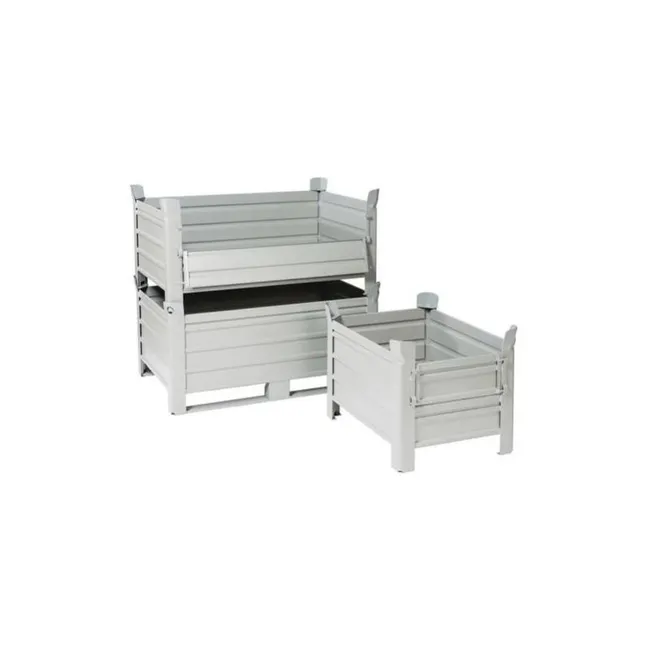
The stackable crates above illustrate the idea: two of them nested (left) take up less length than twice the length of one alone (right), since the legs of the second crate sink into the one before it.
In the Item types table, click More on a row and fill its Nesting length.
In an item type: "nesting_length": 10.
instance_builder.add_item_type(length, nesting_length=10)
instance_builder.set_item_type_nesting_length(item_type_id, 10);
In the following example, 8 items of length 70 are packed in bins of length 500. Without nesting, they need a length of 560, so 2 bins are needed. With a nesting length of 10, every item but the first one occupies a length of 60: the 8 items need a length of 490, and fit in a single bin.
Without nesting length |
With nesting length |
|---|---|
|
|
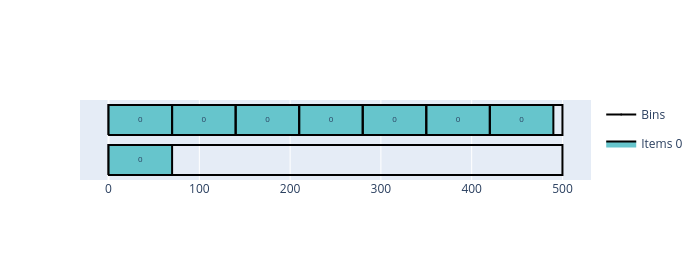
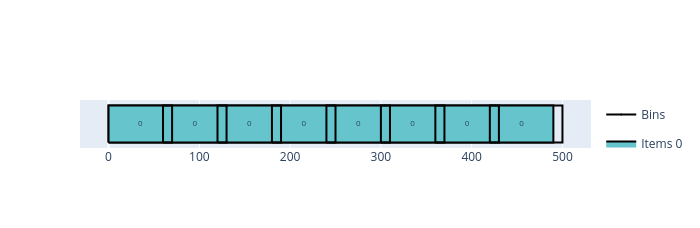
Open the examples in the online solver: Nesting length: without nesting length, Nesting length: with nesting length.
{
    "objective": "bin-packing",
    "bin_types": [
        {"length": 500, "copies": 10}
    ],
    "item_types": [
        {"length": 70, "copies": 8}
    ]
}
{
    "objective": "bin-packing",
    "bin_types": [
        {"length": 500, "copies": 10}
    ],
    "item_types": [
        {"length": 70, "copies": 8, "nesting_length": 10}
    ]
}
import packingsolver.onedimensional as pso

instance_builder = pso.InstanceBuilder()
instance_builder.set_objective(pso.Objective.BinPacking)
instance_builder.add_bin_type(500, copies=10)
instance_builder.add_item_type(70, copies=8)
instance = instance_builder.build()
import packingsolver.onedimensional as pso

instance_builder = pso.InstanceBuilder()
instance_builder.set_objective(pso.Objective.BinPacking)
instance_builder.add_bin_type(500, copies=10)
instance_builder.add_item_type(70, nesting_length=10, copies=8)
instance = instance_builder.build()
#include "packingsolver/onedimensional/instance_builder.hpp"

using namespace packingsolver;
using namespace packingsolver::onedimensional;

InstanceBuilder instance_builder;
instance_builder.set_objective(Objective::BinPacking);
BinTypeId bin_type_id = instance_builder.add_bin_type(500);
instance_builder.set_bin_type_copies(bin_type_id, 10);
ItemTypeId item_type_id = instance_builder.add_item_type(70);
instance_builder.set_item_type_copies(item_type_id, 8);
Instance instance = instance_builder.build();
#include "packingsolver/onedimensional/instance_builder.hpp"

using namespace packingsolver;
using namespace packingsolver::onedimensional;

InstanceBuilder instance_builder;
instance_builder.set_objective(Objective::BinPacking);
BinTypeId bin_type_id = instance_builder.add_bin_type(500);
instance_builder.set_bin_type_copies(bin_type_id, 10);
ItemTypeId item_type_id = instance_builder.add_item_type(70);
instance_builder.set_item_type_nesting_length(item_type_id, 10);
instance_builder.set_item_type_copies(item_type_id, 8);
Instance instance = instance_builder.build();
Maximum number of items in a bin containing an item of a given type
For each item type, it is possible to limit the number of items in a bin that contains an item of this type. This limit is called the maximum stackability of the item type.
In the Item types table, click More on a row and fill its Maximum stackability.
In an item type: "maximum_stackability": 3.
instance_builder.add_item_type(length, maximum_stackability=3)
instance_builder.set_item_type_maximum_stackability(item_type_id, 3);
In the following example, 3 items of length 200 and 4 items of length 100 are packed in bins of length 500. Without a maximum stackability, they fit in 2 bins: 200 + 200 + 100 and 200 + 100 + 100 + 100. With a maximum stackability of 3 for the items of length 200, the second bin isn’t valid anymore, and 3 bins are needed.
Without maximum stackability |
With maximum stackability |
|---|---|
|
|
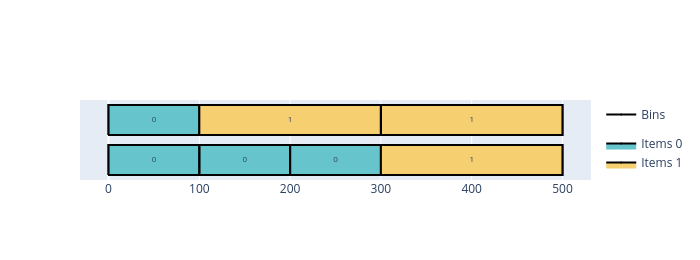
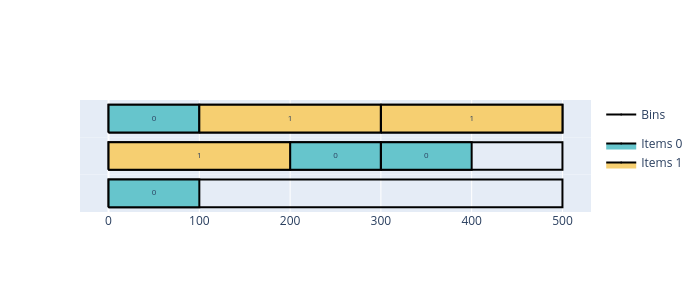
Open the examples in the online solver: Maximum stackability: no limit, Maximum stackability: with a limit.
{
    "objective": "bin-packing",
    "bin_types": [
        {"length": 500, "copies": 10}
    ],
    "item_types": [
        {"length": 200, "copies": 3},
        {"length": 100, "copies": 4}
    ]
}
{
    "objective": "bin-packing",
    "bin_types": [
        {"length": 500, "copies": 10}
    ],
    "item_types": [
        {"length": 200, "copies": 3, "maximum_stackability": 3},
        {"length": 100, "copies": 4, "maximum_stackability": 100}
    ]
}
import packingsolver.onedimensional as pso

instance_builder = pso.InstanceBuilder()
instance_builder.set_objective(pso.Objective.BinPacking)
instance_builder.add_bin_type(500, copies=10)
instance_builder.add_item_type(200, copies=3)
instance_builder.add_item_type(100, copies=4)
instance = instance_builder.build()
import packingsolver.onedimensional as pso

instance_builder = pso.InstanceBuilder()
instance_builder.set_objective(pso.Objective.BinPacking)
instance_builder.add_bin_type(500, copies=10)
instance_builder.add_item_type(200, maximum_stackability=3, copies=3)
instance_builder.add_item_type(100, maximum_stackability=100, copies=4)
instance = instance_builder.build()
#include "packingsolver/onedimensional/instance_builder.hpp"

using namespace packingsolver;
using namespace packingsolver::onedimensional;

InstanceBuilder instance_builder;
instance_builder.set_objective(Objective::BinPacking);
BinTypeId bin_type_id = instance_builder.add_bin_type(500);
instance_builder.set_bin_type_copies(bin_type_id, 10);
ItemTypeId item_type_id = instance_builder.add_item_type(200);
instance_builder.set_item_type_copies(item_type_id, 3);
item_type_id = instance_builder.add_item_type(100);
instance_builder.set_item_type_copies(item_type_id, 4);
Instance instance = instance_builder.build();
#include "packingsolver/onedimensional/instance_builder.hpp"

using namespace packingsolver;
using namespace packingsolver::onedimensional;

InstanceBuilder instance_builder;
instance_builder.set_objective(Objective::BinPacking);
BinTypeId bin_type_id = instance_builder.add_bin_type(500);
instance_builder.set_bin_type_copies(bin_type_id, 10);
ItemTypeId item_type_id = instance_builder.add_item_type(200);
instance_builder.set_item_type_maximum_stackability(item_type_id, 3);
instance_builder.set_item_type_copies(item_type_id, 3);
item_type_id = instance_builder.add_item_type(100);
instance_builder.set_item_type_maximum_stackability(item_type_id, 100);
instance_builder.set_item_type_copies(item_type_id, 4);
Instance instance = instance_builder.build();
Maximum total weight in a bin
Each bin type may have a maximum weight: the total weight of the items packed in a bin must not exceed it.
Fill the Weight column of the Item types table, and the Maximum weight column of the Bin types table.
In an item type: "weight": 100; in a bin type: "maximum_weight": 200.
instance_builder.add_item_type(length, weight=100) and instance_builder.add_bin_type(length, maximum_weight=200)
instance_builder.set_item_type_weight(item_type_id, 100); and instance_builder.set_bin_type_maximum_weight(bin_type_id, 200);
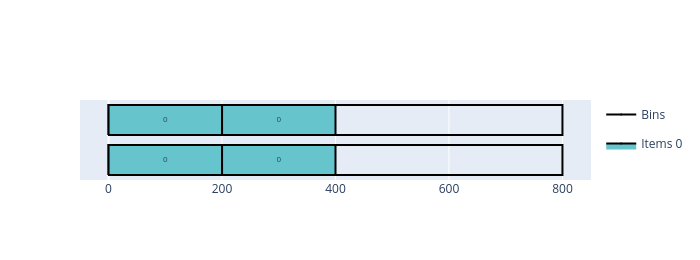
In the following example, 4 items of length 200 and of weight 100 are packed in bins of length 800. Without a maximum weight, they fit in a single bin. With a maximum weight of 200, at most 2 items can share a bin, so 2 bins are needed.
Without maximum weight |
With maximum weight |
|---|---|
|
|
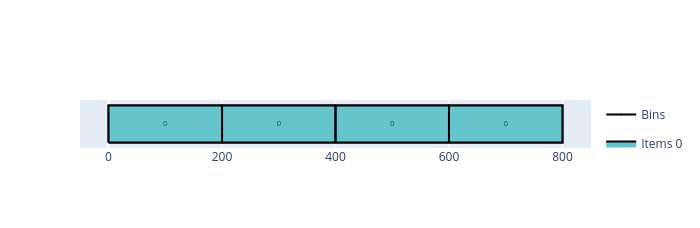
Open the examples in the online solver: Maximum weight: without maximum weight, Maximum weight: with maximum weight.
{
    "objective": "bin-packing",
    "bin_types": [
        {"length": 800, "copies": 10}
    ],
    "item_types": [
        {"length": 200, "copies": 4, "weight": 100}
    ]
}
{
    "objective": "bin-packing",
    "bin_types": [
        {"length": 800, "copies": 10, "maximum_weight": 200}
    ],
    "item_types": [
        {"length": 200, "copies": 4, "weight": 100}
    ]
}
import packingsolver.onedimensional as pso

instance_builder = pso.InstanceBuilder()
instance_builder.set_objective(pso.Objective.BinPacking)
instance_builder.add_bin_type(800, copies=10)
instance_builder.add_item_type(200, weight=100, copies=4)
instance = instance_builder.build()
import packingsolver.onedimensional as pso

instance_builder = pso.InstanceBuilder()
instance_builder.set_objective(pso.Objective.BinPacking)
instance_builder.add_bin_type(800, maximum_weight=200, copies=10)
instance_builder.add_item_type(200, weight=100, copies=4)
instance = instance_builder.build()
#include "packingsolver/onedimensional/instance_builder.hpp"

using namespace packingsolver;
using namespace packingsolver::onedimensional;

InstanceBuilder instance_builder;
instance_builder.set_objective(Objective::BinPacking);
BinTypeId bin_type_id = instance_builder.add_bin_type(800);
instance_builder.set_bin_type_copies(bin_type_id, 10);
ItemTypeId item_type_id = instance_builder.add_item_type(200);
instance_builder.set_item_type_weight(item_type_id, 100);
instance_builder.set_item_type_copies(item_type_id, 4);
Instance instance = instance_builder.build();
#include "packingsolver/onedimensional/instance_builder.hpp"

using namespace packingsolver;
using namespace packingsolver::onedimensional;

InstanceBuilder instance_builder;
instance_builder.set_objective(Objective::BinPacking);
BinTypeId bin_type_id = instance_builder.add_bin_type(800);
instance_builder.set_bin_type_maximum_weight(bin_type_id, 200);
instance_builder.set_bin_type_copies(bin_type_id, 10);
ItemTypeId item_type_id = instance_builder.add_item_type(200);
instance_builder.set_item_type_weight(item_type_id, 100);
instance_builder.set_item_type_copies(item_type_id, 4);
Instance instance = instance_builder.build();
Maximum weight allowed after an item of a given type
Each item type may have a maximum weight for the items packed after it in its bin. This corresponds to the maximum weight that an item can support when the items are stacked on each other.
In the Item types table, click More on a row and fill its Maximum weight after.
In an item type: "maximum_weight_after": 150.
instance_builder.add_item_type(length, maximum_weight_after=150)
instance_builder.set_item_type_maximum_weight_after(item_type_id, 150);
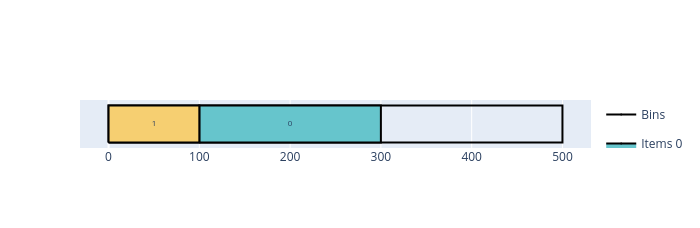
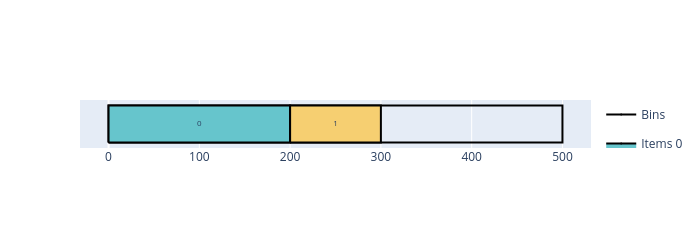
In the following example, 2 items of length 240 (weight 200) and 3 items of length 160 (weight 100) are packed in bins of length 500 (bin-packing-with-leftovers objective). Without a limit, 2 bins are enough: one with the 2 items of length 240, the other with the 3 items of length 160. With a maximum weight after of 150 for the items of length 240, two of them can’t share a bin anymore (an item of length 240 weighs 200), while an item of length 160 (weight 100) can still follow one. Each item of length 240 is then packed in its own bin with an item of length 160, and a third bin is needed for the last item of length 160.
Without maximum weight after |
With maximum weight after |
|---|---|
|
|
Open the examples in the online solver: Maximum weight after: no limit, Maximum weight after: with a limit.
{
    "objective": "bin-packing-with-leftovers",
    "bin_types": [
        {"length": 500, "copies": 10}
    ],
    "item_types": [
        {"length": 240, "copies": 2, "weight": 200},
        {"length": 160, "copies": 3, "weight": 100}
    ]
}
{
    "objective": "bin-packing-with-leftovers",
    "bin_types": [
        {"length": 500, "copies": 10}
    ],
    "item_types": [
        {"length": 240, "copies": 2, "weight": 200, "maximum_weight_after": 150},
        {"length": 160, "copies": 3, "weight": 100, "maximum_weight_after": 10000}
    ]
}
import packingsolver.onedimensional as pso

instance_builder = pso.InstanceBuilder()
instance_builder.set_objective(pso.Objective.BinPackingWithLeftovers)
instance_builder.add_bin_type(500, copies=10)
instance_builder.add_item_type(240, weight=200, copies=2)
instance_builder.add_item_type(160, weight=100, copies=3)
instance = instance_builder.build()
import packingsolver.onedimensional as pso

instance_builder = pso.InstanceBuilder()
instance_builder.set_objective(pso.Objective.BinPackingWithLeftovers)
instance_builder.add_bin_type(500, copies=10)
instance_builder.add_item_type(
        240,
        weight=200,
        maximum_weight_after=150,
        copies=2,
)
instance_builder.add_item_type(
        160,
        weight=100,
        maximum_weight_after=10000,
        copies=3,
)
instance = instance_builder.build()
#include "packingsolver/onedimensional/instance_builder.hpp"

using namespace packingsolver;
using namespace packingsolver::onedimensional;

InstanceBuilder instance_builder;
instance_builder.set_objective(Objective::BinPackingWithLeftovers);
BinTypeId bin_type_id = instance_builder.add_bin_type(500);
instance_builder.set_bin_type_copies(bin_type_id, 10);
ItemTypeId item_type_id = instance_builder.add_item_type(240);
instance_builder.set_item_type_weight(item_type_id, 200);
instance_builder.set_item_type_copies(item_type_id, 2);
item_type_id = instance_builder.add_item_type(160);
instance_builder.set_item_type_weight(item_type_id, 100);
instance_builder.set_item_type_copies(item_type_id, 3);
Instance instance = instance_builder.build();
#include "packingsolver/onedimensional/instance_builder.hpp"

using namespace packingsolver;
using namespace packingsolver::onedimensional;

InstanceBuilder instance_builder;
instance_builder.set_objective(Objective::BinPackingWithLeftovers);
BinTypeId bin_type_id = instance_builder.add_bin_type(500);
instance_builder.set_bin_type_copies(bin_type_id, 10);
ItemTypeId item_type_id = instance_builder.add_item_type(240);
instance_builder.set_item_type_weight(item_type_id, 200);
instance_builder.set_item_type_maximum_weight_after(item_type_id, 150);
instance_builder.set_item_type_copies(item_type_id, 2);
item_type_id = instance_builder.add_item_type(160);
instance_builder.set_item_type_weight(item_type_id, 100);
instance_builder.set_item_type_maximum_weight_after(item_type_id, 10000);
instance_builder.set_item_type_copies(item_type_id, 3);
Instance instance = instance_builder.build();