rectangle solver
The rectangle solver solves problems where items are two-dimensional rectangles that must be packed into rectangular bins without overlapping. Unlike the rectangle-guillotine solver, items can be placed in any position (guillotine cuts are not required).
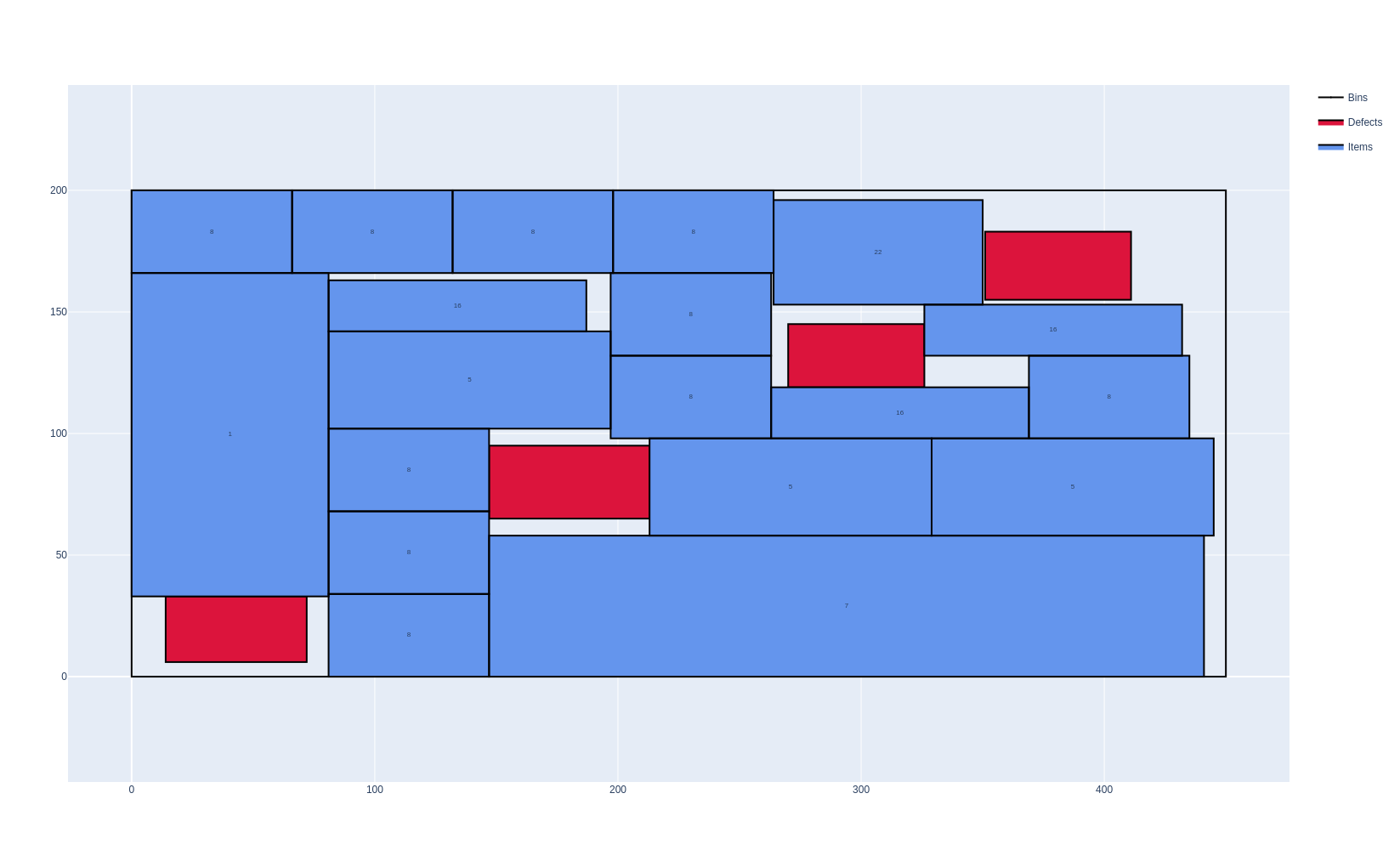
These problems occur for example in logistics (palletizing), sheet-metal cutting, and warehousing.
Features:
Objectives:
Knapsack
Bin packing
Bin packing with leftovers
Open dimension X
Open dimension Y
Variable-sized bin packing
With or without item rotations
Bins may contain defects
Maximum weight in bins
Unloading constraints: only horizontal/vertical movements, increasing x/y
Basic usage
An instance is described in the JSON format below. The online solver downloads its instances in this format (Download) and loads them (Load a JSON file), the command-line solver reads them (--input), and the Python package and the C++ library read them with InstanceBuilder.read. Instances can also be built directly with the InstanceBuilder of the Python package and of the C++ library.
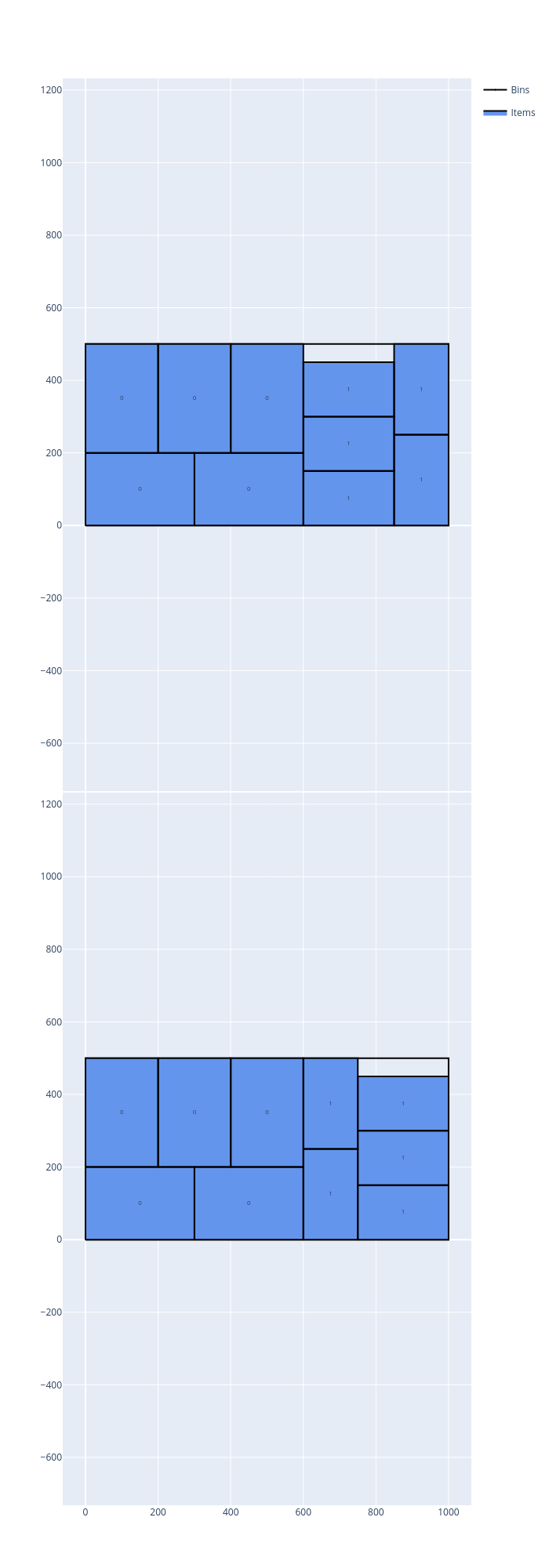
In the following example, the items of two item types are packed in bins of size 1000 × 500, using as few bins as possible, and then maximizing the leftover of the last bin:
Open the example in the online solver: Basic example, then click Solve.
{
    "objective": "bin-packing-with-leftovers",
    "bin_types": [
        {"x": 1000, "y": 500, "copies": 10}
    ],
    "item_types": [
        {"x": 300, "y": 200, "copies": 10},
        {"x": 250, "y": 150, "copies": 10}
    ]
}
Solve it with the command-line solver:
packingsolver_rectangle \
        --input instance.json \
        --certificate solution.csv \
        --time-limit 5
import packingsolver.rectangle as psr

instance_builder = psr.InstanceBuilder()
instance_builder.set_objective(psr.Objective.BinPackingWithLeftovers)
instance_builder.add_bin_type(1000, 500, copies=10)
instance_builder.add_item_type(300, 200, copies=10)
instance_builder.add_item_type(250, 150, copies=10)
instance = instance_builder.build()
Solve it:
parameters = psr.OptimizeParameters()
parameters.time_limit = 5
output = psr.optimize(instance, parameters)
output.solution.write("solution.csv")
#include "packingsolver/rectangle/instance_builder.hpp"

using namespace packingsolver;
using namespace packingsolver::rectangle;

InstanceBuilder instance_builder;
instance_builder.set_objective(Objective::BinPackingWithLeftovers);
BinTypeId bin_type_id = instance_builder.add_bin_type(1000, 500);
instance_builder.set_bin_type_copies(bin_type_id, 10);
ItemTypeId item_type_id = instance_builder.add_item_type(300, 200);
instance_builder.set_item_type_copies(item_type_id, 10);
item_type_id = instance_builder.add_item_type(250, 150);
instance_builder.set_item_type_copies(item_type_id, 10);
Instance instance = instance_builder.build();
Solve it:
#include "packingsolver/rectangle/optimize.hpp"

OptimizeParameters parameters;
parameters.timer.set_time_limit(5);
rectangle::Output output = optimize(instance, parameters);
output.solution_pool.best().write("solution.csv");
Link the target PackingSolver::rectangle of the CMake project.
The solution:
Instance format
An instance is a JSON object with the following fields:
Field |
Description |
|---|---|
|
Mandatory. One of |
|
How the leftover of the last bin is measured, for the |
|
See Unloading constraints. Default: |
|
Mandatory. The bin types (array) |
|
Mandatory. The item types (array) |
A bin type has the following fields:
Field |
Description |
|---|---|
|
Mandatory. The width and the height of the bins (integers) |
|
The number of copies of the bin type. Default: |
|
The minimum number of copies of the bin type to use, for the variable-sized bin packing objective. Default: |
|
The cost of a bin of this type, for the variable-sized bin packing objective. Default: the area of the bin |
|
See Maximum total weight in a bin. Default: no limit |
|
The eligibility ids of the bin type (array): an item type with an eligibility id can only be packed in the bin types which have it. Default: none |
|
See Defects. Default: none |
An item type has the following fields:
Field |
Description |
|---|---|
|
Mandatory. The width and the height of the items (integers) |
|
The number of copies of the item type. Default: |
|
The minimum number of copies of the item type to pack, for the knapsack objective. Default: |
|
The profit of an item of this type, for the knapsack objective. Default: the area of the item |
|
See Item rotations. Default: |
|
See Maximum total weight in a bin. Default: |
|
See Unloading constraints. Default: |
|
The eligibility id of the item type. Default: none (the items can be packed in any bin type) |
In Python, the optional fields of the bin types and of the item types are keyword arguments of InstanceBuilder.add_bin_type and InstanceBuilder.add_item_type, with the same names. In C++, they are set with the InstanceBuilder.set_bin_type_<field> and InstanceBuilder.set_item_type_<field> methods; the examples below show the exceptions.
Certificate format
The solution is written (command-line option --certificate, Solution.write) as a CSV file with the columns TYPE, ID, COPIES, BIN, X, Y, LX, LY, GROUP_ID. Each line is:
a bin (
TYPEBIN):IDis its bin type,COPIESthe number of identical bins it stands for,BINits index in the solution, andLX,LYits width and its height;a defect of a bin (
TYPEDEFECT):IDis its index in its bin type,BINthe index of its bin,X,Ythe position of its bottom-left corner, andLX,LYits width and its height;an item (
TYPEITEM):IDis its item type,BINthe index of its bin,X,Ythe position of its bottom-left corner,LX,LYits width and its height once placed (exchanged if it is rotated), andGROUP_IDthe group of its item type.
TYPE,ID,COPIES,BIN,X,Y,LX,LY,GROUP_ID
BIN,0,1,0,0,0,1000,500,
ITEM,0,1,0,0,0,300,200,0
ITEM,0,1,0,0,200,200,300,0
ITEM,0,1,0,200,200,200,300,0
ITEM,0,1,0,300,0,300,200,0
ITEM,0,1,0,400,200,200,300,0
ITEM,1,1,0,600,0,250,150,0
To visualize a solution, open it in the solution viewer, or run:
python3 scripts/visualize.py solution.csv
Item rotations
By default, the items may be rotated by 90°. An item type can be fixed in its original orientation:
In the Item types table, check Oriented.
In an item type: "oriented": true.
instance_builder.add_item_type(x, y, oriented=True)
instance_builder.add_item_type(x, y, true);
In the following example, 3 items of size 400 × 200 are packed in bins of size 700 × 500. When the items are oriented, at most 2 items fit in a bin, so 2 bins are needed. When they can be rotated, the third item is rotated and placed next to the other two, in the first bin.
Oriented items |
Items which can be rotated |
|---|---|
|
|
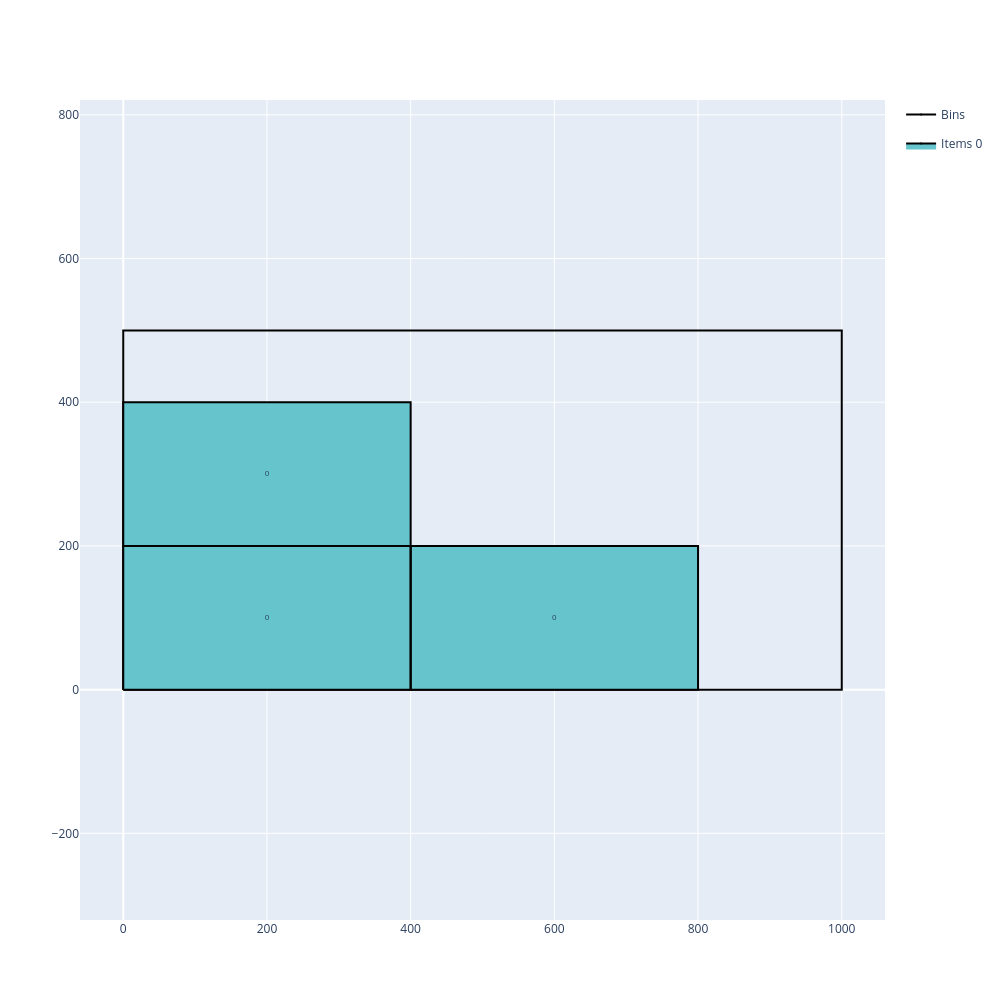
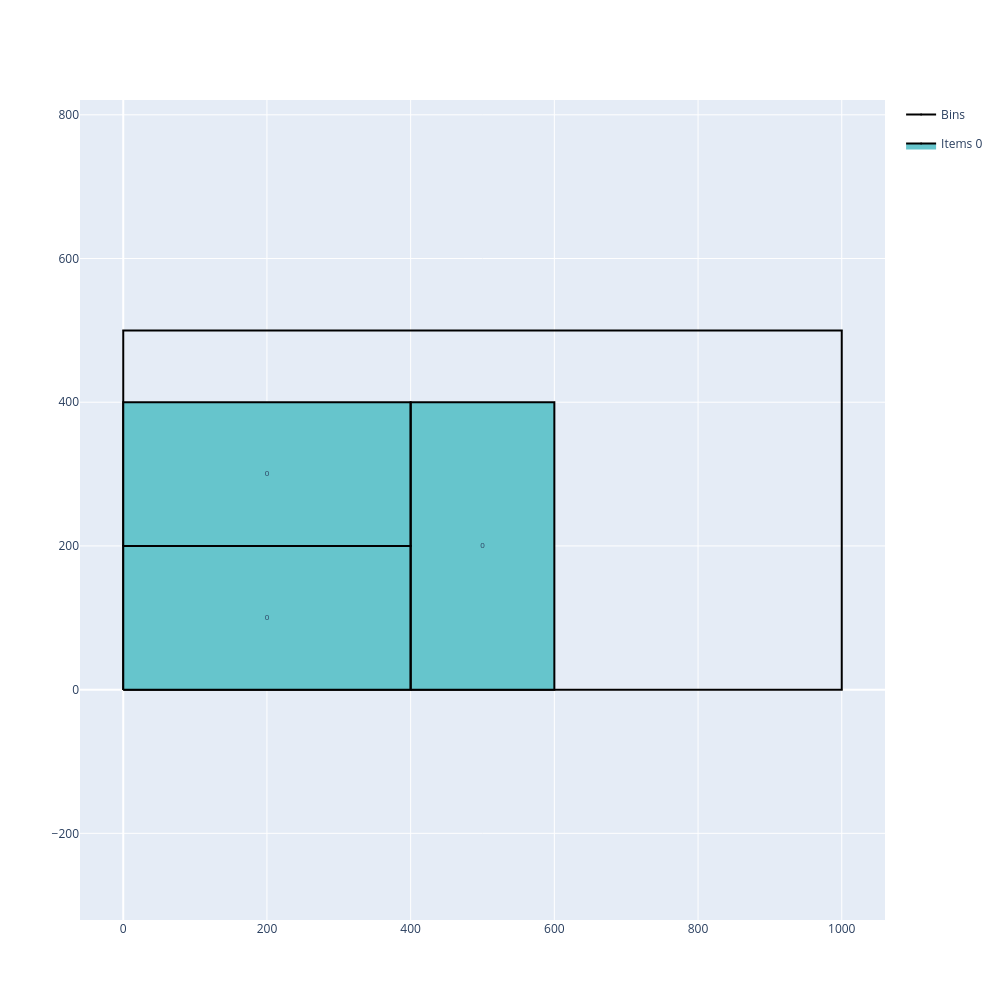
Open the examples in the online solver: Item rotations: oriented items, Item rotations: items which can be rotated.
{
    "objective": "bin-packing-with-leftovers",
    "bin_types": [
        {"x": 700, "y": 500, "copies": 2}
    ],
    "item_types": [
        {"x": 400, "y": 200, "copies": 3, "oriented": true}
    ]
}
{
    "objective": "bin-packing-with-leftovers",
    "bin_types": [
        {"x": 700, "y": 500, "copies": 2}
    ],
    "item_types": [
        {"x": 400, "y": 200, "copies": 3}
    ]
}
import packingsolver.rectangle as psr

instance_builder = psr.InstanceBuilder()
instance_builder.set_objective(psr.Objective.BinPackingWithLeftovers)
instance_builder.add_bin_type(700, 500, copies=2)
instance_builder.add_item_type(400, 200, oriented=True, copies=3)
instance = instance_builder.build()
import packingsolver.rectangle as psr

instance_builder = psr.InstanceBuilder()
instance_builder.set_objective(psr.Objective.BinPackingWithLeftovers)
instance_builder.add_bin_type(700, 500, copies=2)
instance_builder.add_item_type(400, 200, copies=3)
instance = instance_builder.build()
#include "packingsolver/rectangle/instance_builder.hpp"

using namespace packingsolver;
using namespace packingsolver::rectangle;

InstanceBuilder instance_builder;
instance_builder.set_objective(Objective::BinPackingWithLeftovers);
BinTypeId bin_type_id = instance_builder.add_bin_type(700, 500);
instance_builder.set_bin_type_copies(bin_type_id, 2);
ItemTypeId item_type_id = instance_builder.add_item_type(400, 200, true);
instance_builder.set_item_type_copies(item_type_id, 3);
Instance instance = instance_builder.build();
#include "packingsolver/rectangle/instance_builder.hpp"

using namespace packingsolver;
using namespace packingsolver::rectangle;

InstanceBuilder instance_builder;
instance_builder.set_objective(Objective::BinPackingWithLeftovers);
BinTypeId bin_type_id = instance_builder.add_bin_type(700, 500);
instance_builder.set_bin_type_copies(bin_type_id, 2);
ItemTypeId item_type_id = instance_builder.add_item_type(400, 200);
instance_builder.set_item_type_copies(item_type_id, 3);
Instance instance = instance_builder.build();
Defects
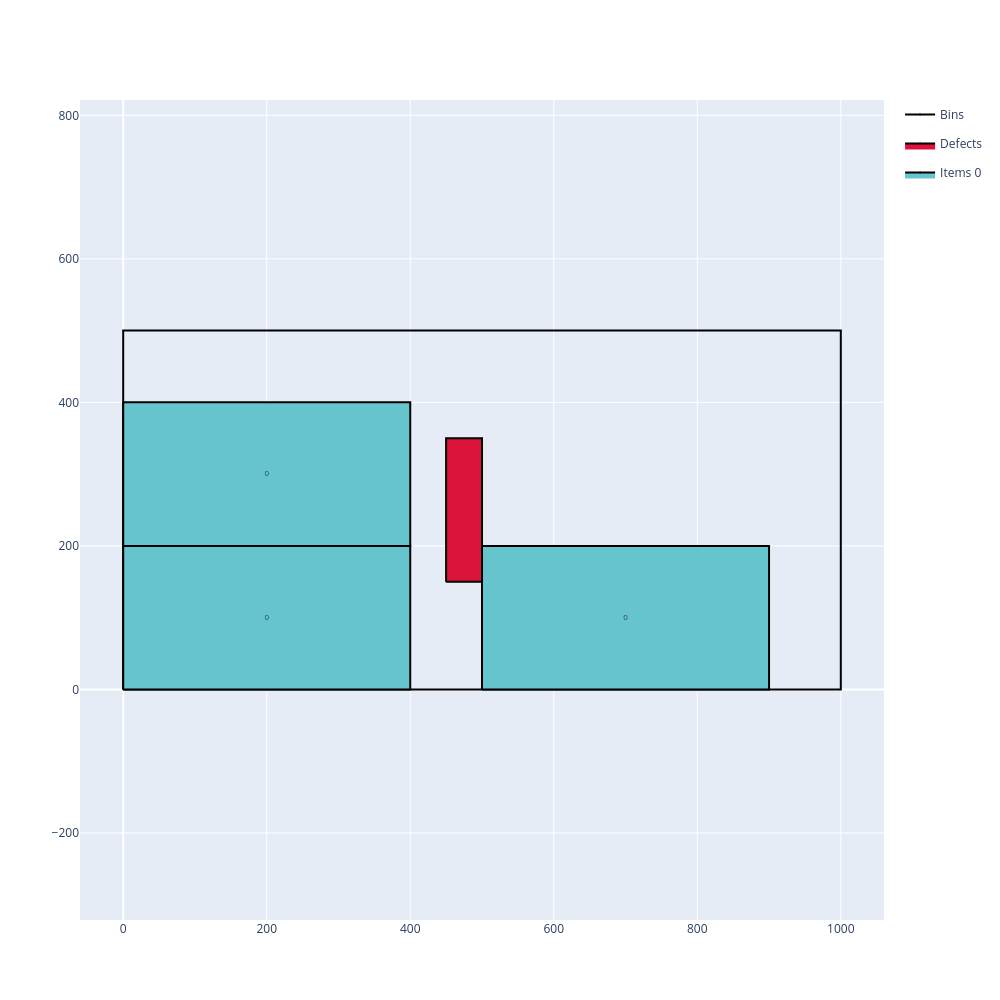
Defects are rectangular regions of a bin where items cannot be placed. A defect is given by the position of its bottom-left corner (x, y) and by its size (width, height):
In the Bin types table, click Add a defect below a bin type, and fill its position (X, Y) and its size (W, H).
In a bin type: "defects": [{"x": 450, "y": 150, "width": 50, "height": 200}].
instance_builder.add_defect(bin_type_id, x, y, width, height), where bin_type_id is returned by add_bin_type.
instance_builder.add_defect(bin_type_id, x, y, width, height);, where bin_type_id is returned by add_bin_type.
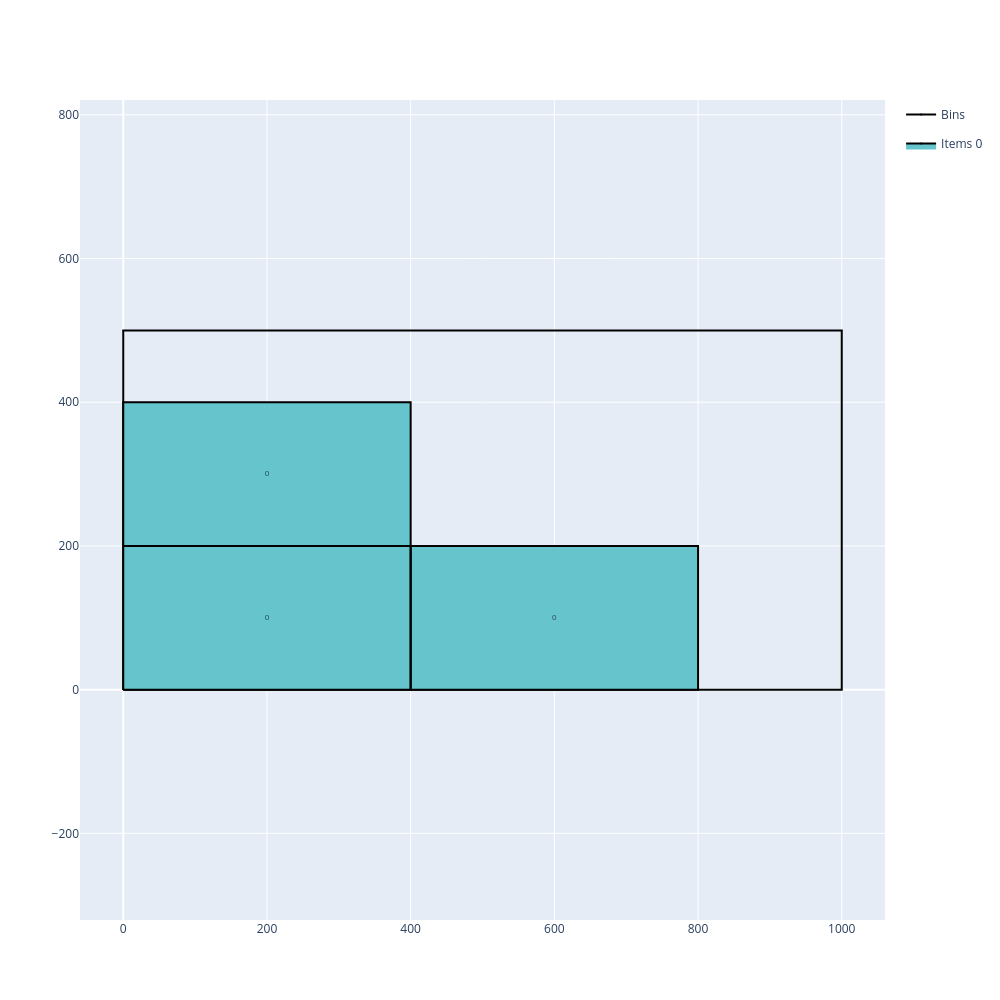
In the following example, 3 oriented items of size 400 × 200 are packed in two bins of size 800 × 500. Without defects, the 3 items fit in the first bin. With a 50 × 200 defect at position (450, 150) in the first bin, only 2 items fit in it, and the third one is packed in the second bin.
Without defects |
With a defect |
|---|---|
|
|
Open the examples in the online solver: Defects: without defects, Defects: with a defect.
{
    "objective": "bin-packing-with-leftovers",
    "bin_types": [
        {"x": 800, "y": 500},
        {"x": 800, "y": 500}
    ],
    "item_types": [
        {"x": 400, "y": 200, "copies": 3, "oriented": true}
    ]
}
{
    "objective": "bin-packing-with-leftovers",
    "bin_types": [
        {"x": 800, "y": 500, "defects": [{"x": 450, "y": 150, "width": 50, "height": 200}]},
        {"x": 800, "y": 500}
    ],
    "item_types": [
        {"x": 400, "y": 200, "copies": 3, "oriented": true}
    ]
}
import packingsolver.rectangle as psr

instance_builder = psr.InstanceBuilder()
instance_builder.set_objective(psr.Objective.BinPackingWithLeftovers)
instance_builder.add_bin_type(800, 500)
instance_builder.add_bin_type(800, 500)
instance_builder.add_item_type(400, 200, oriented=True, copies=3)
instance = instance_builder.build()
import packingsolver.rectangle as psr

instance_builder = psr.InstanceBuilder()
instance_builder.set_objective(psr.Objective.BinPackingWithLeftovers)
bin_type_id = instance_builder.add_bin_type(800, 500)
instance_builder.add_defect(bin_type_id, 450, 150, 50, 200)
instance_builder.add_bin_type(800, 500)
instance_builder.add_item_type(400, 200, oriented=True, copies=3)
instance = instance_builder.build()
#include "packingsolver/rectangle/instance_builder.hpp"

using namespace packingsolver;
using namespace packingsolver::rectangle;

InstanceBuilder instance_builder;
instance_builder.set_objective(Objective::BinPackingWithLeftovers);
instance_builder.add_bin_type(800, 500);
instance_builder.add_bin_type(800, 500);
ItemTypeId item_type_id = instance_builder.add_item_type(400, 200, true);
instance_builder.set_item_type_copies(item_type_id, 3);
Instance instance = instance_builder.build();
#include "packingsolver/rectangle/instance_builder.hpp"

using namespace packingsolver;
using namespace packingsolver::rectangle;

InstanceBuilder instance_builder;
instance_builder.set_objective(Objective::BinPackingWithLeftovers);
BinTypeId bin_type_id = instance_builder.add_bin_type(800, 500);
instance_builder.add_defect(bin_type_id, 450, 150, 50, 200);
instance_builder.add_bin_type(800, 500);
ItemTypeId item_type_id = instance_builder.add_item_type(400, 200, true);
instance_builder.set_item_type_copies(item_type_id, 3);
Instance instance = instance_builder.build();
Maximum total weight in a bin
Each bin type may have a maximum weight: the total weight of the items packed in a bin must not exceed it.
Fill the Weight column of the Item types table, and the Maximum weight column of the Bin types table.
In an item type: "weight": 100; in a bin type: "maximum_weight": 200.
instance_builder.add_item_type(x, y, weight=100) and instance_builder.add_bin_type(x, y, maximum_weight=200)
instance_builder.set_item_type_weight(item_type_id, 100); and instance_builder.set_bin_type_maximum_weight(bin_type_id, 200);
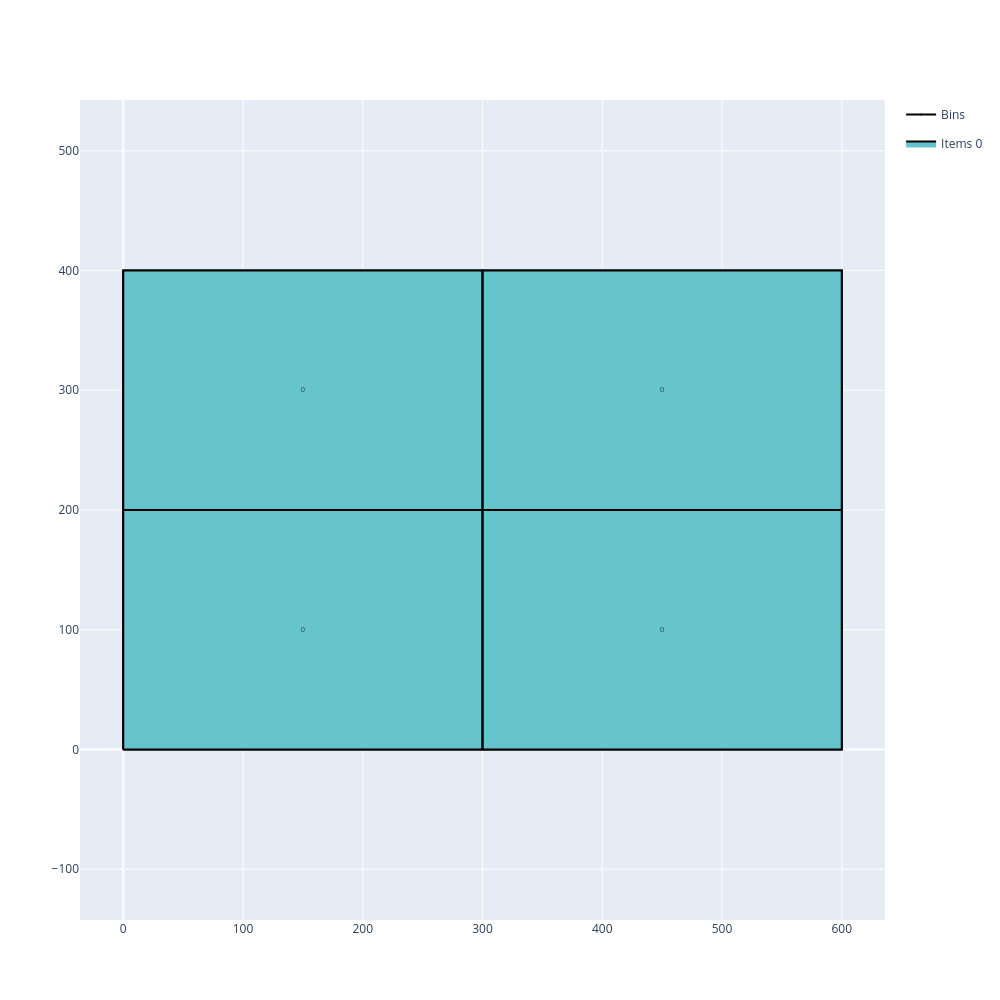
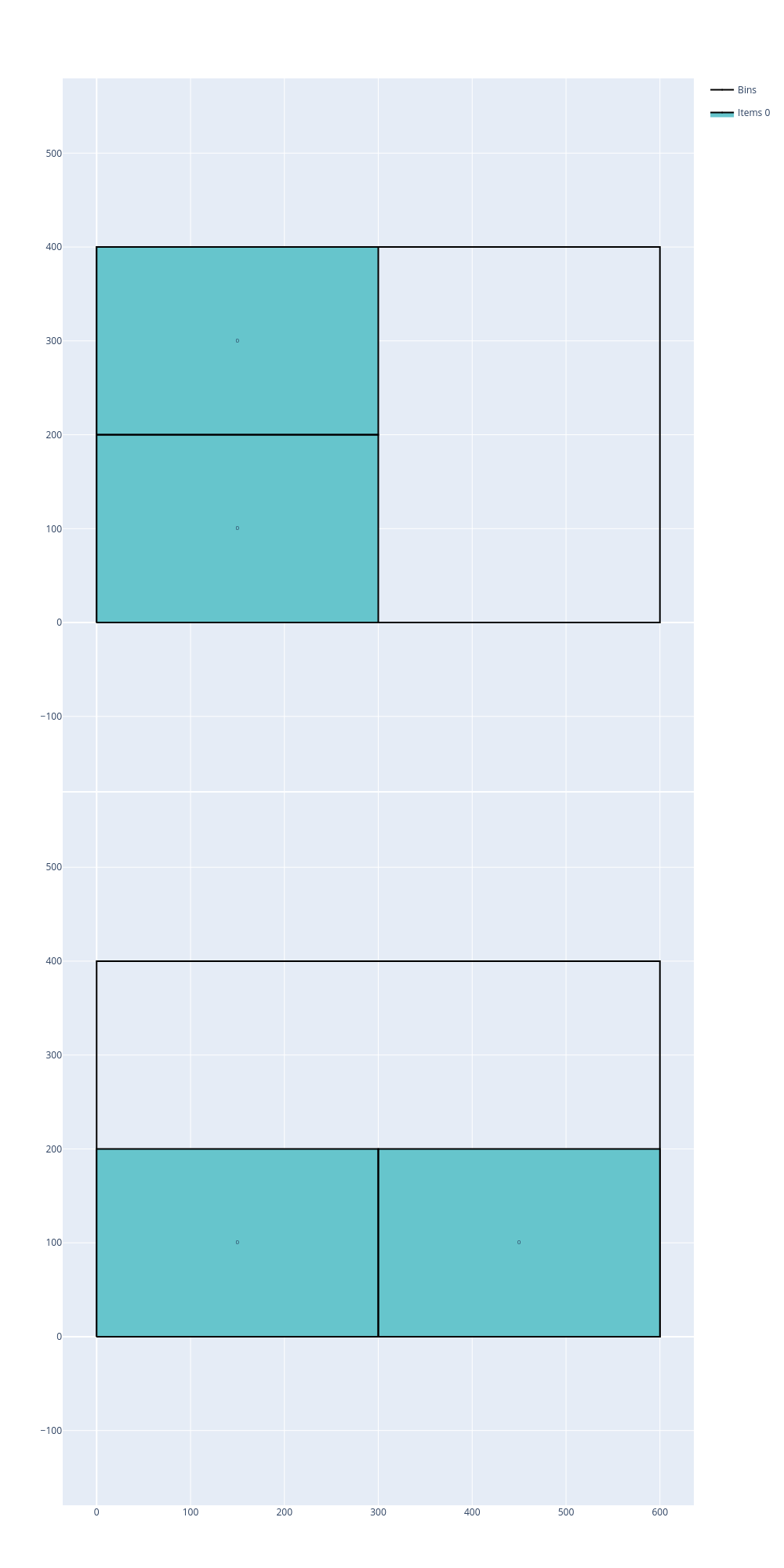
In the following example, 4 items of size 300 × 200 and of weight 100 are packed in bins of size 600 × 400. Without a maximum weight, the 4 items (total weight 400) fit in a single bin. With a maximum weight of 200, at most 2 items can share a bin, so 2 bins are needed.
Without maximum weight |
With maximum weight |
|---|---|
|
|
Open the examples in the online solver: Maximum weight: without maximum weight, Maximum weight: with maximum weight.
{
    "objective": "bin-packing",
    "bin_types": [
        {"x": 600, "y": 400, "copies": 10}
    ],
    "item_types": [
        {"x": 300, "y": 200, "copies": 4, "weight": 100}
    ]
}
{
    "objective": "bin-packing",
    "bin_types": [
        {"x": 600, "y": 400, "copies": 10, "maximum_weight": 200}
    ],
    "item_types": [
        {"x": 300, "y": 200, "copies": 4, "weight": 100}
    ]
}
import packingsolver.rectangle as psr

instance_builder = psr.InstanceBuilder()
instance_builder.set_objective(psr.Objective.BinPacking)
instance_builder.add_bin_type(600, 400, copies=10)
instance_builder.add_item_type(300, 200, weight=100, copies=4)
instance = instance_builder.build()
import packingsolver.rectangle as psr

instance_builder = psr.InstanceBuilder()
instance_builder.set_objective(psr.Objective.BinPacking)
instance_builder.add_bin_type(600, 400, maximum_weight=200, copies=10)
instance_builder.add_item_type(300, 200, weight=100, copies=4)
instance = instance_builder.build()
#include "packingsolver/rectangle/instance_builder.hpp"

using namespace packingsolver;
using namespace packingsolver::rectangle;

InstanceBuilder instance_builder;
instance_builder.set_objective(Objective::BinPacking);
BinTypeId bin_type_id = instance_builder.add_bin_type(600, 400);
instance_builder.set_bin_type_copies(bin_type_id, 10);
ItemTypeId item_type_id = instance_builder.add_item_type(300, 200);
instance_builder.set_item_type_weight(item_type_id, 100);
instance_builder.set_item_type_copies(item_type_id, 4);
Instance instance = instance_builder.build();
#include "packingsolver/rectangle/instance_builder.hpp"

using namespace packingsolver;
using namespace packingsolver::rectangle;

InstanceBuilder instance_builder;
instance_builder.set_objective(Objective::BinPacking);
BinTypeId bin_type_id = instance_builder.add_bin_type(600, 400);
instance_builder.set_bin_type_maximum_weight(bin_type_id, 200);
instance_builder.set_bin_type_copies(bin_type_id, 10);
ItemTypeId item_type_id = instance_builder.add_item_type(300, 200);
instance_builder.set_item_type_weight(item_type_id, 100);
instance_builder.set_item_type_copies(item_type_id, 4);
Instance instance = instance_builder.build();
Unloading constraints
When loading a truck that visits multiple locations, it might be necessary to unload the items at a location without moving the items which are still in the truck. This is modeled with unloading constraints. Items are assigned to groups: the items of group 0 are unloaded first, then the items of group 1, etc.
Choose the Unloading constraint below the objective. Then, in the Item types table, click More on a row and fill its Group.
In the instance: "unloading_constraint": "only-x-movements"; in an item type: "group_id": 1.
instance_builder.set_unloading_constraint(psr.UnloadingConstraint.OnlyXMovements) and instance_builder.add_item_type(x, y, group_id=1)
instance_builder.set_unloading_constraint(UnloadingConstraint::OnlyXMovements); and instance_builder.set_item_type_group(item_type_id, 1);
4 types of unloading constraints are available:
only-x-movements: the items are unloaded by moving them along the X axis, towards the right of the bin: no item of a later group may be on the right of an item of an earlier group which it overlaps verticallyonly-y-movements: same along the Y axis, towards the top of the binincreasing-x: the bottom-left corners of the items of group 0 have greater X coordinates than those of the items of group 1, which have greater X coordinates than those of the items of group 2, etc.increasing-y: same along the Y axis
In the following example, 3 items of groups 0, 1 and 2 are packed in bins of size 700 × 400. Without unloading constraints, the 3 items fit in a single bin. With the only-x-movements unloading constraint, the item of group 2 can’t stay on the right of the item of group 1, so 2 bins are needed.
Without unloading constraints |
|
|---|---|
|
|
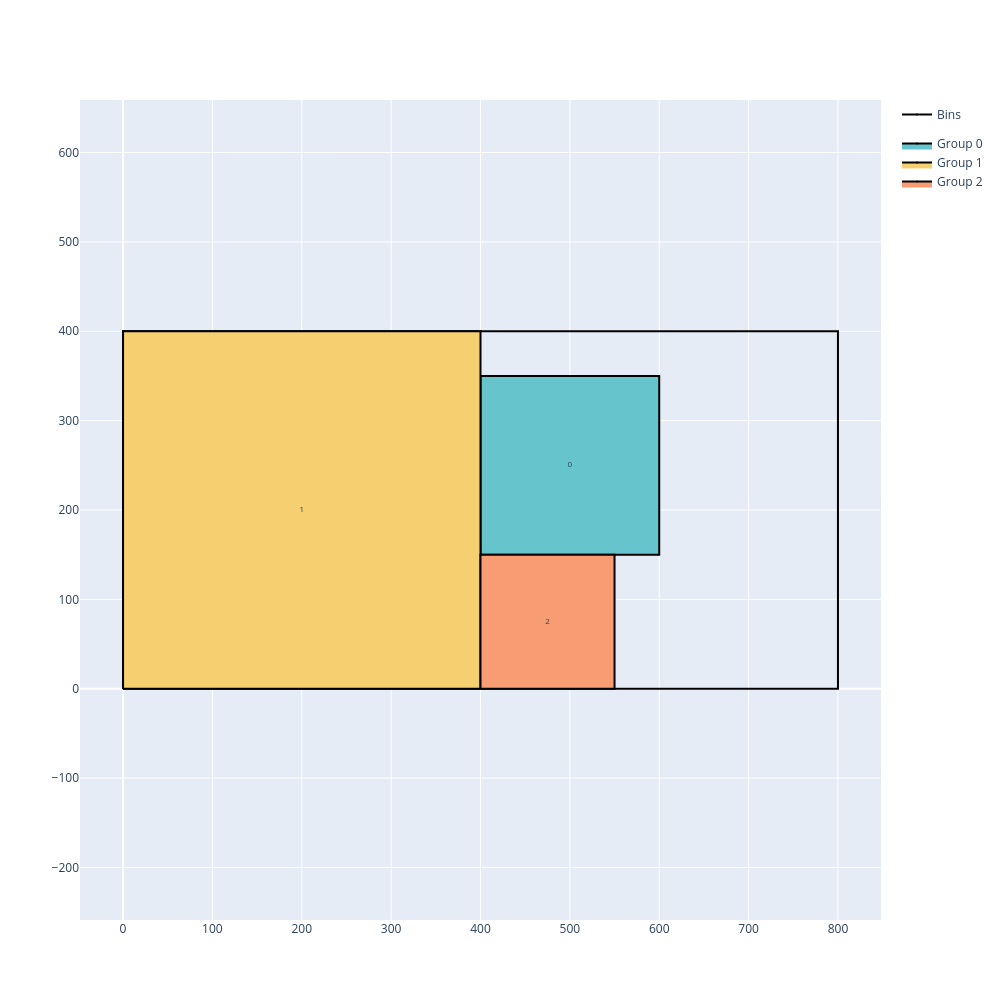
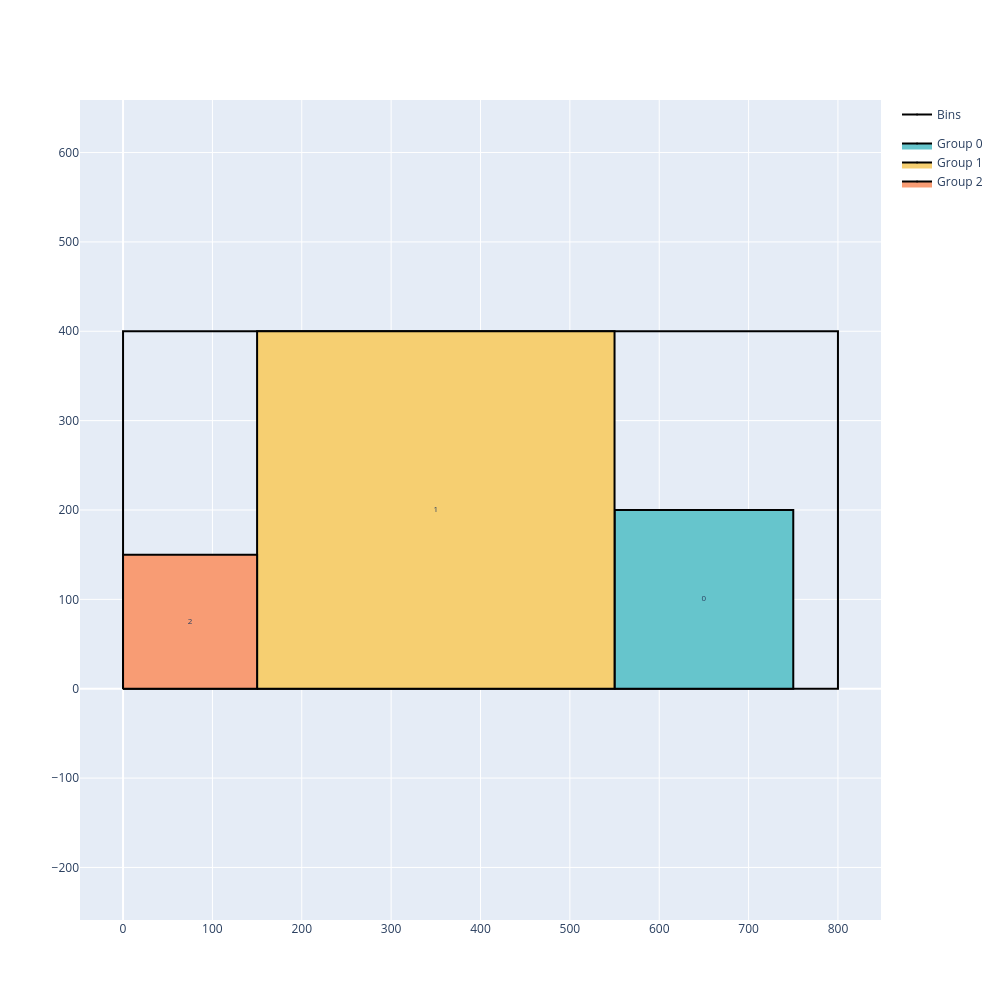
Open the examples in the online solver: Unloading constraints: none, Unloading constraints: only X movements.
{
    "objective": "bin-packing-with-leftovers",
    "bin_types": [
        {"x": 700, "y": 400, "copies": 2}
    ],
    "item_types": [
        {"x": 200, "y": 200},
        {"x": 400, "y": 400, "group_id": 1},
        {"x": 150, "y": 150, "group_id": 2}
    ]
}
{
    "objective": "bin-packing-with-leftovers",
    "unloading_constraint": "only-x-movements",
    "bin_types": [
        {"x": 700, "y": 400, "copies": 2}
    ],
    "item_types": [
        {"x": 200, "y": 200},
        {"x": 400, "y": 400, "group_id": 1},
        {"x": 150, "y": 150, "group_id": 2}
    ]
}
import packingsolver.rectangle as psr

instance_builder = psr.InstanceBuilder()
instance_builder.set_objective(psr.Objective.BinPackingWithLeftovers)
instance_builder.add_bin_type(700, 400, copies=2)
instance_builder.add_item_type(200, 200)
instance_builder.add_item_type(400, 400, group_id=1)
instance_builder.add_item_type(150, 150, group_id=2)
instance = instance_builder.build()
import packingsolver.rectangle as psr

instance_builder = psr.InstanceBuilder()
instance_builder.set_objective(psr.Objective.BinPackingWithLeftovers)
instance_builder.set_unloading_constraint(psr.UnloadingConstraint.OnlyXMovements)
instance_builder.add_bin_type(700, 400, copies=2)
instance_builder.add_item_type(200, 200)
instance_builder.add_item_type(400, 400, group_id=1)
instance_builder.add_item_type(150, 150, group_id=2)
instance = instance_builder.build()
#include "packingsolver/rectangle/instance_builder.hpp"

using namespace packingsolver;
using namespace packingsolver::rectangle;

InstanceBuilder instance_builder;
instance_builder.set_objective(Objective::BinPackingWithLeftovers);
BinTypeId bin_type_id = instance_builder.add_bin_type(700, 400);
instance_builder.set_bin_type_copies(bin_type_id, 2);
instance_builder.add_item_type(200, 200);
ItemTypeId item_type_id = instance_builder.add_item_type(400, 400);
instance_builder.set_item_type_group(item_type_id, 1);
item_type_id = instance_builder.add_item_type(150, 150);
instance_builder.set_item_type_group(item_type_id, 2);
Instance instance = instance_builder.build();
#include "packingsolver/rectangle/instance_builder.hpp"

using namespace packingsolver;
using namespace packingsolver::rectangle;

InstanceBuilder instance_builder;
instance_builder.set_objective(Objective::BinPackingWithLeftovers);
instance_builder.set_unloading_constraint(UnloadingConstraint::OnlyXMovements);
BinTypeId bin_type_id = instance_builder.add_bin_type(700, 400);
instance_builder.set_bin_type_copies(bin_type_id, 2);
instance_builder.add_item_type(200, 200);
ItemTypeId item_type_id = instance_builder.add_item_type(400, 400);
instance_builder.set_item_type_group(item_type_id, 1);
item_type_id = instance_builder.add_item_type(150, 150);
instance_builder.set_item_type_group(item_type_id, 2);
Instance instance = instance_builder.build();
In the following example, the open dimension X objective gives different solutions for the only-x-movements and increasing-x unloading constraints. With only-x-movements, the items of group 1 can be below the item of group 0, and a width of 500 is enough. With increasing-x, the bottom-left corner of the item of group 0 must be on the right of those of the items of group 1, and a width of 650 is needed.
|
|
|---|---|
|
|
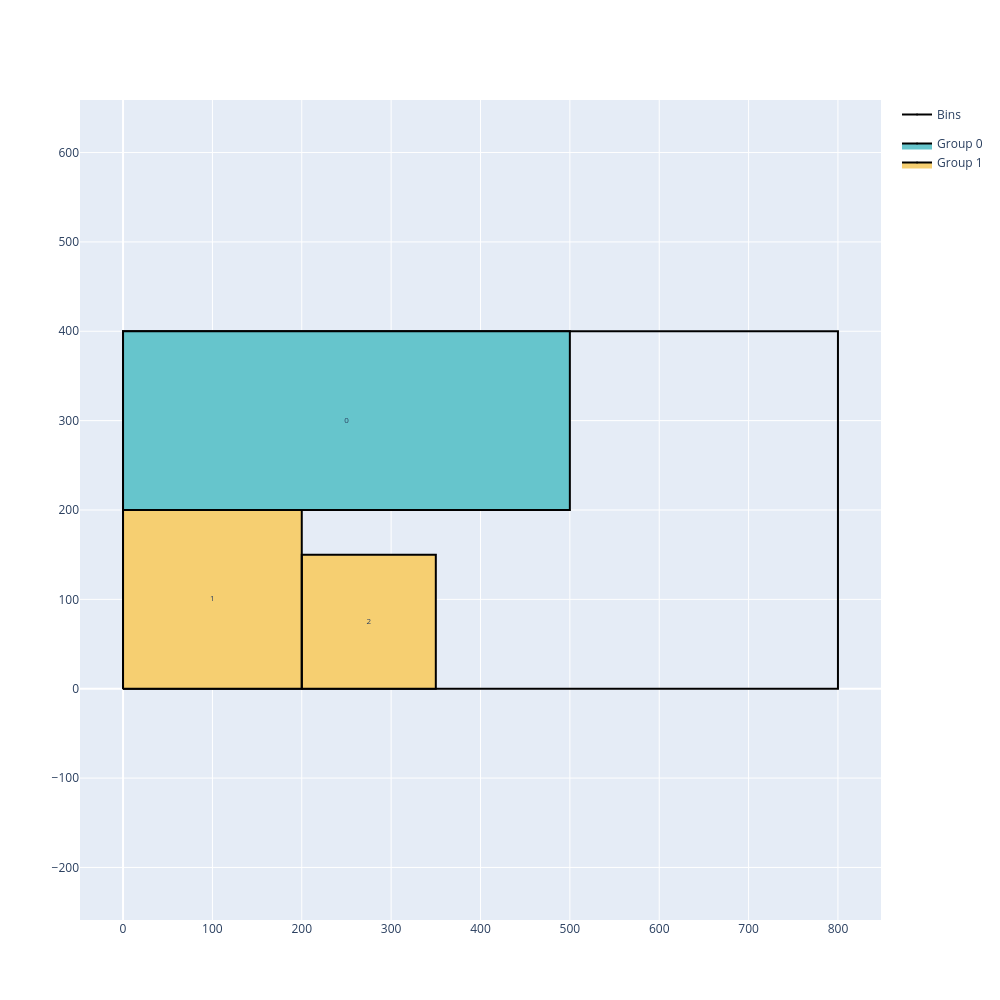
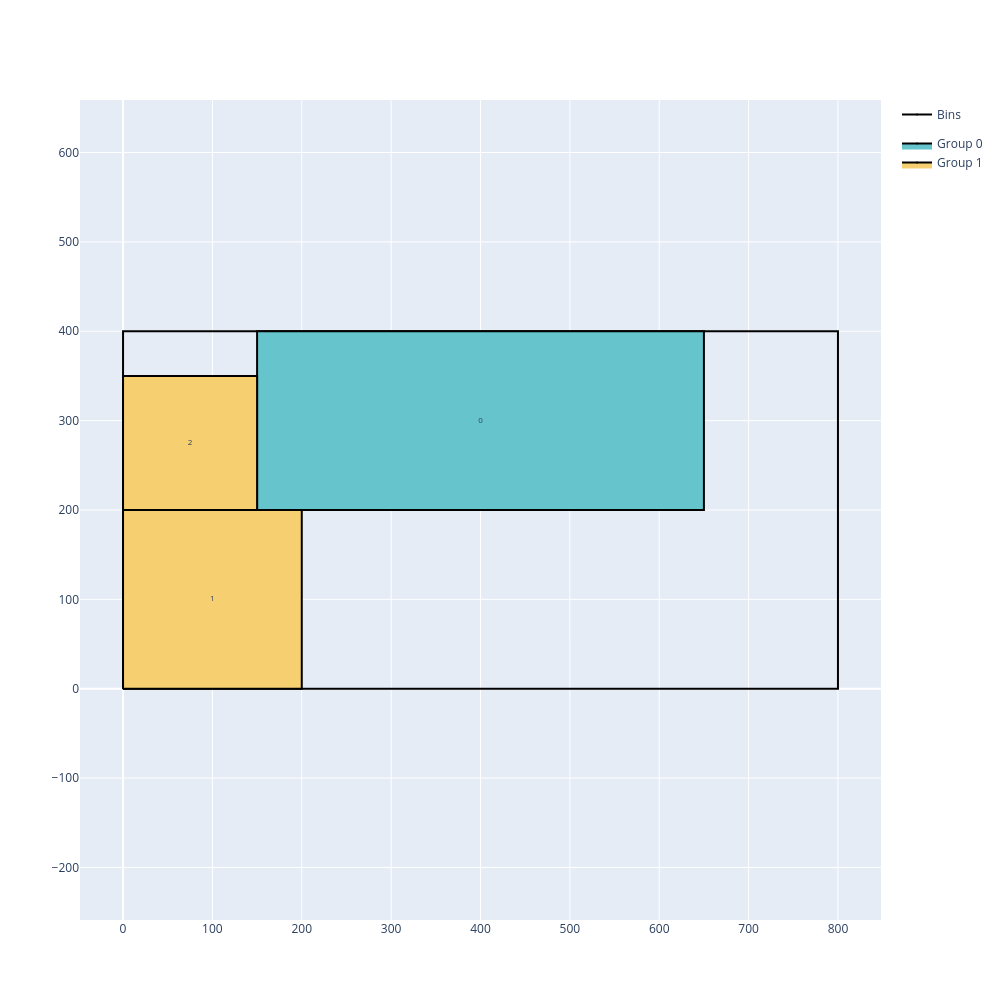
Open the examples in the online solver: Unloading constraints: only X movements, open dimension X, Unloading constraints: increasing X, open dimension X.
{
    "objective": "open-dimension-x",
    "unloading_constraint": "only-x-movements",
    "bin_types": [
        {"x": 800, "y": 400}
    ],
    "item_types": [
        {"x": 500, "y": 200},
        {"x": 200, "y": 200, "group_id": 1},
        {"x": 150, "y": 150, "group_id": 1}
    ]
}
{
    "objective": "open-dimension-x",
    "unloading_constraint": "increasing-x",
    "bin_types": [
        {"x": 800, "y": 400}
    ],
    "item_types": [
        {"x": 500, "y": 200},
        {"x": 200, "y": 200, "group_id": 1},
        {"x": 150, "y": 150, "group_id": 1}
    ]
}
import packingsolver.rectangle as psr

instance_builder = psr.InstanceBuilder()
instance_builder.set_objective(psr.Objective.OpenDimensionX)
instance_builder.set_unloading_constraint(psr.UnloadingConstraint.OnlyXMovements)
instance_builder.add_bin_type(800, 400)
instance_builder.add_item_type(500, 200)
instance_builder.add_item_type(200, 200, group_id=1)
instance_builder.add_item_type(150, 150, group_id=1)
instance = instance_builder.build()
import packingsolver.rectangle as psr

instance_builder = psr.InstanceBuilder()
instance_builder.set_objective(psr.Objective.OpenDimensionX)
instance_builder.set_unloading_constraint(psr.UnloadingConstraint.IncreasingX)
instance_builder.add_bin_type(800, 400)
instance_builder.add_item_type(500, 200)
instance_builder.add_item_type(200, 200, group_id=1)
instance_builder.add_item_type(150, 150, group_id=1)
instance = instance_builder.build()
#include "packingsolver/rectangle/instance_builder.hpp"

using namespace packingsolver;
using namespace packingsolver::rectangle;

InstanceBuilder instance_builder;
instance_builder.set_objective(Objective::OpenDimensionX);
instance_builder.set_unloading_constraint(UnloadingConstraint::OnlyXMovements);
instance_builder.add_bin_type(800, 400);
instance_builder.add_item_type(500, 200);
ItemTypeId item_type_id = instance_builder.add_item_type(200, 200);
instance_builder.set_item_type_group(item_type_id, 1);
item_type_id = instance_builder.add_item_type(150, 150);
instance_builder.set_item_type_group(item_type_id, 1);
Instance instance = instance_builder.build();
#include "packingsolver/rectangle/instance_builder.hpp"

using namespace packingsolver;
using namespace packingsolver::rectangle;

InstanceBuilder instance_builder;
instance_builder.set_objective(Objective::OpenDimensionX);
instance_builder.set_unloading_constraint(UnloadingConstraint::IncreasingX);
instance_builder.add_bin_type(800, 400);
instance_builder.add_item_type(500, 200);
ItemTypeId item_type_id = instance_builder.add_item_type(200, 200);
instance_builder.set_item_type_group(item_type_id, 1);
item_type_id = instance_builder.add_item_type(150, 150);
instance_builder.set_item_type_group(item_type_id, 1);
Instance instance = instance_builder.build();