box-stacks solver
The box-stacks solver solves three-dimensional bin packing problems where items are rectangular parallelepipeds (boxes) that must be packed into rectangular bins. Items can be stacked vertically: a stack is a column of items that all have the same footprint (X and Y dimensions) and the same stackability identifier.
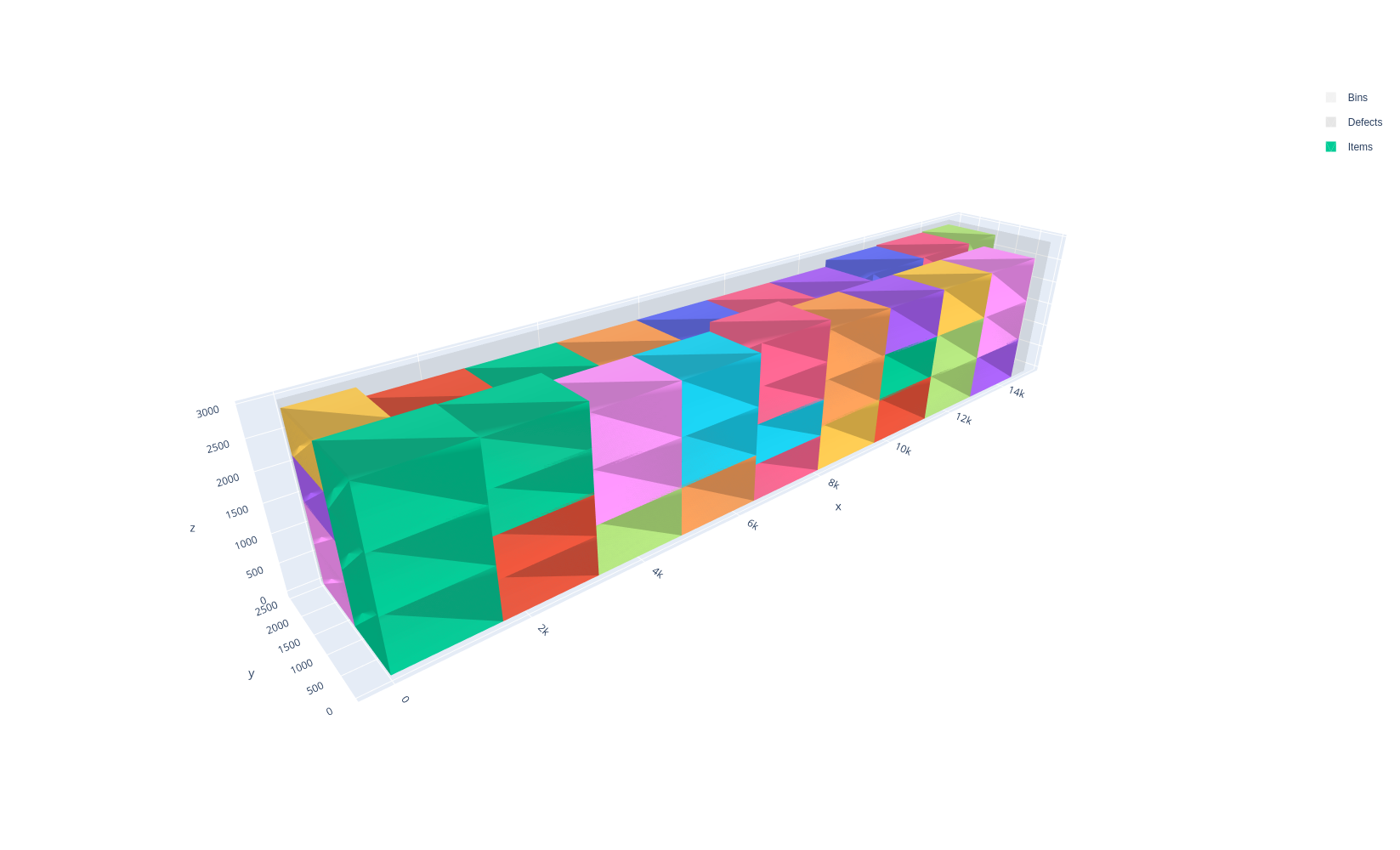
These problems occur for example in pallet building, container loading, and warehouse management.
Features:
Objectives:
Knapsack
Bin packing
Bin packing with leftovers
Open dimension X
Open dimension Y
Variable-sized bin packing
Item types
Rotations around the vertical axis
Groups (for unloading constraints)
Weight
Stacking constraints
Stackability identifier
Nesting height
Maximum number of items in a stack containing an item of a given type
Maximum weight above an item
Bin types
Maximum weight
Maximum stack density (weight per unit floor area)
Maximum weight on the middle and rear axles (semi-trailer trucks)
Unloading constraints (same as the rectangle solver)
Box vs box-stacks
The box-stacks solver only produces patterns where items sharing a footprint (X and Y dimensions) and stackability identifier form a single vertical stack; an item of a different footprint can never be inserted into the space left above a stack, even if that space would otherwise be enough to hold it. Problems where items may instead be placed freely anywhere in 3D space should be modeled with the box solver.
The following example solves the same instance — a 7500 × 2400 × 3000 bin shaped like a truck’s cargo area, with three groups of columns of different footprints (4 columns of 1300 × 1200, 4 of 1200 × 1200, and 4 of 1250 × 1200, for 12 columns in total), each group stacking its own large and medium item types, plus three extra small item types (600 × 500, 500 × 400 and 700 × 600) that are all smaller than every column’s footprint — with both solvers (knapsack objective). The box-stacks solver fills the 7500 × 2400 floor with all 12 columns, each group mixing one large item with several medium items (1500 + 550 + 550 = 2600, 1300 + 450 + 450 + 450 = 2650, and 1600 + 1100 = 2700 out of the 3000 available Z), but none of the three small item types can be placed: none of their footprints matches any column, and the floor is already fully covered, so there is nowhere left to start a new stack — only 88.3% of the bin’s volume is loaded, leaving 400, 350 or 300 of unused space at the top of each column, depending on the group. The box solver, which places items freely, fills that same leftover space by placing one small item directly on top of each column instead — a different small item type for each of the three groups — loading 90.7% of the bin’s volume.
|
|
|---|---|
|
|
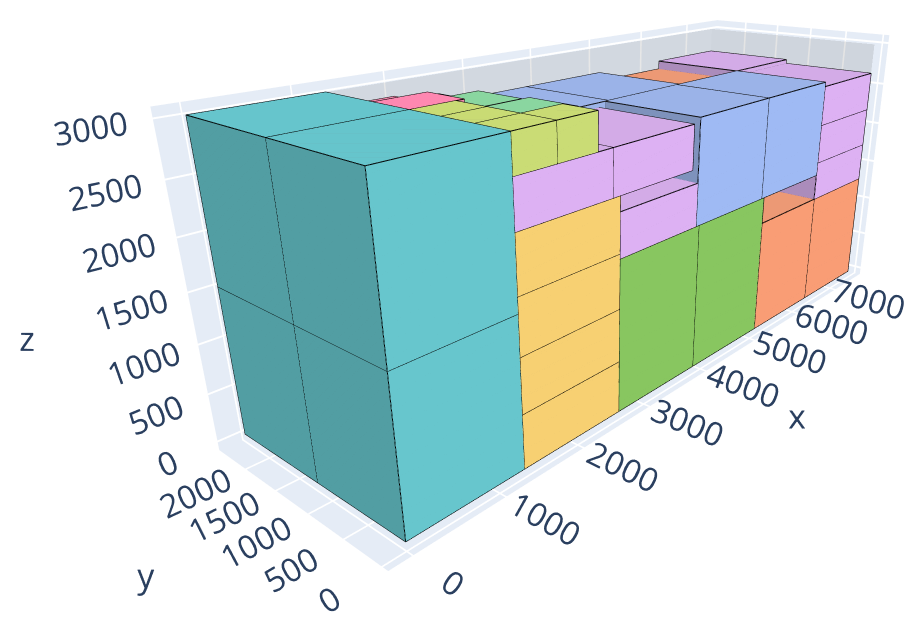
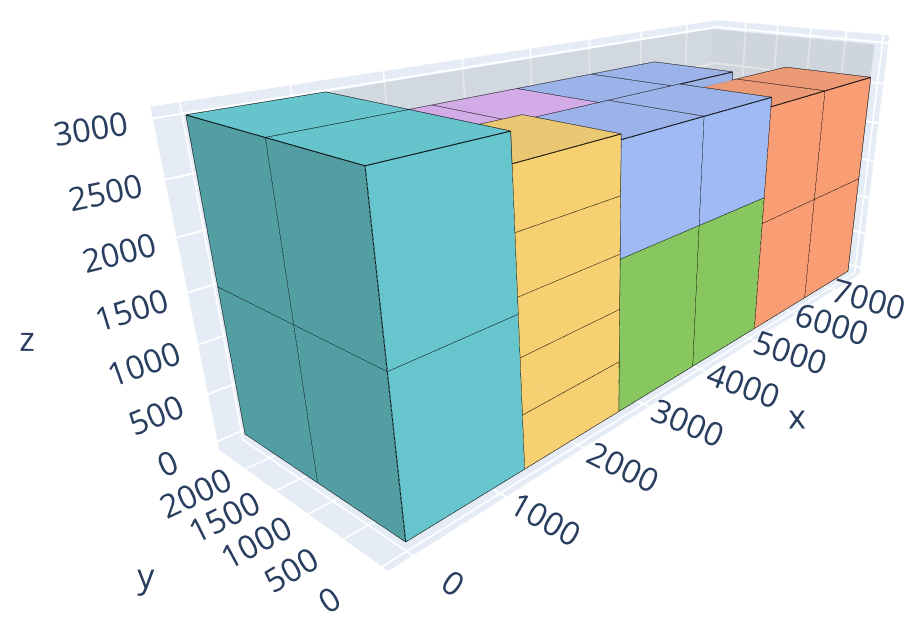
Open the examples in the online solver: Box vs box stacks: boxes, Box vs box stacks: box stacks.
{
    "objective": "knapsack",
    "bin_types": [
        {"x": 7500, "y": 2400, "z": 3000}
    ],
    "item_types": [
        {"x": 1300, "y": 1200, "z": 1500, "copies": 4},
        {"x": 1300, "y": 1200, "z": 550, "copies": 8},
        {"x": 1200, "y": 1200, "z": 1300, "copies": 4},
        {"x": 1200, "y": 1200, "z": 450, "copies": 12},
        {"x": 1250, "y": 1200, "z": 1600, "copies": 4},
        {"x": 1250, "y": 1200, "z": 1100, "copies": 4},
        {"x": 600, "y": 500, "z": 400, "copies": 4},
        {"x": 500, "y": 400, "z": 350, "copies": 4},
        {"x": 700, "y": 600, "z": 300, "copies": 4}
    ]
}
{
    "objective": "knapsack",
    "bin_types": [
        {"x": 7500, "y": 2400, "z": 3000}
    ],
    "item_types": [
        {"x": 1300, "y": 1200, "z": 1500, "stackability_id": 0, "copies": 4},
        {"x": 1300, "y": 1200, "z": 550, "stackability_id": 0, "copies": 8},
        {"x": 1200, "y": 1200, "z": 1300, "stackability_id": 1, "copies": 4},
        {"x": 1200, "y": 1200, "z": 450, "stackability_id": 1, "copies": 12},
        {"x": 1250, "y": 1200, "z": 1600, "stackability_id": 2, "copies": 4},
        {"x": 1250, "y": 1200, "z": 1100, "stackability_id": 2, "copies": 4},
        {"x": 600, "y": 500, "z": 400, "stackability_id": 3, "copies": 4},
        {"x": 500, "y": 400, "z": 350, "stackability_id": 4, "copies": 4},
        {"x": 700, "y": 600, "z": 300, "stackability_id": 5, "copies": 4}
    ]
}
import packingsolver.box as psb

instance_builder = psb.InstanceBuilder()
instance_builder.set_objective(psb.Objective.Knapsack)
instance_builder.add_bin_type(7500, 2400, 3000)
instance_builder.add_item_type(1300, 1200, 1500, copies=4)
instance_builder.add_item_type(1300, 1200, 550, copies=8)
instance_builder.add_item_type(1200, 1200, 1300, copies=4)
instance_builder.add_item_type(1200, 1200, 450, copies=12)
instance_builder.add_item_type(1250, 1200, 1600, copies=4)
instance_builder.add_item_type(1250, 1200, 1100, copies=4)
instance_builder.add_item_type(600, 500, 400, copies=4)
instance_builder.add_item_type(500, 400, 350, copies=4)
instance_builder.add_item_type(700, 600, 300, copies=4)
instance = instance_builder.build()
import packingsolver.boxstacks as psbs

instance_builder = psbs.InstanceBuilder()
instance_builder.set_objective(psbs.Objective.Knapsack)
instance_builder.add_bin_type(7500, 2400, 3000)
instance_builder.add_item_type(1300, 1200, 1500, stackability_id=0, copies=4)
instance_builder.add_item_type(1300, 1200, 550, stackability_id=0, copies=8)
instance_builder.add_item_type(1200, 1200, 1300, stackability_id=1, copies=4)
instance_builder.add_item_type(1200, 1200, 450, stackability_id=1, copies=12)
instance_builder.add_item_type(1250, 1200, 1600, stackability_id=2, copies=4)
instance_builder.add_item_type(1250, 1200, 1100, stackability_id=2, copies=4)
instance_builder.add_item_type(600, 500, 400, stackability_id=3, copies=4)
instance_builder.add_item_type(500, 400, 350, stackability_id=4, copies=4)
instance_builder.add_item_type(700, 600, 300, stackability_id=5, copies=4)
instance = instance_builder.build()
#include "packingsolver/box/instance_builder.hpp"

using namespace packingsolver;
using namespace packingsolver::box;

InstanceBuilder instance_builder;
instance_builder.set_objective(Objective::Knapsack);
instance_builder.add_bin_type(7500, 2400, 3000);
ItemTypeId item_type_id = instance_builder.add_item_type(1300, 1200, 1500);
instance_builder.set_item_type_copies(item_type_id, 4);
item_type_id = instance_builder.add_item_type(1300, 1200, 550);
instance_builder.set_item_type_copies(item_type_id, 8);
item_type_id = instance_builder.add_item_type(1200, 1200, 1300);
instance_builder.set_item_type_copies(item_type_id, 4);
item_type_id = instance_builder.add_item_type(1200, 1200, 450);
instance_builder.set_item_type_copies(item_type_id, 12);
item_type_id = instance_builder.add_item_type(1250, 1200, 1600);
instance_builder.set_item_type_copies(item_type_id, 4);
item_type_id = instance_builder.add_item_type(1250, 1200, 1100);
instance_builder.set_item_type_copies(item_type_id, 4);
item_type_id = instance_builder.add_item_type(600, 500, 400);
instance_builder.set_item_type_copies(item_type_id, 4);
item_type_id = instance_builder.add_item_type(500, 400, 350);
instance_builder.set_item_type_copies(item_type_id, 4);
item_type_id = instance_builder.add_item_type(700, 600, 300);
instance_builder.set_item_type_copies(item_type_id, 4);
Instance instance = instance_builder.build();
#include "packingsolver/boxstacks/instance_builder.hpp"

using namespace packingsolver;
using namespace packingsolver::boxstacks;

InstanceBuilder instance_builder;
instance_builder.set_objective(Objective::Knapsack);
instance_builder.add_bin_type(7500, 2400, 3000);
ItemTypeId item_type_id = instance_builder.add_item_type(1300, 1200, 1500);
instance_builder.set_item_type_stackability_id(item_type_id, 0);
instance_builder.set_item_type_copies(item_type_id, 4);
item_type_id = instance_builder.add_item_type(1300, 1200, 550);
instance_builder.set_item_type_stackability_id(item_type_id, 0);
instance_builder.set_item_type_copies(item_type_id, 8);
item_type_id = instance_builder.add_item_type(1200, 1200, 1300);
instance_builder.set_item_type_stackability_id(item_type_id, 1);
instance_builder.set_item_type_copies(item_type_id, 4);
item_type_id = instance_builder.add_item_type(1200, 1200, 450);
instance_builder.set_item_type_stackability_id(item_type_id, 1);
instance_builder.set_item_type_copies(item_type_id, 12);
item_type_id = instance_builder.add_item_type(1250, 1200, 1600);
instance_builder.set_item_type_stackability_id(item_type_id, 2);
instance_builder.set_item_type_copies(item_type_id, 4);
item_type_id = instance_builder.add_item_type(1250, 1200, 1100);
instance_builder.set_item_type_stackability_id(item_type_id, 2);
instance_builder.set_item_type_copies(item_type_id, 4);
item_type_id = instance_builder.add_item_type(600, 500, 400);
instance_builder.set_item_type_stackability_id(item_type_id, 3);
instance_builder.set_item_type_copies(item_type_id, 4);
item_type_id = instance_builder.add_item_type(500, 400, 350);
instance_builder.set_item_type_stackability_id(item_type_id, 4);
instance_builder.set_item_type_copies(item_type_id, 4);
item_type_id = instance_builder.add_item_type(700, 600, 300);
instance_builder.set_item_type_stackability_id(item_type_id, 5);
instance_builder.set_item_type_copies(item_type_id, 4);
Instance instance = instance_builder.build();
Basic usage
An instance is described in the JSON format below. The online solver downloads its instances in this format (Download) and loads them (Load a JSON file), the command-line solver reads them (--input), and the Python package and the C++ library read them with InstanceBuilder.read. Instances can also be built directly with the InstanceBuilder of the Python package and of the C++ library.
Items can be stacked on top of each other within a bin. An item can only be placed on top of another item if both items have the same X and Y dimensions in their placed orientations, and the same stackability identifier.
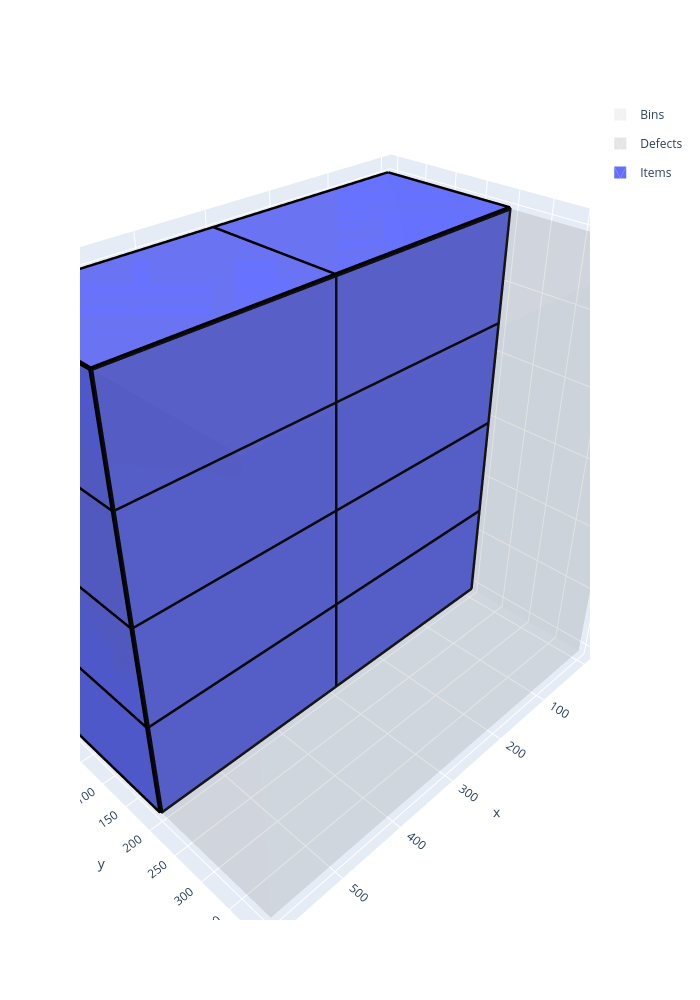
In the following example, the items of three item types, which can’t be stacked together, are packed in a bin of size 7500 × 2400 × 3000, maximizing the volume of the items packed:
Open the example in the online solver: Basic example, then click Solve.
{
    "objective": "knapsack",
    "bin_types": [
        {"x": 7500, "y": 2400, "z": 3000}
    ],
    "item_types": [
        {"x": 2500, "y": 800, "z": 750, "stackability_id": 0, "copies": 10},
        {"x": 2500, "y": 800, "z": 1000, "stackability_id": 1, "copies": 10},
        {"x": 2500, "y": 800, "z": 1250, "stackability_id": 2, "copies": 10}
    ]
}
Solve it with the command-line solver:
packingsolver_boxstacks \
        --input instance.json \
        --certificate solution.csv \
        --time-limit 5
import packingsolver.boxstacks as psbs

instance_builder = psbs.InstanceBuilder()
instance_builder.set_objective(psbs.Objective.Knapsack)
instance_builder.add_bin_type(7500, 2400, 3000)
instance_builder.add_item_type(2500, 800, 750, stackability_id=0, copies=10)
instance_builder.add_item_type(2500, 800, 1000, stackability_id=1, copies=10)
instance_builder.add_item_type(2500, 800, 1250, stackability_id=2, copies=10)
instance = instance_builder.build()
Solve it:
parameters = psbs.OptimizeParameters()
parameters.time_limit = 5
output = psbs.optimize(instance, parameters)
output.solution.write("solution.csv")
#include "packingsolver/boxstacks/instance_builder.hpp"

using namespace packingsolver;
using namespace packingsolver::boxstacks;

InstanceBuilder instance_builder;
instance_builder.set_objective(Objective::Knapsack);
instance_builder.add_bin_type(7500, 2400, 3000);
ItemTypeId item_type_id = instance_builder.add_item_type(2500, 800, 750);
instance_builder.set_item_type_stackability_id(item_type_id, 0);
instance_builder.set_item_type_copies(item_type_id, 10);
item_type_id = instance_builder.add_item_type(2500, 800, 1000);
instance_builder.set_item_type_stackability_id(item_type_id, 1);
instance_builder.set_item_type_copies(item_type_id, 10);
item_type_id = instance_builder.add_item_type(2500, 800, 1250);
instance_builder.set_item_type_stackability_id(item_type_id, 2);
instance_builder.set_item_type_copies(item_type_id, 10);
Instance instance = instance_builder.build();
Solve it:
#include "packingsolver/boxstacks/optimize.hpp"

OptimizeParameters parameters;
parameters.timer.set_time_limit(5);
boxstacks::Output output = optimize(instance, parameters);
output.solution_pool.best().write("solution.csv");
Link the target PackingSolver::boxstacks of the CMake project.
The solution:
Instance format
An instance is a JSON object with the following fields:
Field |
Description |
|---|---|
|
Mandatory. One of |
|
How the leftover of the last bin is measured, for the |
|
See Unloading constraints. Default: |
|
The groups (array) whose items are not subject to the weight constraints (maximum weight above an item, maximum stack density, axle weights). Default: none |
|
Mandatory. The bin types (array) |
|
Mandatory. The item types (array) |
A bin type has the following fields:
Field |
Description |
|---|---|
|
Mandatory. The dimensions of the bins (integers); |
|
The number of copies of the bin type. Default: |
|
The minimum number of copies of the bin type to use, for the variable-sized bin packing objective. Default: |
|
The cost of a bin of this type, for the variable-sized bin packing objective. Default: the volume of the bin |
|
The maximum total weight of the items in a bin of this type. Default: no limit |
|
See Maximum stack density. Default: no limit |
|
See Maximum weight on the middle and rear axles. Default: none |
|
Rectangular regions of the floor of the bin where no stack can be placed (array of objects with fields |
An item type has the following fields:
Field |
Description |
|---|---|
|
Mandatory. The dimensions of the items (integers); |
|
The number of copies of the item type. Default: |
|
The minimum number of copies of the item type to pack, for the knapsack objective. Default: |
|
The profit of an item of this type, for the knapsack objective. Default: the volume of the item |
|
Only the items with the same stackability identifier can be stacked together. The item types with the same stackability identifier must have the same |
|
See Item rotations. Default: |
|
See Nesting height. Default: |
|
See Maximum number of items in a stack containing an item of a given type. Default: no limit |
|
The weight of an item of this type. Default: |
|
See Maximum weight above an item. Default: no limit |
|
See Unloading constraints. Default: |
In Python, the optional fields of the bin types and of the item types are keyword arguments of InstanceBuilder.add_bin_type and InstanceBuilder.add_item_type, with the same names (semi_trailer_truck_parameters for semi_trailer_truck). In C++, they are set with the InstanceBuilder.set_bin_type_<field> and InstanceBuilder.set_item_type_<field> methods; the examples below show the exceptions.
Certificate format
The solution is written (command-line option --certificate, Solution.write) as a CSV file with the columns TYPE, ID, COPIES, BIN, STACK, X, Y, Z, LX, LY, LZ, GROUP_ID, ROTATION. Each line is:
a bin (
TYPEBIN):IDis its bin type,COPIESthe number of identical bins it stands for,BINits index in the solution, andLX,LY,LZits dimensions;a defect of a bin (
TYPEDEFECT):IDis its index in its bin type,BINthe index of its bin,X,Ythe position of its corner, andLX,LYits dimensions;a stack (
TYPESTACK):IDandSTACKare its index in its bin,BINthe index of its bin,X,Ythe position of its corner,LX,LYits footprint, andLZits height;an item (
TYPEITEM):IDis its item type,BINandSTACKthe indices of its bin and of its stack,X,Y,Zthe position of its corner,LX,LY,LZits dimensions once placed,GROUP_IDits group, andROTATIONits rotation.
TYPE,ID,COPIES,BIN,STACK,X,Y,Z,LX,LY,LZ,GROUP_ID
BIN,0,1,0,-1,0,0,0,7500,2400,3000,
STACK,0,1,0,0,0,0,0,2500,800,3000,
ITEM,0,1,0,0,0,0,0,2500,800,750,0
ITEM,0,1,0,0,0,0,750,2500,800,750,0
ITEM,0,1,0,0,0,0,1500,2500,800,750,0
ITEM,0,1,0,0,0,0,2250,2500,800,750,0
STACK,1,1,0,1,0,800,0,2500,800,3000,
To visualize a solution, open it in the solution viewer, or run:
python3 scripts/visualize.py solution.csv
Item rotations
The items stay upright in their stacks: they can only be rotated around the vertical axis. By default, they keep their original orientation (XYZ); the rotation YXZ exchanges their X and Y dimensions.
In the Item types table, check the allowed rotations of each item type.
In an item type: "rotations": ["XYZ", "YXZ"].
instance_builder.add_item_type(x, y, z, rotations=[psbs.Rotation.XYZ, psbs.Rotation.YXZ])
instance_builder.add_item_type_rotation(item_type_id, Rotation::YXZ);, once for each allowed rotation.
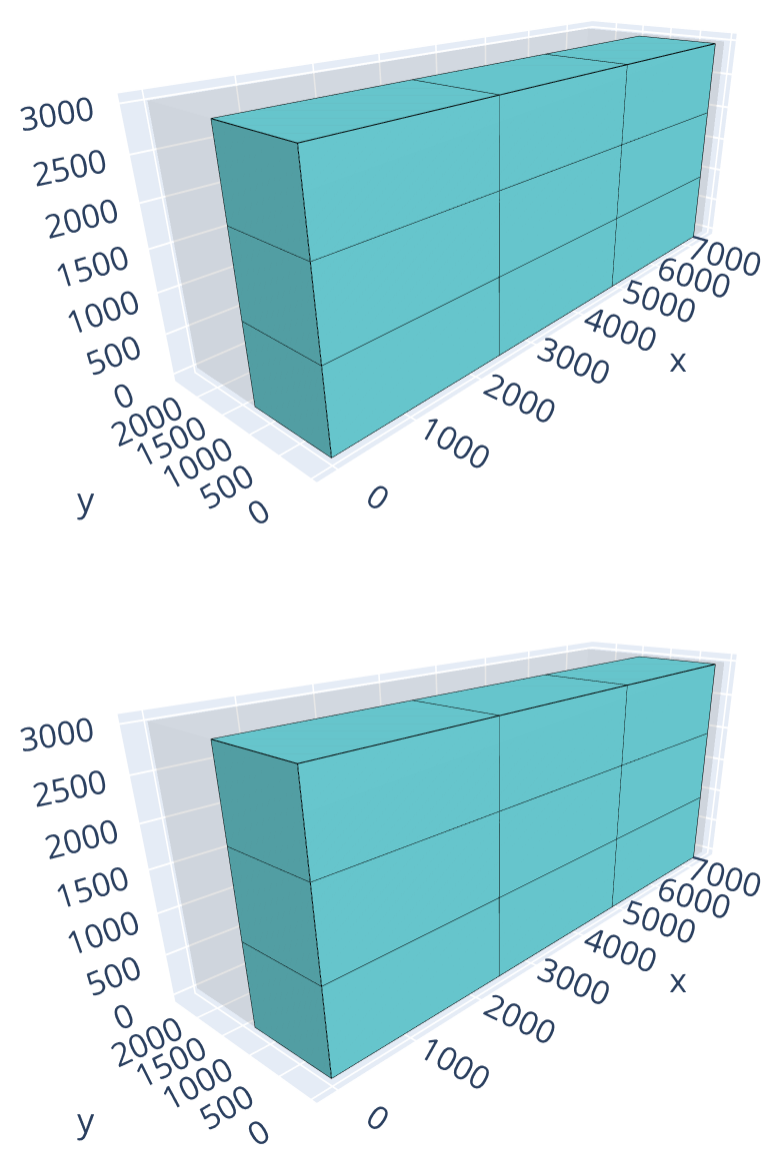
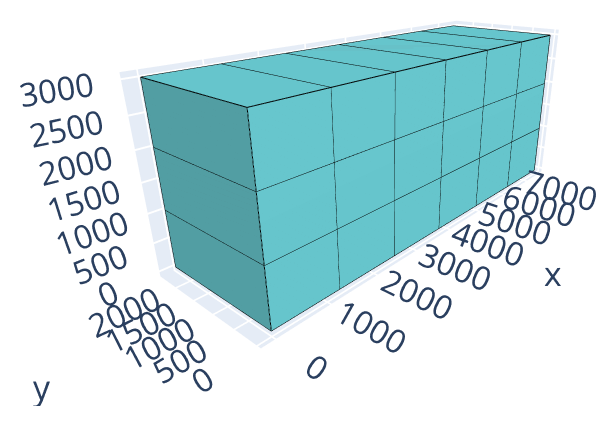
The following example packs 18 copies of a 2400 × 1250 × 1000 item into 7500 × 2400 × 3000 bins, with up to 2 bins available (bin-packing objective). Each stack holds 3 items (3 × 1000 = 3000 of the 3000 available Z). In its original orientation, each item is 2400 wide, so 3 columns fit across the 7500-wide floor, but each column is 1250 deep, so only 1 row fits along the 2400-deep floor, for 3 stacks (9 items) per bin: packing all 18 items needs both bins. Allowing the rotation YXZ turns each item into a 1250 × 2400 × 1000 box, so 6 columns now fit across the floor, for 6 stacks (18 items) on a single bin’s floor: all the items fit in a single bin.
Oriented items |
Items which can be rotated |
|---|---|
|
|
Open the examples in the online solver: Item rotations: oriented items, Item rotations: items which can be rotated.
{
    "objective": "bin-packing",
    "bin_types": [
        {"x": 7500, "y": 2400, "z": 3000, "copies": 2}
    ],
    "item_types": [
        {"x": 2400, "y": 1250, "z": 1000, "copies": 18}
    ]
}
{
    "objective": "bin-packing",
    "bin_types": [
        {"x": 7500, "y": 2400, "z": 3000, "copies": 2}
    ],
    "item_types": [
        {"x": 2400, "y": 1250, "z": 1000, "copies": 18, "rotations": ["XYZ", "YXZ"]}
    ]
}
import packingsolver.boxstacks as psbs

instance_builder = psbs.InstanceBuilder()
instance_builder.set_objective(psbs.Objective.BinPacking)
instance_builder.add_bin_type(7500, 2400, 3000, copies=2)
instance_builder.add_item_type(2400, 1250, 1000, copies=18)
instance = instance_builder.build()
import packingsolver.boxstacks as psbs

instance_builder = psbs.InstanceBuilder()
instance_builder.set_objective(psbs.Objective.BinPacking)
instance_builder.add_bin_type(7500, 2400, 3000, copies=2)
instance_builder.add_item_type(
        2400,
        1250,
        1000,
        rotations=[psbs.Rotation.XYZ, psbs.Rotation.YXZ],
        copies=18,
)
instance = instance_builder.build()
#include "packingsolver/boxstacks/instance_builder.hpp"

using namespace packingsolver;
using namespace packingsolver::boxstacks;

InstanceBuilder instance_builder;
instance_builder.set_objective(Objective::BinPacking);
BinTypeId bin_type_id = instance_builder.add_bin_type(7500, 2400, 3000);
instance_builder.set_bin_type_copies(bin_type_id, 2);
ItemTypeId item_type_id = instance_builder.add_item_type(2400, 1250, 1000);
instance_builder.set_item_type_copies(item_type_id, 18);
Instance instance = instance_builder.build();
#include "packingsolver/boxstacks/instance_builder.hpp"

using namespace packingsolver;
using namespace packingsolver::boxstacks;

InstanceBuilder instance_builder;
instance_builder.set_objective(Objective::BinPacking);
BinTypeId bin_type_id = instance_builder.add_bin_type(7500, 2400, 3000);
instance_builder.set_bin_type_copies(bin_type_id, 2);
ItemTypeId item_type_id = instance_builder.add_item_type(2400, 1250, 1000);
instance_builder.set_item_type_copies(item_type_id, 18);
instance_builder.add_item_type_rotation(item_type_id, Rotation::XYZ);
instance_builder.add_item_type_rotation(item_type_id, Rotation::YXZ);
Instance instance = instance_builder.build();
Nesting height
When an item is placed on top of another item, the height it occupies may be reduced by its nesting height: this models hollow items (e.g. crates, buckets) that partially nest into each other when stacked, instead of resting flat on top.
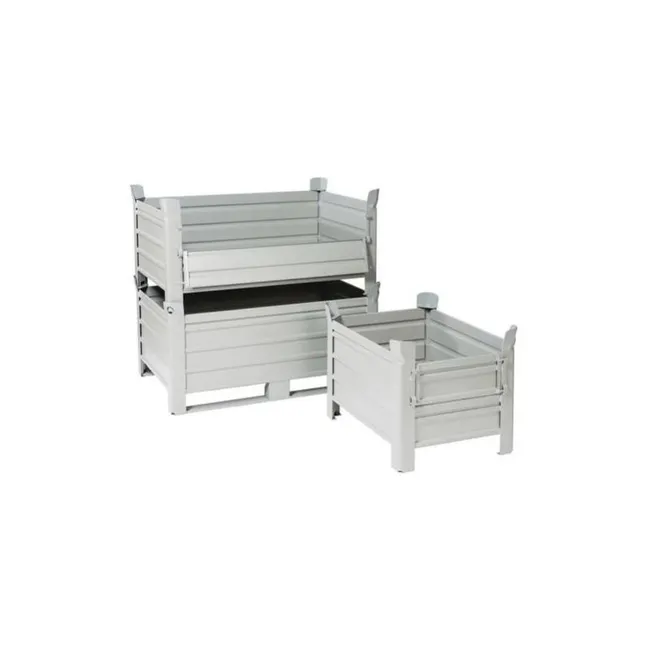
The stackable crates above illustrate the idea: two of them stacked (left) sit lower than twice the height of one alone (right), since the legs of the top crate sink into the one below.
In the Item types table, click More on a row and fill its Nesting height.
In an item type: "nesting_height": 200.
instance_builder.add_item_type(x, y, z, nesting_height=200)
instance_builder.set_item_type_nesting_height(item_type_id, 200);
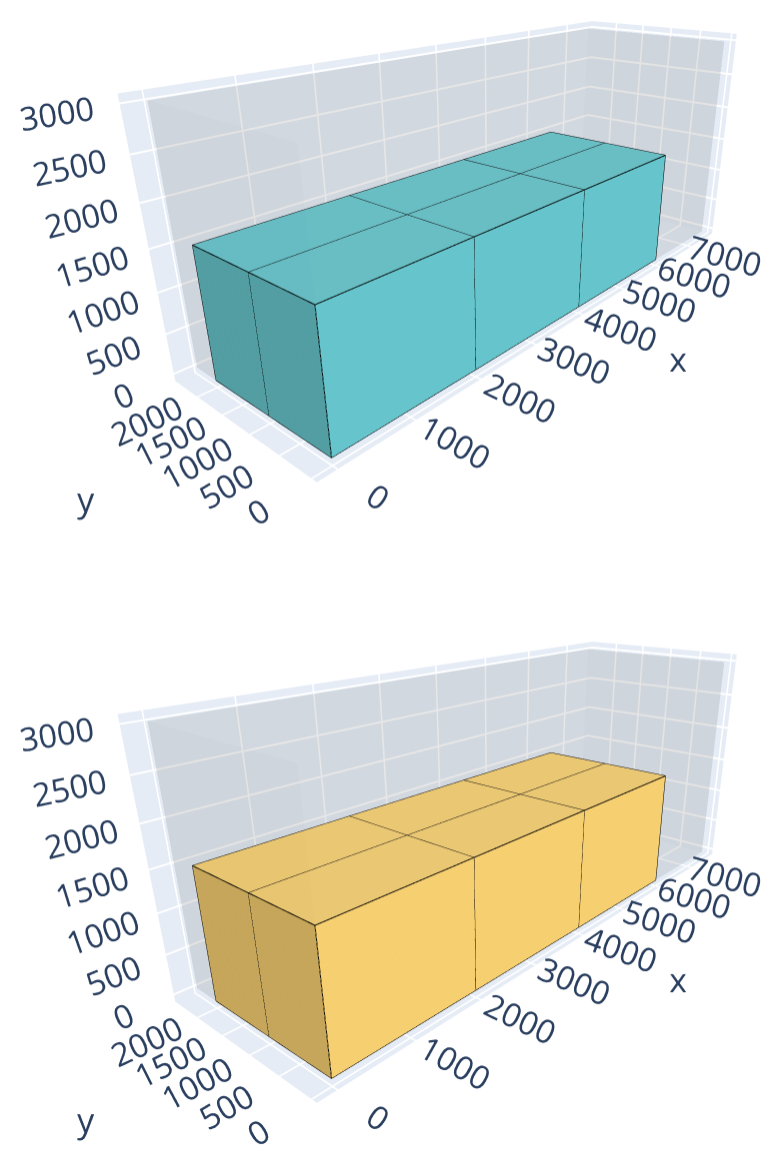
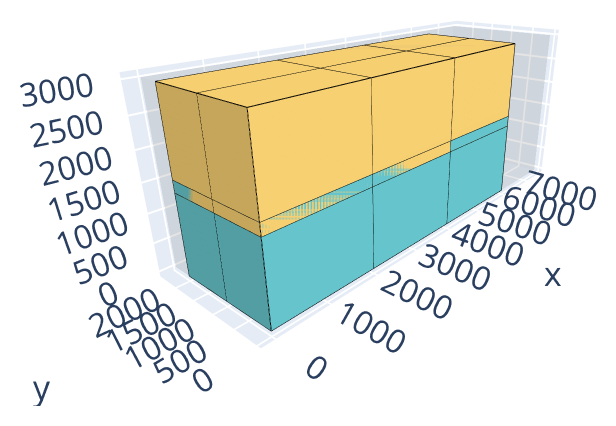
The following example packs 6 copies each of two 2000 × 1000 × 1600 items into 7500 × 2400 × 3000 bins (bin-packing objective), forming 6 side-by-side stacks (3 × 2) per bin. Without nesting height, two items can’t share a stack (1600 + 1600 = 3200 exceeds the bin height of 3000), so 2 bins are needed. With a nesting height of 200, the second item of each stack sinks 200 into the first, so a stack of two items only needs 1600 + 1600 - 200 = 3000, exactly matching the bin height, and all 12 items fit into a single bin as 6 stacks of 2.
Without nesting height |
With nesting height |
|---|---|
|
|
Open the examples in the online solver: Nesting height: without nesting height, Nesting height: with nesting height.
{
    "objective": "bin-packing",
    "bin_types": [
        {"x": 7500, "y": 2400, "z": 3000, "copies": 4}
    ],
    "item_types": [
        {"x": 2000, "y": 1000, "z": 1600, "nesting_height": 0, "copies": 6},
        {"x": 2000, "y": 1000, "z": 1600, "nesting_height": 0, "copies": 6}
    ]
}
{
    "objective": "bin-packing",
    "bin_types": [
        {"x": 7500, "y": 2400, "z": 3000, "copies": 4}
    ],
    "item_types": [
        {"x": 2000, "y": 1000, "z": 1600, "nesting_height": 200, "copies": 6},
        {"x": 2000, "y": 1000, "z": 1600, "nesting_height": 200, "copies": 6}
    ]
}
import packingsolver.boxstacks as psbs

instance_builder = psbs.InstanceBuilder()
instance_builder.set_objective(psbs.Objective.BinPacking)
instance_builder.add_bin_type(7500, 2400, 3000, copies=4)
instance_builder.add_item_type(2000, 1000, 1600, nesting_height=0, copies=6)
instance_builder.add_item_type(2000, 1000, 1600, nesting_height=0, copies=6)
instance = instance_builder.build()
import packingsolver.boxstacks as psbs

instance_builder = psbs.InstanceBuilder()
instance_builder.set_objective(psbs.Objective.BinPacking)
instance_builder.add_bin_type(7500, 2400, 3000, copies=4)
instance_builder.add_item_type(2000, 1000, 1600, nesting_height=200, copies=6)
instance_builder.add_item_type(2000, 1000, 1600, nesting_height=200, copies=6)
instance = instance_builder.build()
#include "packingsolver/boxstacks/instance_builder.hpp"

using namespace packingsolver;
using namespace packingsolver::boxstacks;

InstanceBuilder instance_builder;
instance_builder.set_objective(Objective::BinPacking);
BinTypeId bin_type_id = instance_builder.add_bin_type(7500, 2400, 3000);
instance_builder.set_bin_type_copies(bin_type_id, 4);
ItemTypeId item_type_id = instance_builder.add_item_type(2000, 1000, 1600);
instance_builder.set_item_type_nesting_height(item_type_id, 0);
instance_builder.set_item_type_copies(item_type_id, 6);
item_type_id = instance_builder.add_item_type(2000, 1000, 1600);
instance_builder.set_item_type_nesting_height(item_type_id, 0);
instance_builder.set_item_type_copies(item_type_id, 6);
Instance instance = instance_builder.build();
#include "packingsolver/boxstacks/instance_builder.hpp"

using namespace packingsolver;
using namespace packingsolver::boxstacks;

InstanceBuilder instance_builder;
instance_builder.set_objective(Objective::BinPacking);
BinTypeId bin_type_id = instance_builder.add_bin_type(7500, 2400, 3000);
instance_builder.set_bin_type_copies(bin_type_id, 4);
ItemTypeId item_type_id = instance_builder.add_item_type(2000, 1000, 1600);
instance_builder.set_item_type_nesting_height(item_type_id, 200);
instance_builder.set_item_type_copies(item_type_id, 6);
item_type_id = instance_builder.add_item_type(2000, 1000, 1600);
instance_builder.set_item_type_nesting_height(item_type_id, 200);
instance_builder.set_item_type_copies(item_type_id, 6);
Instance instance = instance_builder.build();
Maximum number of items in a stack containing an item of a given type
For each item type, it is possible to limit the number of items in a stack that contains an item of this type. This limit is called the maximum stackability of the item type.
In the Item types table, click More on a row and fill its Maximum stackability.
In an item type: "maximum_stackability": 3.
instance_builder.add_item_type(x, y, z, maximum_stackability=3)
instance_builder.set_item_type_maximum_stackability(item_type_id, 3);
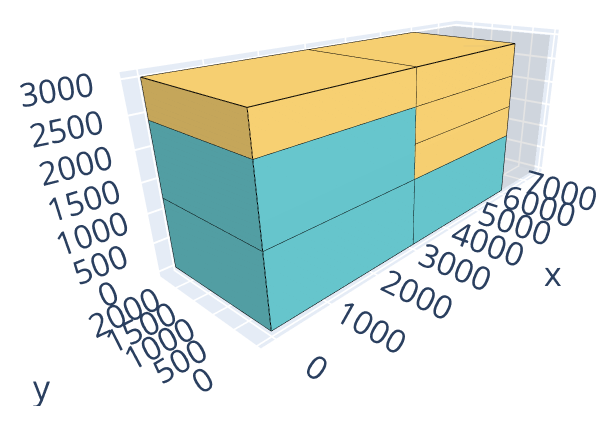
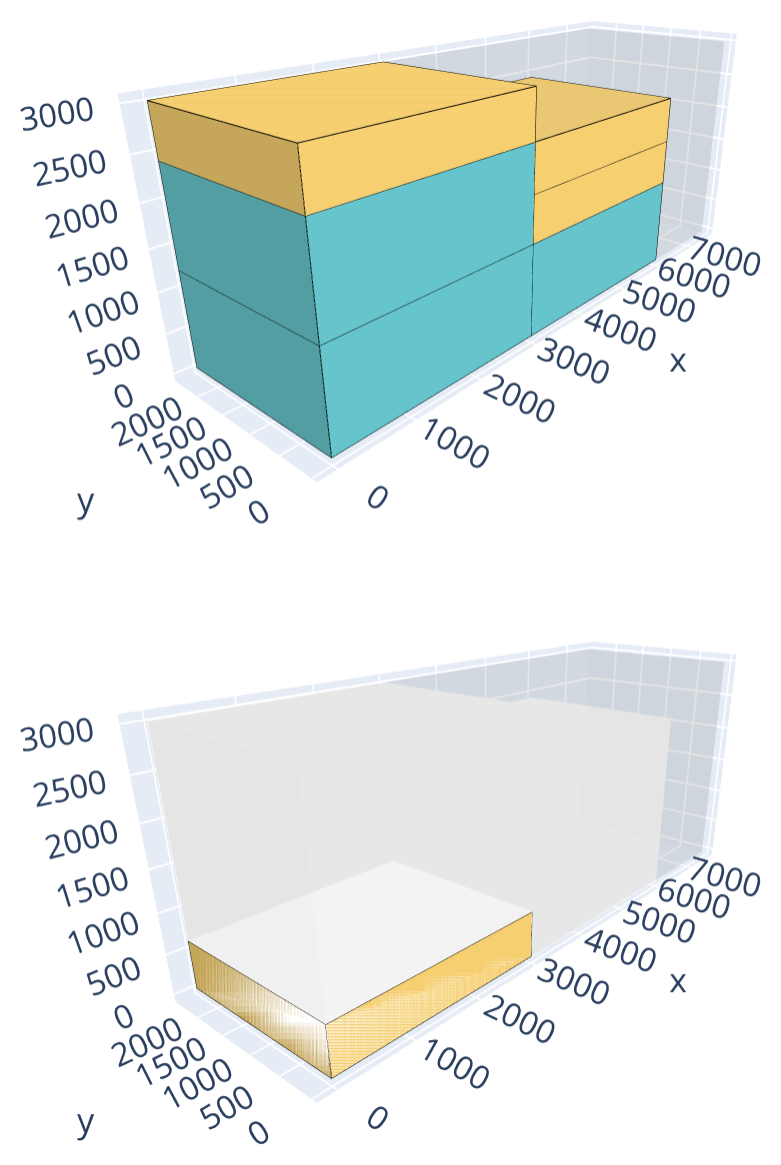
The following example packs 3 copies of a 3000 × 2400 × 1200 item and 4 copies of a 3000 × 2400 × 600 item into 7500 × 2400 × 3000 bins — floor room for 2 stacks per bin (bin-packing objective). Each stack behaves like a bin of the corresponding one-dimensional example: without a limit, 2 stacks are enough, both fitting in a single bin — one with 2 copies of the 1200-high item and 1 of the 600-high item (3000), the other with 1 copy of the 1200-high item and 3 of the 600-high item (3000). With a maximum stackability of 3 for the 1200-high item, a stack containing it may hold at most 3 items: the second stack (4 items) isn’t valid anymore, and a third stack is needed, which doesn’t fit on the floor of the first bin: a second bin is needed.
Without limit |
Maximum stackability 3 |
|---|---|
|
|
Open the examples in the online solver: Maximum stackability: no limit, Maximum stackability: with a limit.
{
    "objective": "bin-packing",
    "bin_types": [
        {"x": 7500, "y": 2400, "z": 3000, "copies": 2}
    ],
    "item_types": [
        {"x": 3000, "y": 2400, "z": 1200, "copies": 3},
        {"x": 3000, "y": 2400, "z": 600, "copies": 4}
    ]
}
{
    "objective": "bin-packing",
    "bin_types": [
        {"x": 7500, "y": 2400, "z": 3000, "copies": 2}
    ],
    "item_types": [
        {"x": 3000, "y": 2400, "z": 1200, "maximum_stackability": 3, "copies": 3},
        {"x": 3000, "y": 2400, "z": 600, "maximum_stackability": 100, "copies": 4}
    ]
}
import packingsolver.boxstacks as psbs

instance_builder = psbs.InstanceBuilder()
instance_builder.set_objective(psbs.Objective.BinPacking)
instance_builder.add_bin_type(7500, 2400, 3000, copies=2)
instance_builder.add_item_type(3000, 2400, 1200, copies=3)
instance_builder.add_item_type(3000, 2400, 600, copies=4)
instance = instance_builder.build()
import packingsolver.boxstacks as psbs

instance_builder = psbs.InstanceBuilder()
instance_builder.set_objective(psbs.Objective.BinPacking)
instance_builder.add_bin_type(7500, 2400, 3000, copies=2)
instance_builder.add_item_type(
        3000,
        2400,
        1200,
        maximum_stackability=3,
        copies=3,
)
instance_builder.add_item_type(
        3000,
        2400,
        600,
        maximum_stackability=100,
        copies=4,
)
instance = instance_builder.build()
#include "packingsolver/boxstacks/instance_builder.hpp"

using namespace packingsolver;
using namespace packingsolver::boxstacks;

InstanceBuilder instance_builder;
instance_builder.set_objective(Objective::BinPacking);
BinTypeId bin_type_id = instance_builder.add_bin_type(7500, 2400, 3000);
instance_builder.set_bin_type_copies(bin_type_id, 2);
ItemTypeId item_type_id = instance_builder.add_item_type(3000, 2400, 1200);
instance_builder.set_item_type_copies(item_type_id, 3);
item_type_id = instance_builder.add_item_type(3000, 2400, 600);
instance_builder.set_item_type_copies(item_type_id, 4);
Instance instance = instance_builder.build();
#include "packingsolver/boxstacks/instance_builder.hpp"

using namespace packingsolver;
using namespace packingsolver::boxstacks;

InstanceBuilder instance_builder;
instance_builder.set_objective(Objective::BinPacking);
BinTypeId bin_type_id = instance_builder.add_bin_type(7500, 2400, 3000);
instance_builder.set_bin_type_copies(bin_type_id, 2);
ItemTypeId item_type_id = instance_builder.add_item_type(3000, 2400, 1200);
instance_builder.set_item_type_maximum_stackability(item_type_id, 3);
instance_builder.set_item_type_copies(item_type_id, 3);
item_type_id = instance_builder.add_item_type(3000, 2400, 600);
instance_builder.set_item_type_maximum_stackability(item_type_id, 100);
instance_builder.set_item_type_copies(item_type_id, 4);
Instance instance = instance_builder.build();
Maximum weight above an item
Each item type may have a maximum weight for the items stacked above its items.
Fill the Weight column of the Item types table; then click More on a row and fill its Maximum weight above.
In an item type: "weight": 40, "maximum_weight_above": 30.
instance_builder.add_item_type(x, y, z, weight=40, maximum_weight_above=30)
instance_builder.set_item_type_weight(item_type_id, 40); and instance_builder.set_item_type_maximum_weight_above(item_type_id, 30);
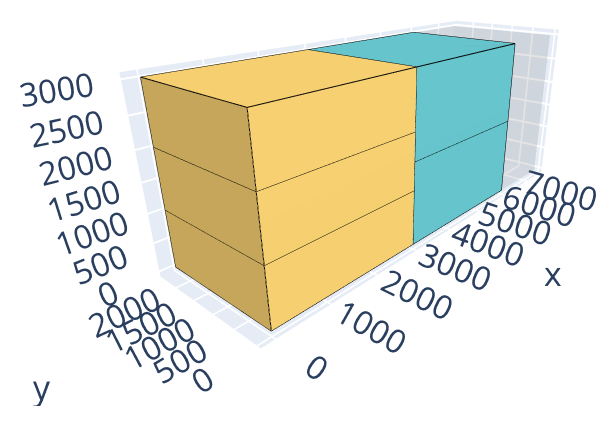
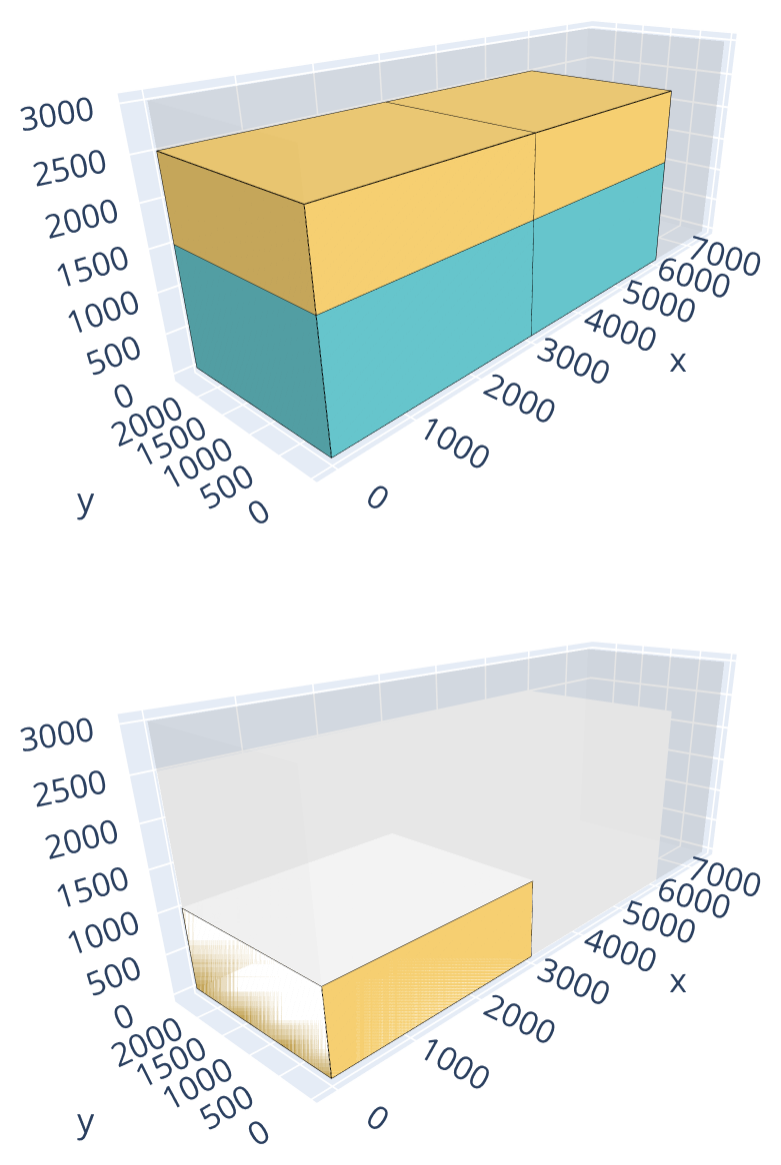
The following example packs 2 copies of a 3000 × 2400 × 1500 item (weight 40) and 3 copies of a 3000 × 2400 × 1000 item (weight 20) into 7500 × 2400 × 3000 bins — floor room for 2 stacks per bin (bin-packing objective). Without a limit, 2 stacks are enough, both fitting in a single bin — one with both copies of the 1500-high item (3000), the other with the 3 copies of the 1000-high item (3000). With a maximum weight above of 30 for the 1500-high item, two of them can no longer share a stack (an item weighs 40), while a 1000-high item (weight 20) can still be stacked on one. The solution now uses 2 stacks mixing one of each item, plus a third stack for the last 1000-high item, which doesn’t fit on the floor of the first bin: a second bin is needed.
Without limit |
Maximum weight above 30 |
|---|---|
|
|
Open the examples in the online solver: Maximum weight above: no limit, Maximum weight above: with a limit.
{
    "objective": "bin-packing",
    "bin_types": [
        {"x": 7500, "y": 2400, "z": 3000, "copies": 2}
    ],
    "item_types": [
        {"x": 3000, "y": 2400, "z": 1500, "weight": 40, "copies": 2},
        {"x": 3000, "y": 2400, "z": 1000, "weight": 20, "copies": 3}
    ]
}
{
    "objective": "bin-packing",
    "bin_types": [
        {"x": 7500, "y": 2400, "z": 3000, "copies": 2}
    ],
    "item_types": [
        {"x": 3000, "y": 2400, "z": 1500, "weight": 40, "maximum_weight_above": 30, "copies": 2},
        {"x": 3000, "y": 2400, "z": 1000, "weight": 20, "maximum_weight_above": 10000, "copies": 3}
    ]
}
import packingsolver.boxstacks as psbs

instance_builder = psbs.InstanceBuilder()
instance_builder.set_objective(psbs.Objective.BinPacking)
instance_builder.add_bin_type(7500, 2400, 3000, copies=2)
instance_builder.add_item_type(3000, 2400, 1500, weight=40, copies=2)
instance_builder.add_item_type(3000, 2400, 1000, weight=20, copies=3)
instance = instance_builder.build()
import packingsolver.boxstacks as psbs

instance_builder = psbs.InstanceBuilder()
instance_builder.set_objective(psbs.Objective.BinPacking)
instance_builder.add_bin_type(7500, 2400, 3000, copies=2)
instance_builder.add_item_type(
        3000,
        2400,
        1500,
        weight=40,
        maximum_weight_above=30,
        copies=2,
)
instance_builder.add_item_type(
        3000,
        2400,
        1000,
        weight=20,
        maximum_weight_above=10000,
        copies=3,
)
instance = instance_builder.build()
#include "packingsolver/boxstacks/instance_builder.hpp"

using namespace packingsolver;
using namespace packingsolver::boxstacks;

InstanceBuilder instance_builder;
instance_builder.set_objective(Objective::BinPacking);
BinTypeId bin_type_id = instance_builder.add_bin_type(7500, 2400, 3000);
instance_builder.set_bin_type_copies(bin_type_id, 2);
ItemTypeId item_type_id = instance_builder.add_item_type(3000, 2400, 1500);
instance_builder.set_item_type_weight(item_type_id, 40);
instance_builder.set_item_type_copies(item_type_id, 2);
item_type_id = instance_builder.add_item_type(3000, 2400, 1000);
instance_builder.set_item_type_weight(item_type_id, 20);
instance_builder.set_item_type_copies(item_type_id, 3);
Instance instance = instance_builder.build();
#include "packingsolver/boxstacks/instance_builder.hpp"

using namespace packingsolver;
using namespace packingsolver::boxstacks;

InstanceBuilder instance_builder;
instance_builder.set_objective(Objective::BinPacking);
BinTypeId bin_type_id = instance_builder.add_bin_type(7500, 2400, 3000);
instance_builder.set_bin_type_copies(bin_type_id, 2);
ItemTypeId item_type_id = instance_builder.add_item_type(3000, 2400, 1500);
instance_builder.set_item_type_weight(item_type_id, 40);
instance_builder.set_item_type_maximum_weight_above(item_type_id, 30);
instance_builder.set_item_type_copies(item_type_id, 2);
item_type_id = instance_builder.add_item_type(3000, 2400, 1000);
instance_builder.set_item_type_weight(item_type_id, 20);
instance_builder.set_item_type_maximum_weight_above(item_type_id, 10000);
instance_builder.set_item_type_copies(item_type_id, 3);
Instance instance = instance_builder.build();
Maximum stack density
Each bin type may have a maximum stack density: the maximum weight of a stack per unit of area of its footprint.
Fill the Weight column of the Item types table; then, in the Bin types table, click More on a row and fill its Maximum stack density.
In a bin type: "maximum_stack_density": 0.6.
instance_builder.add_bin_type(x, y, z, maximum_stack_density=0.6)
instance_builder.set_bin_type_maximum_stack_density(bin_type_id, 0.6);
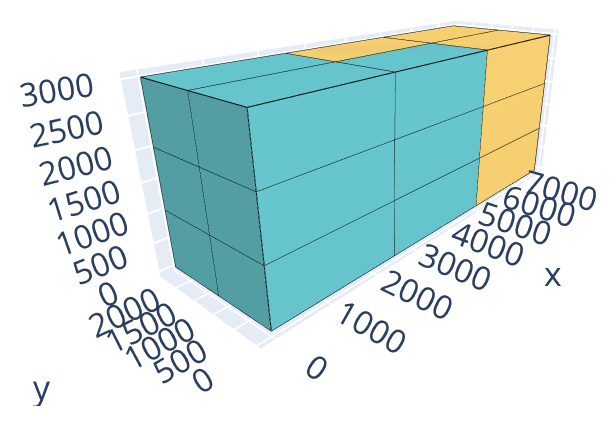
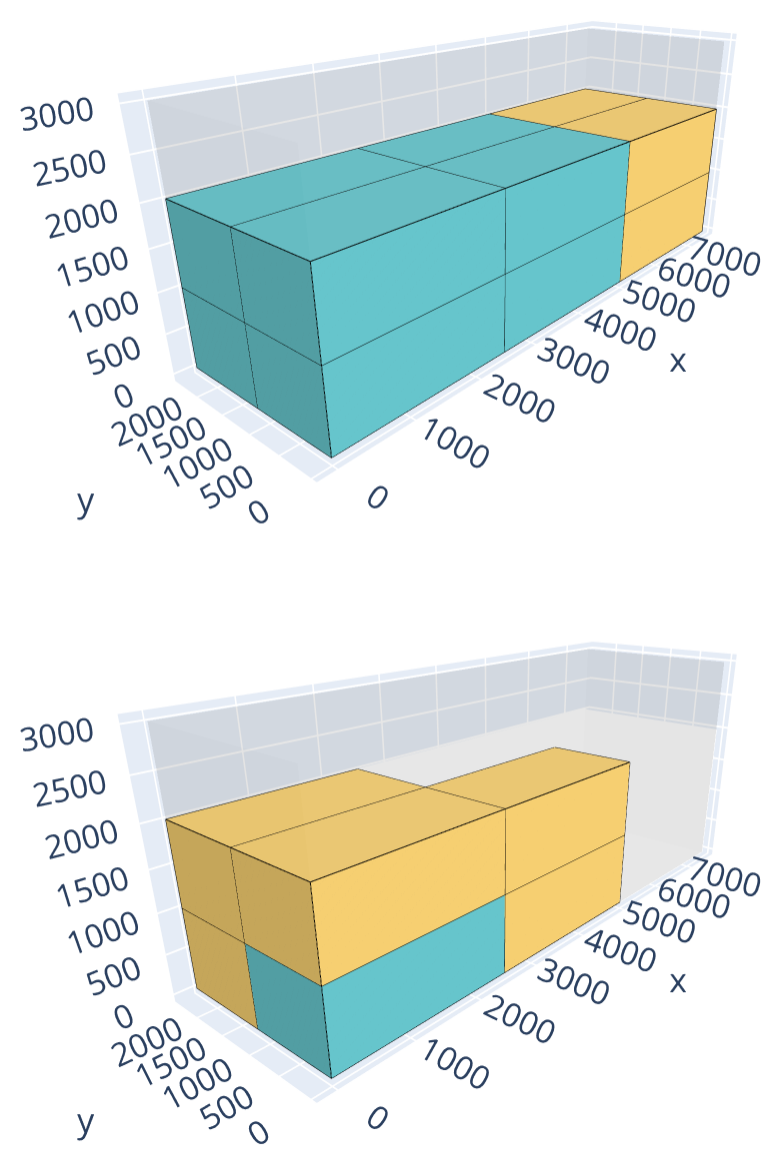
The following example packs 9 copies of a 2500 × 1200 × 1000 item weighing 700,000 and 9 copies of a 2500 × 1200 × 1000 item weighing 900,000 into 7500 × 2400 × 3000 bins (bin-packing objective). Without a density limit, the items stack into a single bin as 6 side-by-side stacks of 3 — 3 stacks of the lighter item (weighing 3 × 700,000 = 2,100,000) and 3 of the heavier one (weighing 3 × 900,000 = 2,700,000) — each on a 2500 × 1200 = 3,000,000 floor area (density up to 2,700,000 / 3,000,000 = 0.9). With a maximum stack density of 0.6, a stack may weigh at most 0.6 × 3,000,000 = 1,800,000: no stack of 3 items fits under that limit anymore, so every stack is limited to 2 items. With only 6 stacks per bin now holding 12 of the 18 items, a second bin is needed for the remaining 6.
Without limit |
Maximum stack density 0.6 |
|---|---|
|
|
Open the examples in the online solver: Maximum stack density: no limit, Maximum stack density: with a limit.
{
    "objective": "bin-packing",
    "bin_types": [
        {"x": 7500, "y": 2400, "z": 3000, "copies": 4}
    ],
    "item_types": [
        {"x": 2500, "y": 1200, "z": 1000, "weight": 700000, "copies": 9},
        {"x": 2500, "y": 1200, "z": 1000, "weight": 900000, "copies": 9}
    ]
}
{
    "objective": "bin-packing",
    "bin_types": [
        {"x": 7500, "y": 2400, "z": 3000, "maximum_stack_density": 0.6, "copies": 4}
    ],
    "item_types": [
        {"x": 2500, "y": 1200, "z": 1000, "weight": 700000, "copies": 9},
        {"x": 2500, "y": 1200, "z": 1000, "weight": 900000, "copies": 9}
    ]
}
import packingsolver.boxstacks as psbs

instance_builder = psbs.InstanceBuilder()
instance_builder.set_objective(psbs.Objective.BinPacking)
instance_builder.add_bin_type(7500, 2400, 3000, copies=4)
instance_builder.add_item_type(2500, 1200, 1000, weight=700000, copies=9)
instance_builder.add_item_type(2500, 1200, 1000, weight=900000, copies=9)
instance = instance_builder.build()
import packingsolver.boxstacks as psbs

instance_builder = psbs.InstanceBuilder()
instance_builder.set_objective(psbs.Objective.BinPacking)
instance_builder.add_bin_type(
        7500,
        2400,
        3000,
        maximum_stack_density=0.6,
        copies=4,
)
instance_builder.add_item_type(2500, 1200, 1000, weight=700000, copies=9)
instance_builder.add_item_type(2500, 1200, 1000, weight=900000, copies=9)
instance = instance_builder.build()
#include "packingsolver/boxstacks/instance_builder.hpp"

using namespace packingsolver;
using namespace packingsolver::boxstacks;

InstanceBuilder instance_builder;
instance_builder.set_objective(Objective::BinPacking);
BinTypeId bin_type_id = instance_builder.add_bin_type(7500, 2400, 3000);
instance_builder.set_bin_type_copies(bin_type_id, 4);
ItemTypeId item_type_id = instance_builder.add_item_type(2500, 1200, 1000);
instance_builder.set_item_type_weight(item_type_id, 700000);
instance_builder.set_item_type_copies(item_type_id, 9);
item_type_id = instance_builder.add_item_type(2500, 1200, 1000);
instance_builder.set_item_type_weight(item_type_id, 900000);
instance_builder.set_item_type_copies(item_type_id, 9);
Instance instance = instance_builder.build();
#include "packingsolver/boxstacks/instance_builder.hpp"

using namespace packingsolver;
using namespace packingsolver::boxstacks;

InstanceBuilder instance_builder;
instance_builder.set_objective(Objective::BinPacking);
BinTypeId bin_type_id = instance_builder.add_bin_type(7500, 2400, 3000);
instance_builder.set_bin_type_maximum_stack_density(bin_type_id, 0.6);
instance_builder.set_bin_type_copies(bin_type_id, 4);
ItemTypeId item_type_id = instance_builder.add_item_type(2500, 1200, 1000);
instance_builder.set_item_type_weight(item_type_id, 700000);
instance_builder.set_item_type_copies(item_type_id, 9);
item_type_id = instance_builder.add_item_type(2500, 1200, 1000);
instance_builder.set_item_type_weight(item_type_id, 900000);
instance_builder.set_item_type_copies(item_type_id, 9);
Instance instance = instance_builder.build();
Unloading constraints
When loading a truck that visits multiple locations, it might be necessary to unload the items at a location without moving the items which are still in the truck. This is modeled with unloading constraints, as for the rectangle solver. Items are assigned to groups: the items of group 0 are unloaded first, then the items of group 1, etc.
Choose the Unloading constraint below the objective. Then, in the Item types table, click More on a row and fill its Group.
In the instance: "unloading_constraint": "only-x-movements"; in an item type: "group_id": 1.
instance_builder.set_unloading_constraint(psbs.UnloadingConstraint.OnlyXMovements) and instance_builder.add_item_type(x, y, z, group_id=1)
instance_builder.set_unloading_constraint(rectangle::UnloadingConstraint::OnlyXMovements); and instance_builder.set_item_type_group(item_type_id, 1);
4 types of unloading constraints are available:
only-x-movements: the items are unloaded by moving them along the X axis, towards the right of the bin: no item of a later group may be on the right of an item of an earlier group which it overlapsonly-y-movements: same along the Y axisincreasing-x: the items of group 0 have greater X coordinates than the items of group 1, which have greater X coordinates than the items of group 2, etc.increasing-y: same along the Y axis
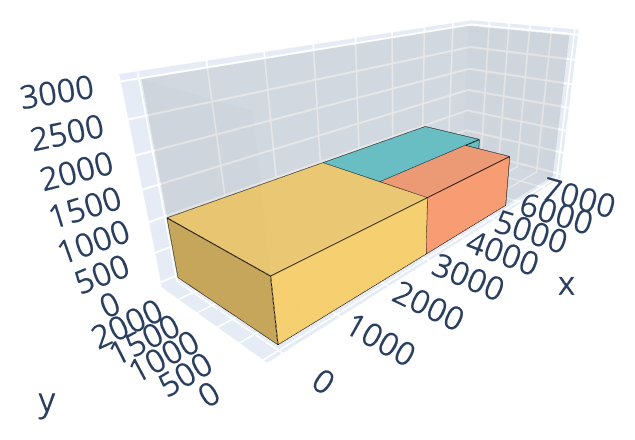
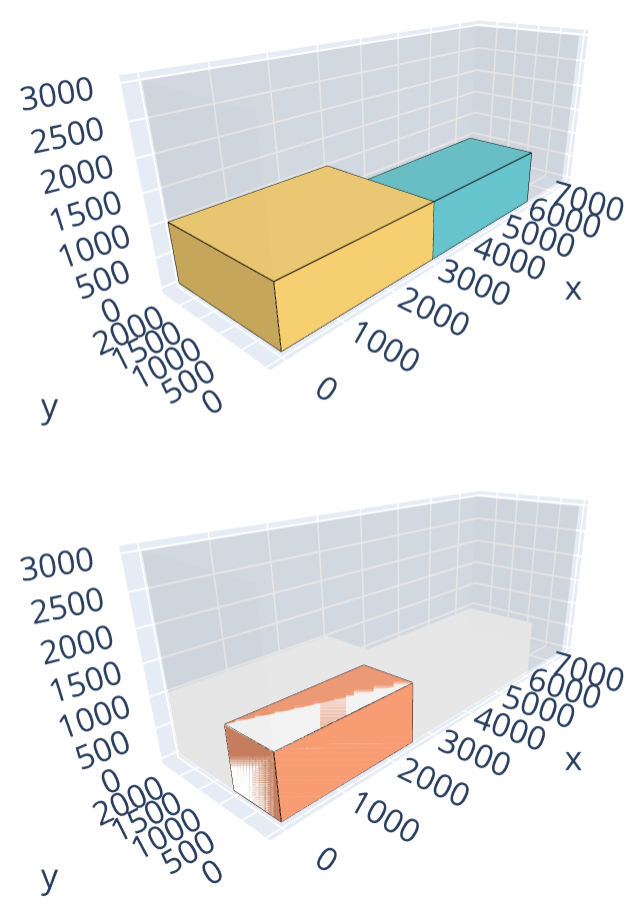
The following example packs 3 items (3000 × 1400, 3000 × 2400 and 2500 × 1000 footprints, groups 0, 1 and 2) into 7500 × 2400 × 3000 bins (bin-packing-with-leftovers objective). Without unloading constraints, the 3 items fit into a single bin. With only-x-movements, the item of group 2 can’t stay on the right of the item of group 1, so a second bin is needed.
Without unloading constraints |
|
|---|---|
|
|
Open the examples in the online solver: Unloading constraints: none, Unloading constraints: only X movements.
{
    "objective": "bin-packing-with-leftovers",
    "bin_types": [
        {"x": 7500, "y": 2400, "z": 3000, "copies": 2}
    ],
    "item_types": [
        {"x": 3000, "y": 1400, "z": 1000, "stackability_id": 0},
        {"x": 3000, "y": 2400, "z": 1000, "group_id": 1, "stackability_id": 1},
        {"x": 2500, "y": 1000, "z": 1000, "group_id": 2, "stackability_id": 2}
    ]
}
{
    "objective": "bin-packing-with-leftovers",
    "unloading_constraint": "only-x-movements",
    "bin_types": [
        {"x": 7500, "y": 2400, "z": 3000, "copies": 2}
    ],
    "item_types": [
        {"x": 3000, "y": 1400, "z": 1000, "stackability_id": 0},
        {"x": 3000, "y": 2400, "z": 1000, "group_id": 1, "stackability_id": 1},
        {"x": 2500, "y": 1000, "z": 1000, "group_id": 2, "stackability_id": 2}
    ]
}
import packingsolver.boxstacks as psbs

instance_builder = psbs.InstanceBuilder()
instance_builder.set_objective(psbs.Objective.BinPackingWithLeftovers)
instance_builder.add_bin_type(7500, 2400, 3000, copies=2)
instance_builder.add_item_type(3000, 1400, 1000, stackability_id=0)
instance_builder.add_item_type(3000, 2400, 1000, group_id=1, stackability_id=1)
instance_builder.add_item_type(2500, 1000, 1000, group_id=2, stackability_id=2)
instance = instance_builder.build()
import packingsolver.boxstacks as psbs

instance_builder = psbs.InstanceBuilder()
instance_builder.set_objective(psbs.Objective.BinPackingWithLeftovers)
instance_builder.set_unloading_constraint(psbs.UnloadingConstraint.OnlyXMovements)
instance_builder.add_bin_type(7500, 2400, 3000, copies=2)
instance_builder.add_item_type(3000, 1400, 1000, stackability_id=0)
instance_builder.add_item_type(3000, 2400, 1000, group_id=1, stackability_id=1)
instance_builder.add_item_type(2500, 1000, 1000, group_id=2, stackability_id=2)
instance = instance_builder.build()
#include "packingsolver/boxstacks/instance_builder.hpp"

using namespace packingsolver;
using namespace packingsolver::boxstacks;

InstanceBuilder instance_builder;
instance_builder.set_objective(Objective::BinPackingWithLeftovers);
BinTypeId bin_type_id = instance_builder.add_bin_type(7500, 2400, 3000);
instance_builder.set_bin_type_copies(bin_type_id, 2);
ItemTypeId item_type_id = instance_builder.add_item_type(3000, 1400, 1000);
instance_builder.set_item_type_stackability_id(item_type_id, 0);
item_type_id = instance_builder.add_item_type(3000, 2400, 1000);
instance_builder.set_item_type_group(item_type_id, 1);
instance_builder.set_item_type_stackability_id(item_type_id, 1);
item_type_id = instance_builder.add_item_type(2500, 1000, 1000);
instance_builder.set_item_type_group(item_type_id, 2);
instance_builder.set_item_type_stackability_id(item_type_id, 2);
Instance instance = instance_builder.build();
#include "packingsolver/boxstacks/instance_builder.hpp"

using namespace packingsolver;
using namespace packingsolver::boxstacks;

InstanceBuilder instance_builder;
instance_builder.set_objective(Objective::BinPackingWithLeftovers);
instance_builder.set_unloading_constraint(rectangle::UnloadingConstraint::OnlyXMovements);
BinTypeId bin_type_id = instance_builder.add_bin_type(7500, 2400, 3000);
instance_builder.set_bin_type_copies(bin_type_id, 2);
ItemTypeId item_type_id = instance_builder.add_item_type(3000, 1400, 1000);
instance_builder.set_item_type_stackability_id(item_type_id, 0);
item_type_id = instance_builder.add_item_type(3000, 2400, 1000);
instance_builder.set_item_type_group(item_type_id, 1);
instance_builder.set_item_type_stackability_id(item_type_id, 1);
item_type_id = instance_builder.add_item_type(2500, 1000, 1000);
instance_builder.set_item_type_group(item_type_id, 2);
instance_builder.set_item_type_stackability_id(item_type_id, 2);
Instance instance = instance_builder.build();
Maximum weight on the middle and rear axles
For bins that model the trailer of a semi-trailer truck, the solver can enforce legal weight limits on the tractor’s middle (drive) axle and on the trailer’s rear axle, computed from the position of the loaded stacks along the trailer and the truck’s geometry.
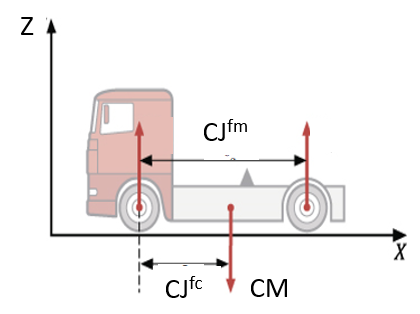
The tractor alone is characterized by its weight (CM, tractor_weight) and by the distances between its front axle and its middle axle (CJfm, front_axle_middle_axle_distance) and center of gravity (CJfc, front_axle_tractor_gravity_center_distance):
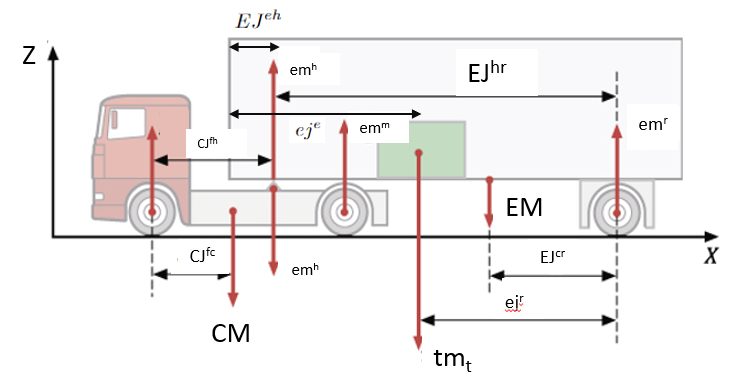
Once the trailer is attached at the harness (fifth wheel), its own geometry and the loaded cargo’s weight and position add the remaining quantities used in the axle weight computation below (EM, EJeh, EJhr, EJcr are empty_trailer_weight, trailer_start_harness_distance, harness_rear_axle_distance and trailer_gravity_center_rear_axle_distance; tmt is the combined weight of the loaded stacks):
A semi-trailer truck is given by the semi_trailer_truck object of a bin type, with the following fields (the missing ones are 0, except the maximum weights which are unlimited):
tractor_weight: the weight of the tractorfront_axle_middle_axle_distance: the distance between the tractor’s front axle and its middle (drive) axlefront_axle_tractor_gravity_center_distance: the distance between the tractor’s front axle and its center of gravityfront_axle_harness_distance: the distance between the tractor’s front axle and the harness (fifth-wheel coupling point)empty_trailer_weight: the weight of the empty trailerharness_rear_axle_distance: the distance between the harness and the trailer’s rear axletrailer_gravity_center_rear_axle_distance: the distance between the empty trailer’s center of gravity and its rear axletrailer_start_harness_distance: the distance between the start of the trailer’s cargo area (X = 0) and the harnessrear_axle_maximum_weight: the maximum weight on the trailer’s rear axlemiddle_axle_maximum_weight: the maximum weight on the tractor’s middle (drive) axle
In the Bin types table, click More on a row, check Semi-trailer truck, and fill the fields of the truck.
In a bin type: "semi_trailer_truck": {"tractor_weight": 7808, ...}.
instance_builder.add_bin_type(x, y, z, semi_trailer_truck_parameters={"tractor_weight": 7808, ...})
A SemiTrailerTruckData (with is = true), set with instance_builder.set_bin_type_semi_trailer_truck_parameters(bin_type_id, semi_trailer_truck_data);
Loading cargo further toward the front of the trailer (closer to the harness) shifts more weight onto the tractor’s middle axle and less onto the trailer’s rear axle; loading further back does the opposite. The solver uses the combined weight and the X position of each stack’s center to compute the resulting middle and rear axle weights, and only accepts solutions that stay within the limits.
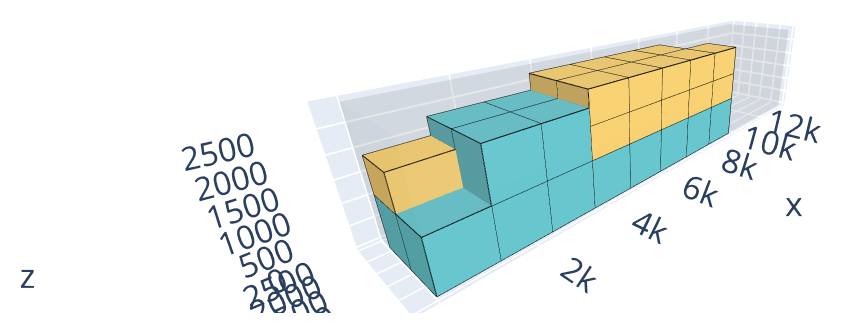
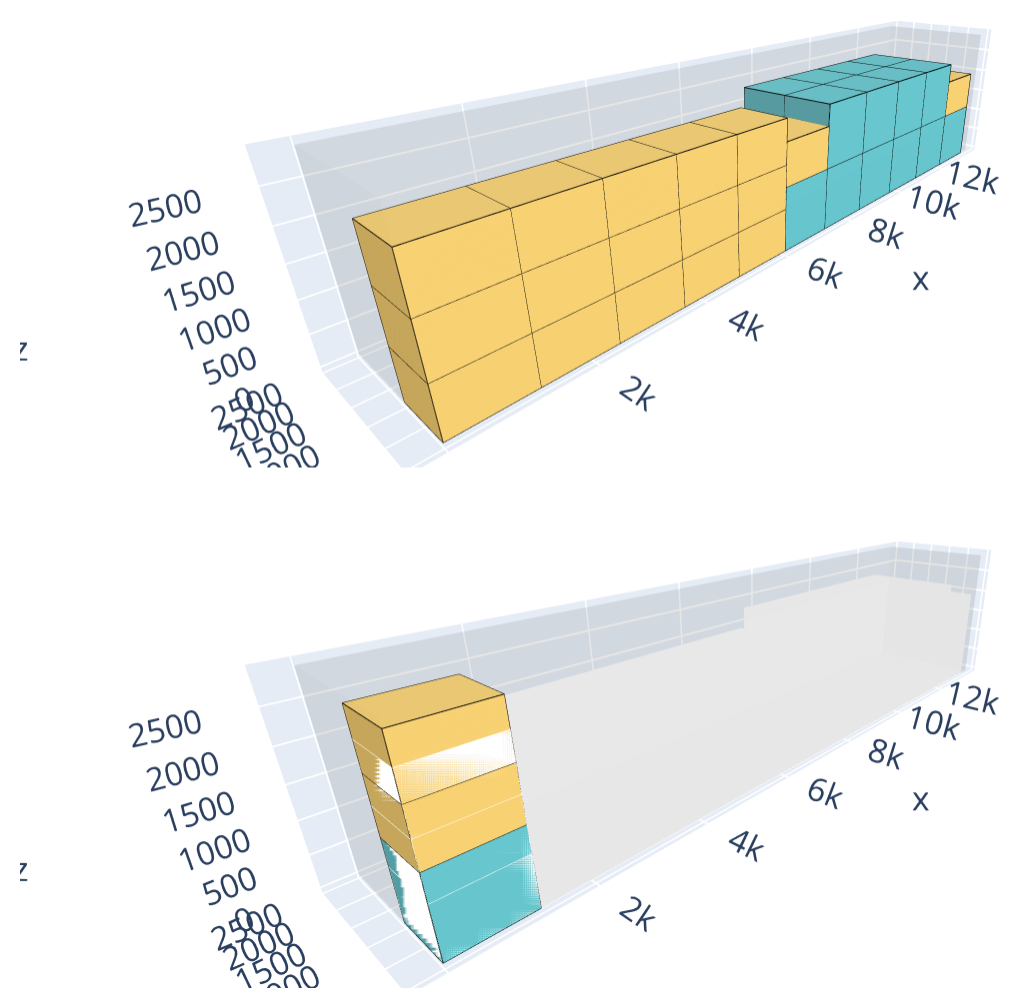
The following example packs 19 copies of a 1200 × 1000 × 1200 item weighing 1200 and 19 copies of a 1200 × 1000 × 800 item weighing 800 — heights proportional to weight — into 13500 × 2440 × 2900 bins (38,000 of total weight) — dimensions and axle geometry matching a standard semi-trailer truck, as found in the reference instances under data/boxstacks — with up to 2 bins available (bin-packing objective). Without the truck, no axle limits apply, and all 38 items fit in a single bin, packed compactly from the front of the trailer. Had the axle constraint been checked on that loading, it would put 23,499 on the middle axle — almost twice the 12,000 limit used below. With the truck, with a maximum weight of 12,000 on the middle axle and 31,500 on the rear axle, that loading is infeasible: the solver instead places the lighter item toward the front of the trailer and the heavier item toward the back, shifting the load rearward until both axles are just inside their limits. That rebalanced loading doesn’t fit all the items in the first bin, so a second bin is needed.
Without axle constraints |
With axle constraints |
|---|---|
|
|
Open the examples in the online solver: Axle weights: without axle constraints, Axle weights: with axle constraints.
{
    "objective": "bin-packing",
    "bin_types": [
        {"x": 13500, "y": 2440, "z": 2900, "copies": 2}
    ],
    "item_types": [
        {"x": 1200, "y": 1000, "z": 1200, "weight": 1200, "copies": 19},
        {"x": 1200, "y": 1000, "z": 800, "weight": 800, "copies": 19}
    ]
}
{
    "objective": "bin-packing",
    "bin_types": [
        {
            "x": 13500,
            "y": 2440,
            "z": 2900,
            "copies": 2,
            "semi_trailer_truck": {
                "tractor_weight": 7808,
                "front_axle_middle_axle_distance": 3800,
                "front_axle_tractor_gravity_center_distance": 1040,
                "front_axle_harness_distance": 3330,
                "empty_trailer_weight": 7300,
                "harness_rear_axle_distance": 7630,
                "trailer_gravity_center_rear_axle_distance": 2350,
                "trailer_start_harness_distance": 1670,
                "rear_axle_maximum_weight": 31500,
                "middle_axle_maximum_weight": 12000
            }
        }
    ],
    "item_types": [
        {"x": 1200, "y": 1000, "z": 1200, "weight": 1200, "copies": 19},
        {"x": 1200, "y": 1000, "z": 800, "weight": 800, "copies": 19}
    ]
}
import packingsolver.boxstacks as psbs

instance_builder = psbs.InstanceBuilder()
instance_builder.set_objective(psbs.Objective.BinPacking)
instance_builder.add_bin_type(13500, 2440, 2900, copies=2)
instance_builder.add_item_type(1200, 1000, 1200, weight=1200, copies=19)
instance_builder.add_item_type(1200, 1000, 800, weight=800, copies=19)
instance = instance_builder.build()
import packingsolver.boxstacks as psbs

instance_builder = psbs.InstanceBuilder()
instance_builder.set_objective(psbs.Objective.BinPacking)
instance_builder.add_bin_type(
        13500,
        2440,
        2900,
        copies=2,
        semi_trailer_truck_parameters={
            "tractor_weight": 7808,
            "front_axle_middle_axle_distance": 3800,
            "front_axle_tractor_gravity_center_distance": 1040,
            "front_axle_harness_distance": 3330,
            "empty_trailer_weight": 7300,
            "harness_rear_axle_distance": 7630,
            "trailer_gravity_center_rear_axle_distance": 2350,
            "trailer_start_harness_distance": 1670,
            "rear_axle_maximum_weight": 31500,
            "middle_axle_maximum_weight": 12000,
        },
)
instance_builder.add_item_type(1200, 1000, 1200, weight=1200, copies=19)
instance_builder.add_item_type(1200, 1000, 800, weight=800, copies=19)
instance = instance_builder.build()
#include "packingsolver/boxstacks/instance_builder.hpp"

using namespace packingsolver;
using namespace packingsolver::boxstacks;

InstanceBuilder instance_builder;
instance_builder.set_objective(Objective::BinPacking);
BinTypeId bin_type_id = instance_builder.add_bin_type(13500, 2440, 2900);
instance_builder.set_bin_type_copies(bin_type_id, 2);
ItemTypeId item_type_id = instance_builder.add_item_type(1200, 1000, 1200);
instance_builder.set_item_type_weight(item_type_id, 1200);
instance_builder.set_item_type_copies(item_type_id, 19);
item_type_id = instance_builder.add_item_type(1200, 1000, 800);
instance_builder.set_item_type_weight(item_type_id, 800);
instance_builder.set_item_type_copies(item_type_id, 19);
Instance instance = instance_builder.build();
#include "packingsolver/boxstacks/instance_builder.hpp"

using namespace packingsolver;
using namespace packingsolver::boxstacks;

InstanceBuilder instance_builder;
instance_builder.set_objective(Objective::BinPacking);
BinTypeId bin_type_id = instance_builder.add_bin_type(13500, 2440, 2900);
instance_builder.set_bin_type_copies(bin_type_id, 2);
SemiTrailerTruckData semi_trailer_truck_data;
semi_trailer_truck_data.is = true;
semi_trailer_truck_data.tractor_weight = 7808;
semi_trailer_truck_data.front_axle_middle_axle_distance = 3800;
semi_trailer_truck_data.front_axle_tractor_gravity_center_distance = 1040;
semi_trailer_truck_data.front_axle_harness_distance = 3330;
semi_trailer_truck_data.empty_trailer_weight = 7300;
semi_trailer_truck_data.harness_rear_axle_distance = 7630;
semi_trailer_truck_data.trailer_gravity_center_rear_axle_distance = 2350;
semi_trailer_truck_data.trailer_start_harness_distance = 1670;
semi_trailer_truck_data.rear_axle_maximum_weight = 31500;
semi_trailer_truck_data.middle_axle_maximum_weight = 12000;
instance_builder.set_bin_type_semi_trailer_truck_parameters(bin_type_id, semi_trailer_truck_data);
ItemTypeId item_type_id = instance_builder.add_item_type(1200, 1000, 1200);
instance_builder.set_item_type_weight(item_type_id, 1200);
instance_builder.set_item_type_copies(item_type_id, 19);
item_type_id = instance_builder.add_item_type(1200, 1000, 800);
instance_builder.set_item_type_weight(item_type_id, 800);
instance_builder.set_item_type_copies(item_type_id, 19);
Instance instance = instance_builder.build();